Home
GUSTARD
Recording Equipment
U18
Page 9 (DSD Hardware Decoding with foobar2000)
GUSTARD U18 - DSD Hardware Decoding with foobar2000
20 pages
Manual
Save Page as PDF
To Next Page
To Next Page
To Previous Page
To Previous Page
Loading...
-
8
-
DSD
hardw
are d
ecodi
ng on
foob
ar2
000
●
foo
bar2000 c
onfigu
ration
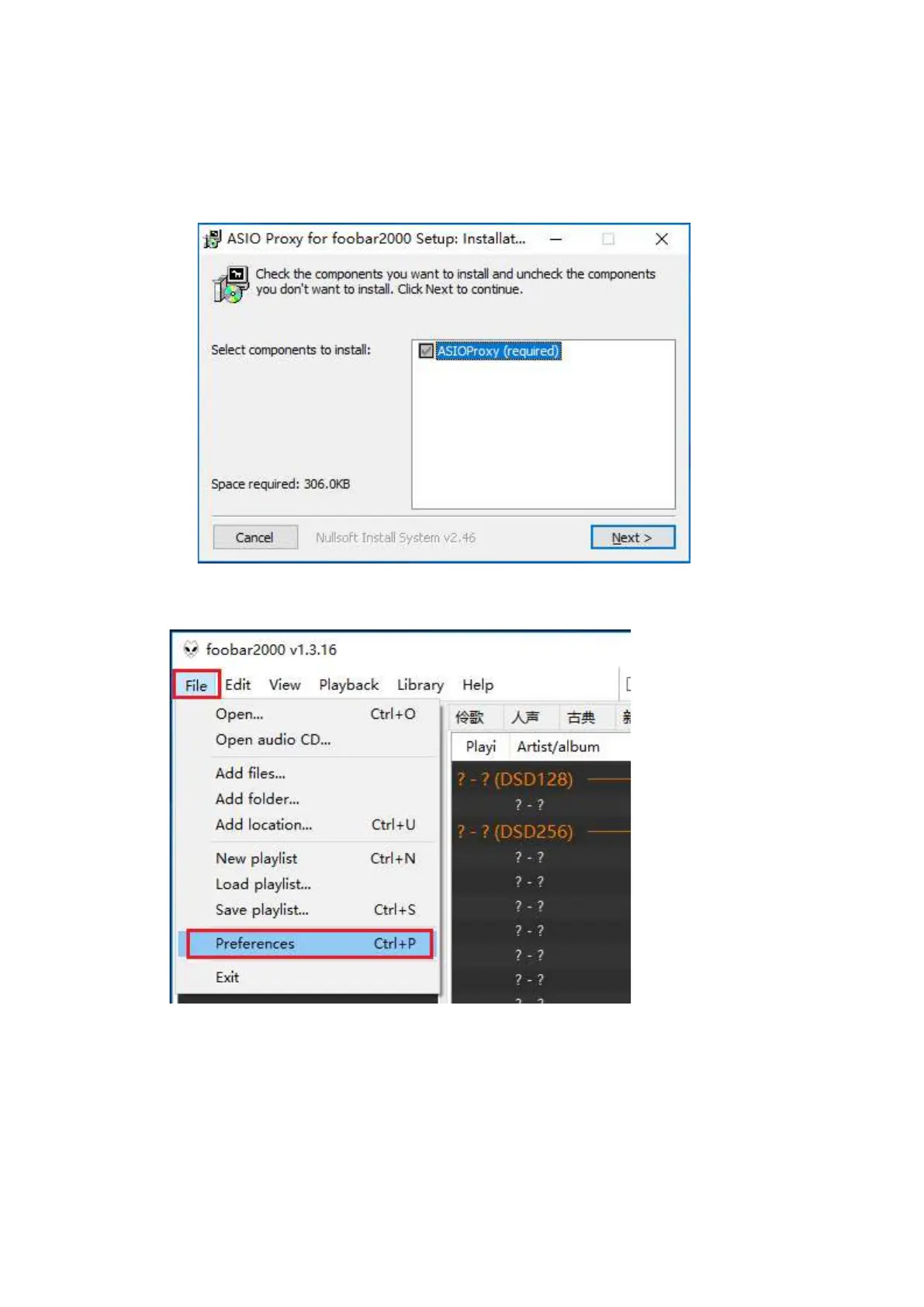
1.
Ope
n
foobar2000
_DSD_0.
7.X,
double-
click
ASI
OProxyIn
stall
-0.7
.2.exe,
then
keep
clicki
ng ne
xt or
instal
l to
finis
h.
2.
Run
foob
ar2000,
click
File
—>Prefe
rence
s.
8
10
Table of Contents
Main Page
Table of Contents
2
Front Panel
3
Back Panel
3
Display & Menu
4
Iis-Hdmi Pinout
5
Driver Installation
6
DSD Hardware Decoding on Foobar2000
9
DSD Playback Issues
15
Specifications
19
Warranty Service
20


 To Next Page