EasyManua.ls Logo

GW Instek GPT-9904 - Page 80

GW Instek GPT-9904
182 pages
Print Icon
To Next Page IconTo Next Page
To Previous Page IconTo Previous Page
Loading...
GPT-9000/9000A Series User Manual
80
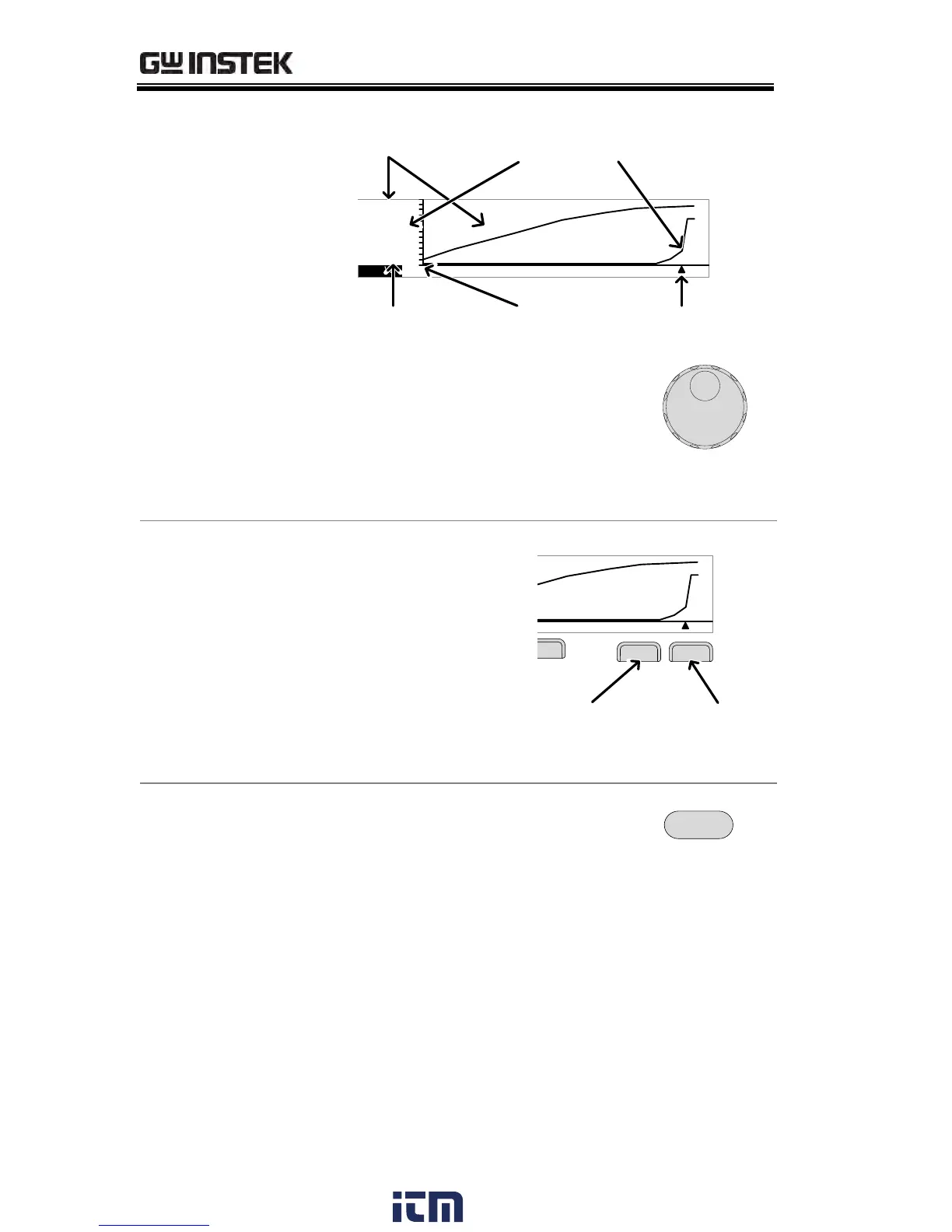
DCW Example
D CW
Primary item
Secondary item
I ( m A ) :
V ( k V ) :
0 . 2 0 0
0 0 . 5 1
T ( S ) :
0 0 0 4 . 5
V
I
Test Time CursorSTA.t time
2. Use the scroll wheel to move the
cursor on the time axis (x-axis).
The measured values for the
primary and secondary items at
that particular point in time are
shown on the left-hand side.
Remove Lines
from the Graph
1. Pressing the F5 key
will toggle the
primary test item
on/off.
2. Pressing the F6 key
will toggle the
secondary test item
on/off.
D C W
Test Voltage
I ( m A ) :
V ( k V ) :
0 . 2 0 0
0 0 . 5 1
T ( S ) :
0 0 0 4 . 5
V
I
Test Time
Toggle
voltage line
Toggle
current line
Example: DCW test
Exit the Results
Graph
To exit the graph, press the ESC
key. You will be returned back to
MANU mode/VIEW status.
ESC
w ww . . co m
information@itm.com1.800.561.8187

Other manuals for GW Instek GPT-9904

Related product manuals