200208-S111-73515 9/28
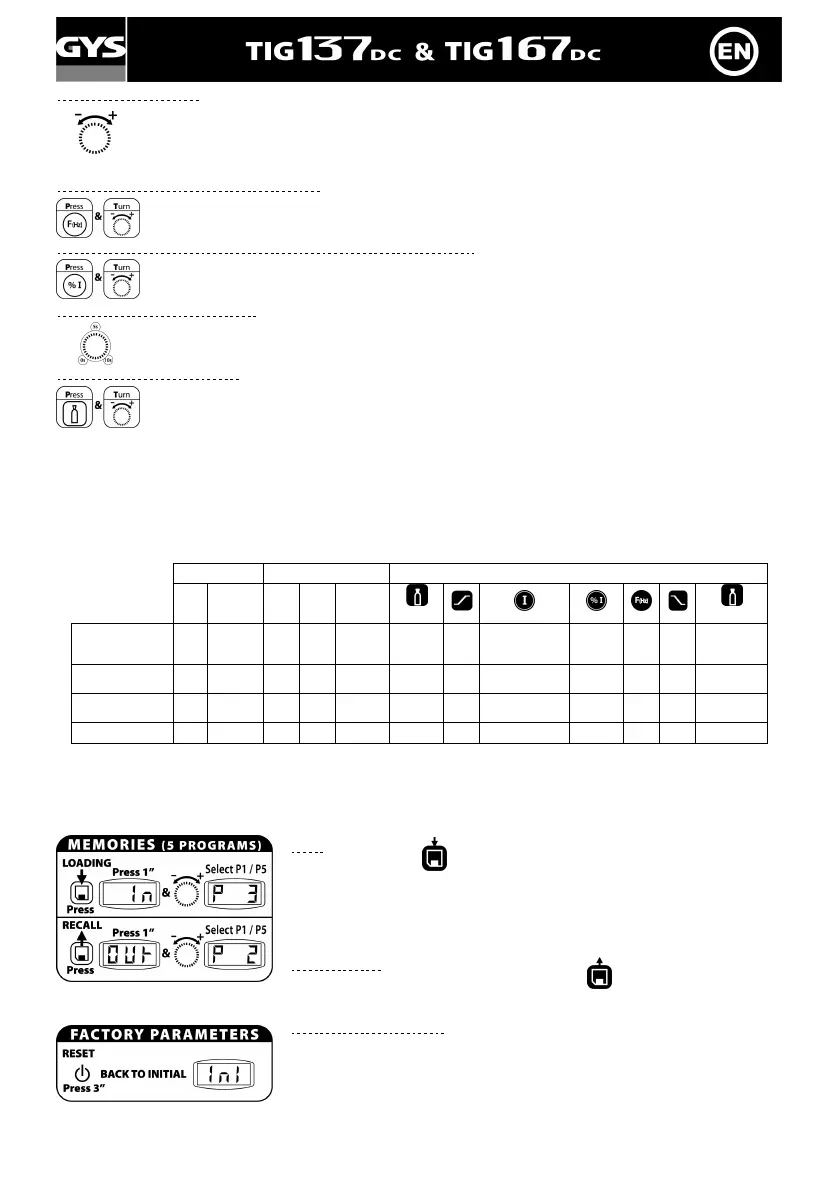
Welding current setting
The value of the welding current depends on the thickness and the nature of the metal, as well as on
the welding configuration.
Advice : Take 30A/mm as a default setting and adjust according to the part to weld.
Pulse frequency setting (from 0.2 to 20Hz)
The pulse frequency is the number of cycles (½ cycle of hot current, ½ cycle of cold current) made in
a second.
Cold current setting (low intensity) (from 20 to 70% of hot current)
It is the percentage of hot current : the colder the current, the less the part will turn hot during
welding.
Down slope setting (0 to 10 sec)
Time needed to shift from welding current to minimum current. Avoids cracks and craters at the end of
welding.
Post-gas setting (3 to 20 sec)
This parameter determines the time during which the gas keeps on escaping after the arc is out. It
protects the part and the electrode against oxidization.
Advice : Increase the time if the welding seems dark.
(For default setting : 25A=4sec. – 50A=8sec. – 75A=9sec. – 100A=10sec. – 125A=11sec. –
150A=13sec).
n.b. : At any time, you can check your settings by a simple pressure on the parameter button, without turning the
wheel.
Functions available according to welding mode
According to welding modes, some buttons do not work, please see table below :
Starting Trigger TIG process
HF Lift Arc 2T 4T 4T log
Pre-gas
Post-gas
Normal TIG
(I)
(only in
4T log)
Pulse TIG
(I)
Easy Pulse TIG
(average I)
SPOT
Memories saving and recall
There are 5 memories to save and recall TIG parameters. On top of these memories, GYSMI 137/167 stores your last
activated settings and activates them at each new start of the device.
Input
1- Press the button
2- "In" during 1 second.
As long as the display indicates "In", the action can be cancelled.
3- After one second, the display indicates a program number (P1 to P5),
keeping the button pressed, turn the wheel to set the exact memory location.
Release the button to store the parameters.
Recall a set-up
Proceed the same way but pressing the button
Reset factory parameters
1- Press 3 seconds on the reset button.
2- The display indicates "Ini".
All the memories have been deleted (the factory parameters are set on the 5
programs + start parameters).



 To Next Page