CONTROL PANEL
12
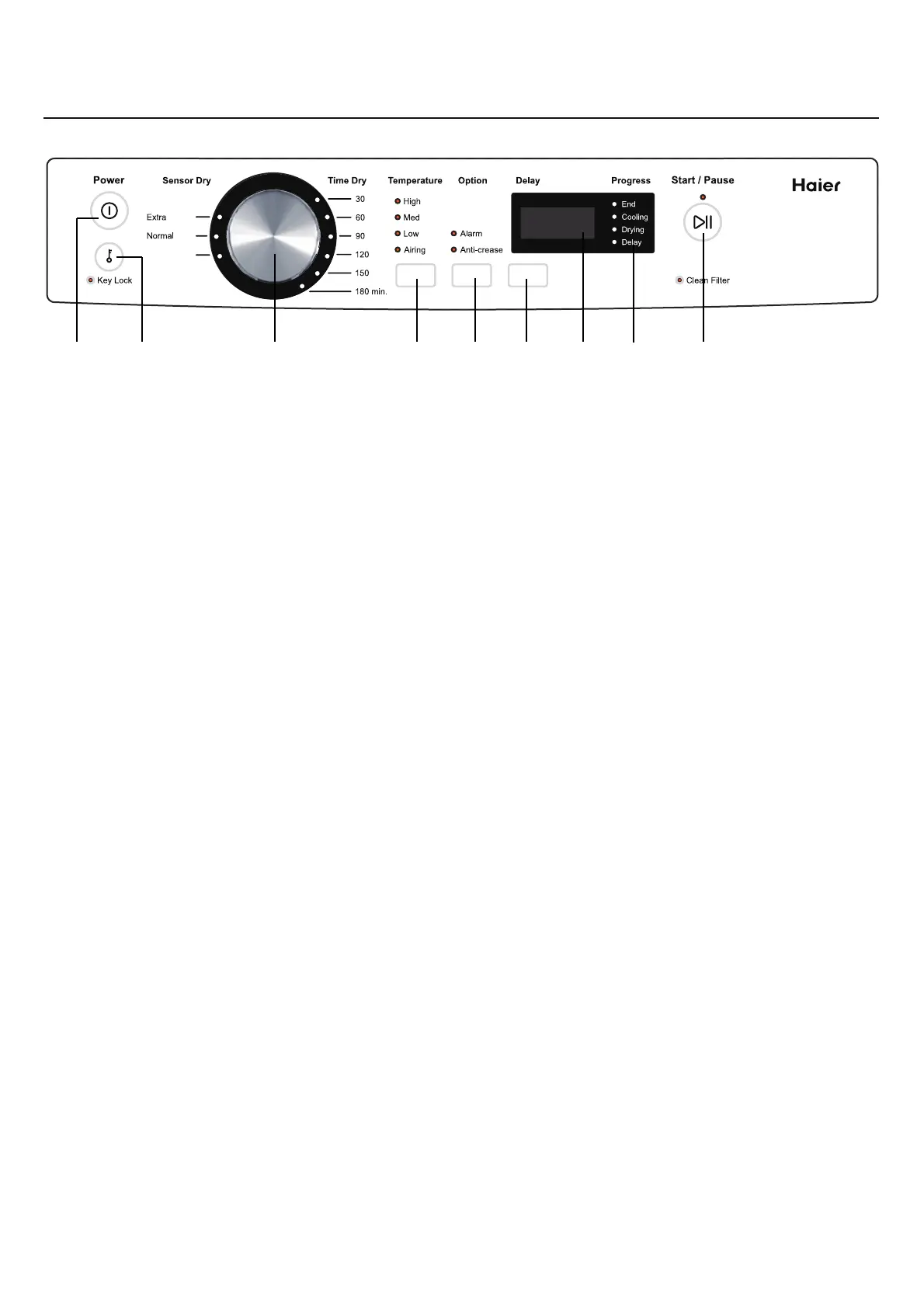
A Press ‘Power’ button to activate your dryer. Press it again to switch the dryer off.
B ‘Key Lock’ can be used to lock the buttons on your dryer.This will avoid accidental
button presses.
C There are two drying settings with your dryer, Sensor Dry and Time Dry. The default
cycle is “Normal Dry – Sensor Dry”.
D Press the ‘Temperature’ button until the light next to your desired drying temperature
is illuminated.
E The ‘Alarm’ and ‘Anti-crease’ Option automatically defaults for all cycles. This means
a series of beeps will sound to alert at the end of a cycle, and the drum will rotate
periodically and cool air will be circulated through the load to minimise wrinkling and
creasing.
F The ‘Delay’ option enables you to delay the start of the drying cycle. If
you have
programmed a ‘Delay’ time, the delay light is on.
G The screen displays the remaining time for a program and delay time.
H The progress lights indicate what part of the cycle the dryer is currently on.
I Press the ‘Start / Pause’ button to start or pause the cycle.
A B C D E F G IH
Dry
Dry
Dry
7kg
HDV70E1
Iron


 To Next Page