AV CONNECTION
5
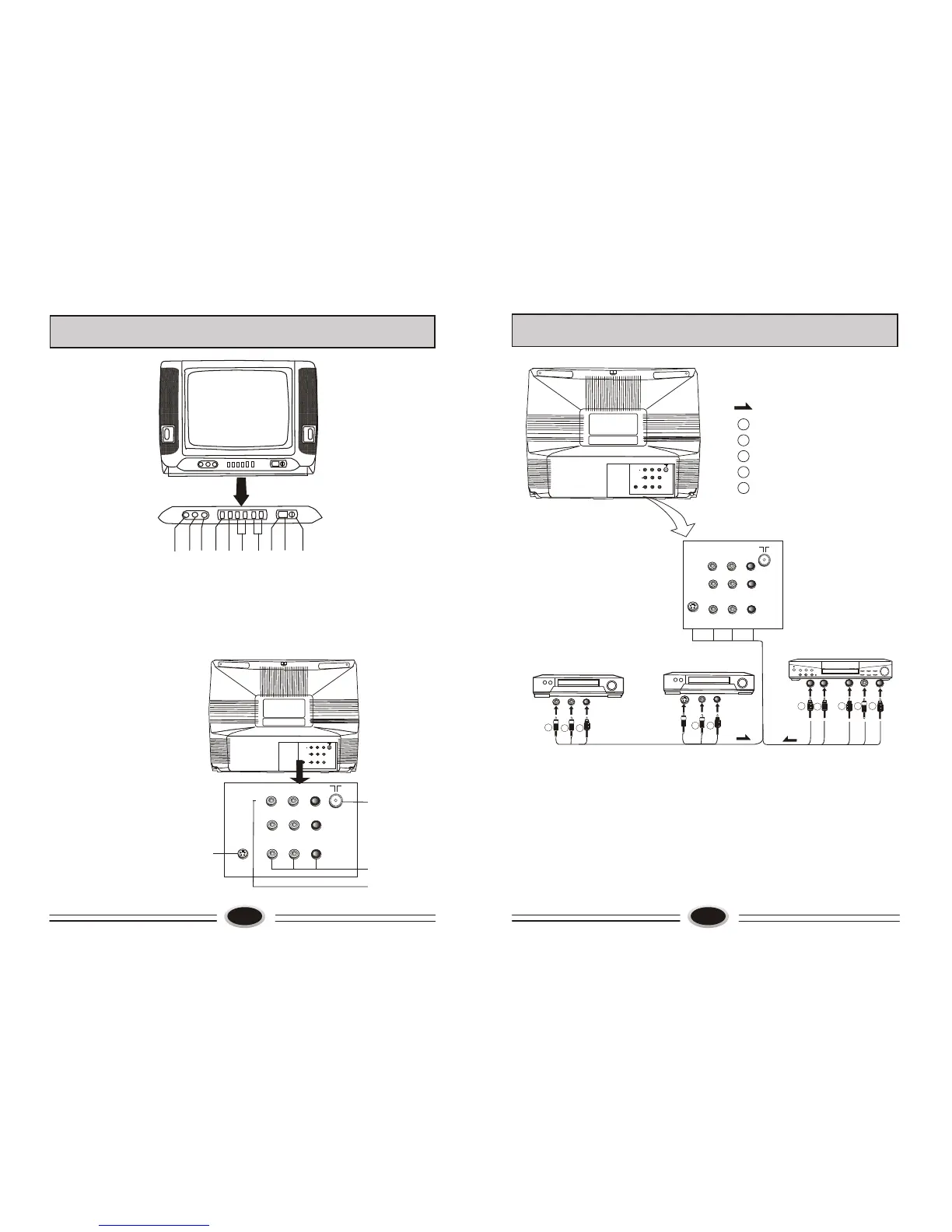
FUNCTION BUTTONS AND EXTERNAL SOCKETS
4
VIDEO
IN
L AUDIO R
S-VIDEO
3
Y
Cb
Cr
OUT
1.Front Panel
①Remote sensor:let the remote controller aim here, the TV set can receive remote
control signal.
②Power switch:press the button to turn on the TV set ,press the button again to
turn off the TV set.
③Power indicator: the indicator lights in standby status .The indicator glints
when you use remote controller.
④Menu button
⑤Program up/down button
⑥Volume up/down button
⑦TV/AV
⑧Audio(R) input
⑨Audio(L) input
⑩Video input
2.The sockets on the rear panel
①Antenna socket
②Audio/Video socket
③S-Video socket
④DVD component socket
VIDEO
IN
L AUDIO R
S-VIDEO
3
Y
Cb
Cr
OUT
IN
VIDEO
IN
L AUDIO R
Y
Cb
Cr
OUT
W
R
B
G R
DVD(with DVD component)
W
R
G
B
Direction of signal
White(left audio)
red(C /right audio )
blue(C )
green(Y)
yellow(video)
r
b
Y
S-VIDEO
VCR (without S-VIDEO terminal)
Y
W R
T
o
a
dio
u
t
u
o
VCR (with S-VIDEO terminal)
W R
s
- e
tp
To v
i
d
o
ou
u
t
v oT
o
id
e
o u
tput
o
mp
e
t u
T
c
o
on n
o
t
VIDEO
IN
L AUDIO R
S-VIDEO
3
Y
Cb
Cr
OUT
IN
Note:
1.When receive s-video signal, you must remove video signal; when receive
video signal, you must remove s-video signal.
2.When receive front video signal, you must remove back video signal; when
receive back video signal, you must remove front video signal.
① ② ③ ④ ⑤ ⑥ ⑦ ⑧ ⑨ ⑩
①
②
③
④


 To Next Page