10
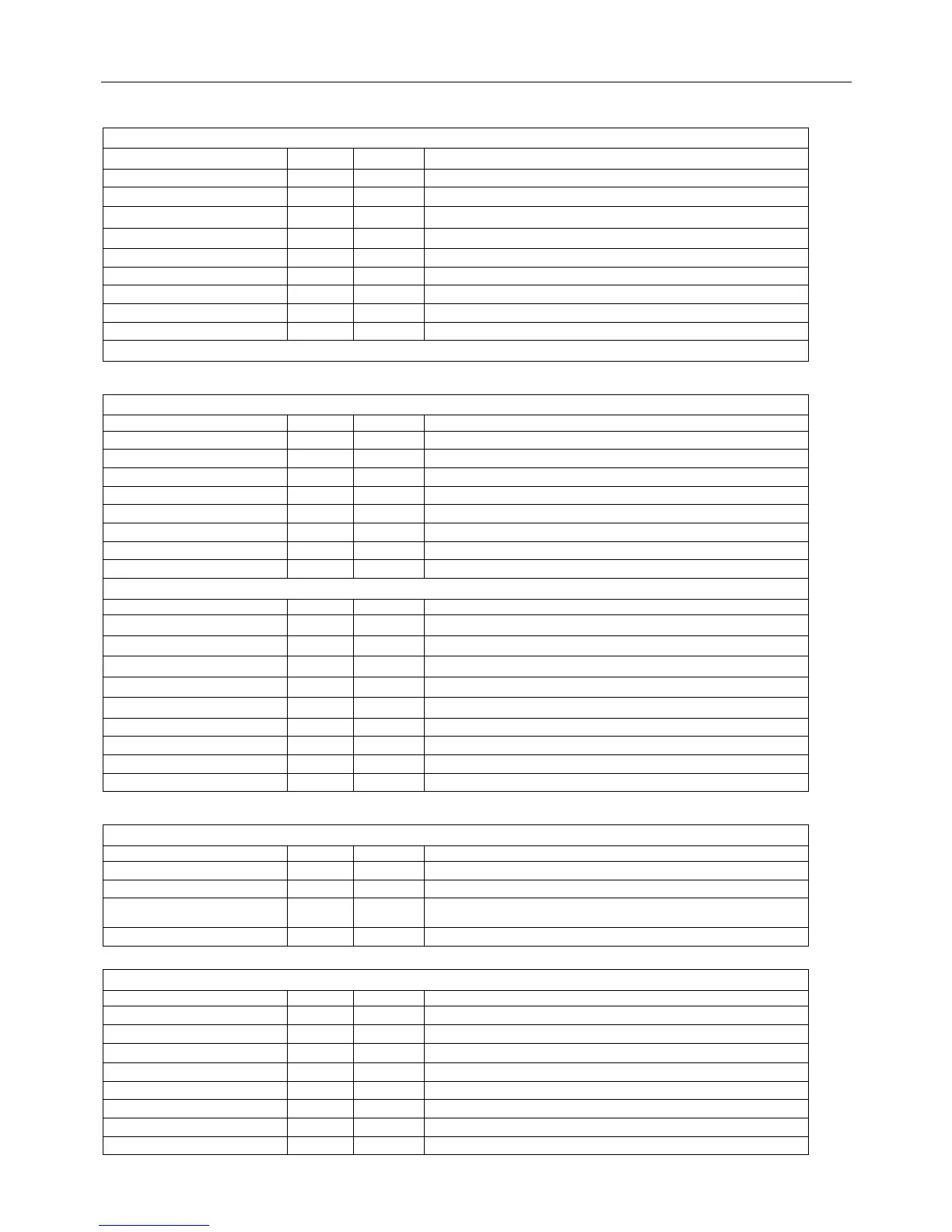
Adjustable Items
P1:
Items Preset Remark Description
H PHASE 0 ~ 31 14 ★
Horizontal shift
V SIZE 0 ~ 63 20 ★
Vertical amplitude
V POS 0 ~ 7 2 ★
Vertical shift
V LIN 0 ~ 63 29 ★
Vertical slop
V SC 0 ~ 63 32 ★ S emendation
PARABOLA 0 ~ 63 32 ★
S-correction
TRAPEXIUM 0 ~ 63 32 ★ Echclon distortion correction
H SIZE 0 ~ 63 32 ★
Horizontal amplitude
CORNER 0 ~ 63 40 ★ TOP Vertical distortion correction
注:
P2:
Items Preset Remark Description
RC 0 ~ 255 120 ★
White point R
GC 0 ~ 255 120 ★
White point G
BC 0 ~255 120 ★
White point B
RD 0 ~ 127 70 ★
Black level offset R
BD 0 ~ 127 75 ★
Black level offset B
SB 0 ~ 127 47 ★ Aassistant brightness adjust
VK 0 ~ 1 0 ★ Horizontal line choice [field surge stop choice]
WB BRI 0 ~ 127 47 ★ Horizontal line brightness
P3:
Items Preset Remark Description
RB YUV -128~ 128 0 ◆
IN YUV,
Black level offset R
GB YUV -128~ 128 0 ◆
IN YUV,
Black level offset G
BB YUV -128~ 128 0 ◆
IN YUV,
Black level offset B
RD YUV -128~ 128 0 ◆
IN YUV,
White point R
BD YUV -128~ 128 0 ◆
IN YUV,
White point B
CR PEDDOT 0~15 8 ◆ CR benchmark voltage adjust
CB PEDDOT 0~15 8 ◆ CB benchmark voltage adjust
CRCB PED ON 0~1 1 ◆ YUV benchmark voltage switch
CRCB GAIN UP 0~1 0 ◆ YUV benchmark voltage plus
P4:
Items Preset Remark Description
VIF VCO OK OK ◆ Picture IF adjust
S TRAP OK OK ◆ Sound frequency adjust
RF AGC 0 ~ 127 35 ◆
AGC adjust
VIDEO LVL 0 ~ 7 7 ◆ Video demodulation output voltage control
P5:
Items Preset Remark Description
OSD HP 0 ~ 63 35 ◆ OSD Horizontal vision position adjust
OSD VP 0 ~ 31 21 ◆ OSD Vertical vision position adjust
H TONE 0 ~ 1 0 ◆
Translucence ON-OFF
A OSD 0 ~ 1 0 ◆ A/D OSDchoice; 0 = D OSD; 1 = A OSD;
OSD L 0 ~ 1 0 ◆ D OSD output voltage choice; 0 = 70%; 1 = 90%
TITLE 0 ~ 127 57 ◆ OSD title color choice
MENU 0 ~ 127 79 ◆ OSD color choice
MENU HL 0 ~ 127 57 ◆ OSD pitch on color choice



 To Next Page