6. Operation Instructions
Basal information
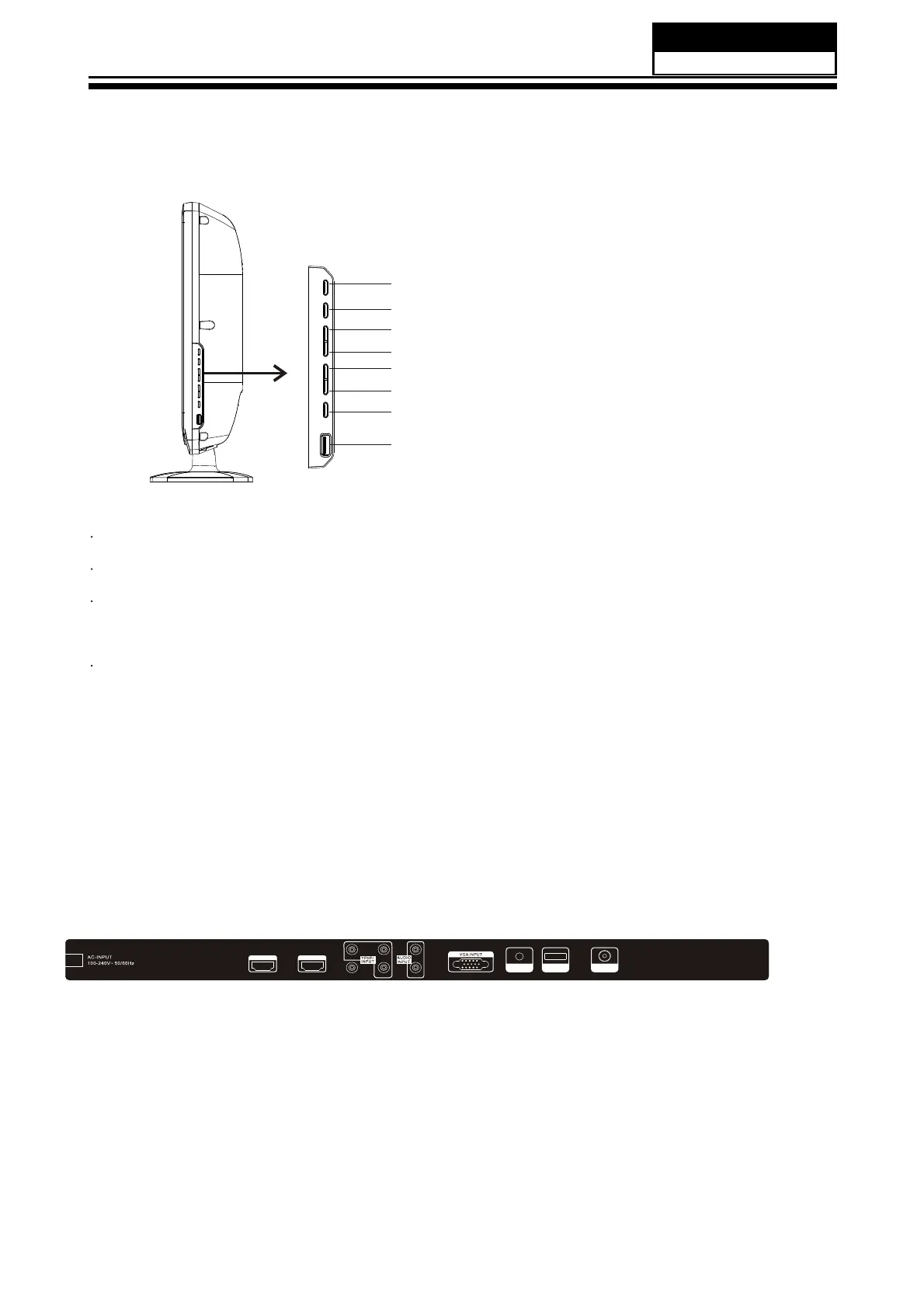
6-1 Front panel controls
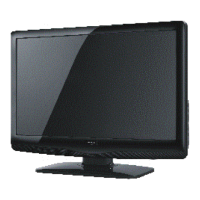
6.2 Back panel controls
Service Manual
Model No.:
- 24 -
1 SOURCE:
Display the input source menu.
2
MENU:
Display main MENU.
3
CH+/CH-
In TV mode, press "CH+" or "CH-" to change the channel
up and down.
In MENU mode, press "CH+" or "CH-" to select items.
In standby mode, press "CH+" or "CH-" to
turn on the TV
.
4
VOL+/VOL-
Adjust sound
level.
In MENU mode, press "VOL+" or "VOL-" to adjust the item that you selected.
5.
STANDBY
Press this button to turn the unit ON from ST
ANDBY mode.
Press it again to turn the set back to STANDBY.
6.
USB
The USB memory stick should be plug in the unit directly
. USB extension cable
should not be used to avoid failing of data transferring and interference caused.
S
O
U
R
C
E
M
E
N
U
C
H
+
C
H
-
V
O
L
+
V
O
L
-
S
T
A
N
D
B
Y
U
S
B
All the terminals
are (from left
to right):
AC POWER SOCKET
, HDMI 1,
HDMI 2,
A
V
, YPbPr
, AUDIO
INPUT,
VGA ,
PC AUDIO
INPUT,
AV2 IN/AV OUT, ANTENNA.
Note: 1.A
V and
YPbPr share one
audio channel.
2.When HDMI 1
port get DVI
signal, the "PC
Audio" channel
is changed to
receive the audio
for HDMI 1 port.
H
D
M
I
1
I
N
P
U
T
H
D
M
I
2
I
N
P
U
T
L
RA
V
P
r
Y
P
b
P
C
A
U
D
IO
I
N
P
U
T
R
F
I
N
P
U
T
AV2 IN/AV OUT


 To Next Page