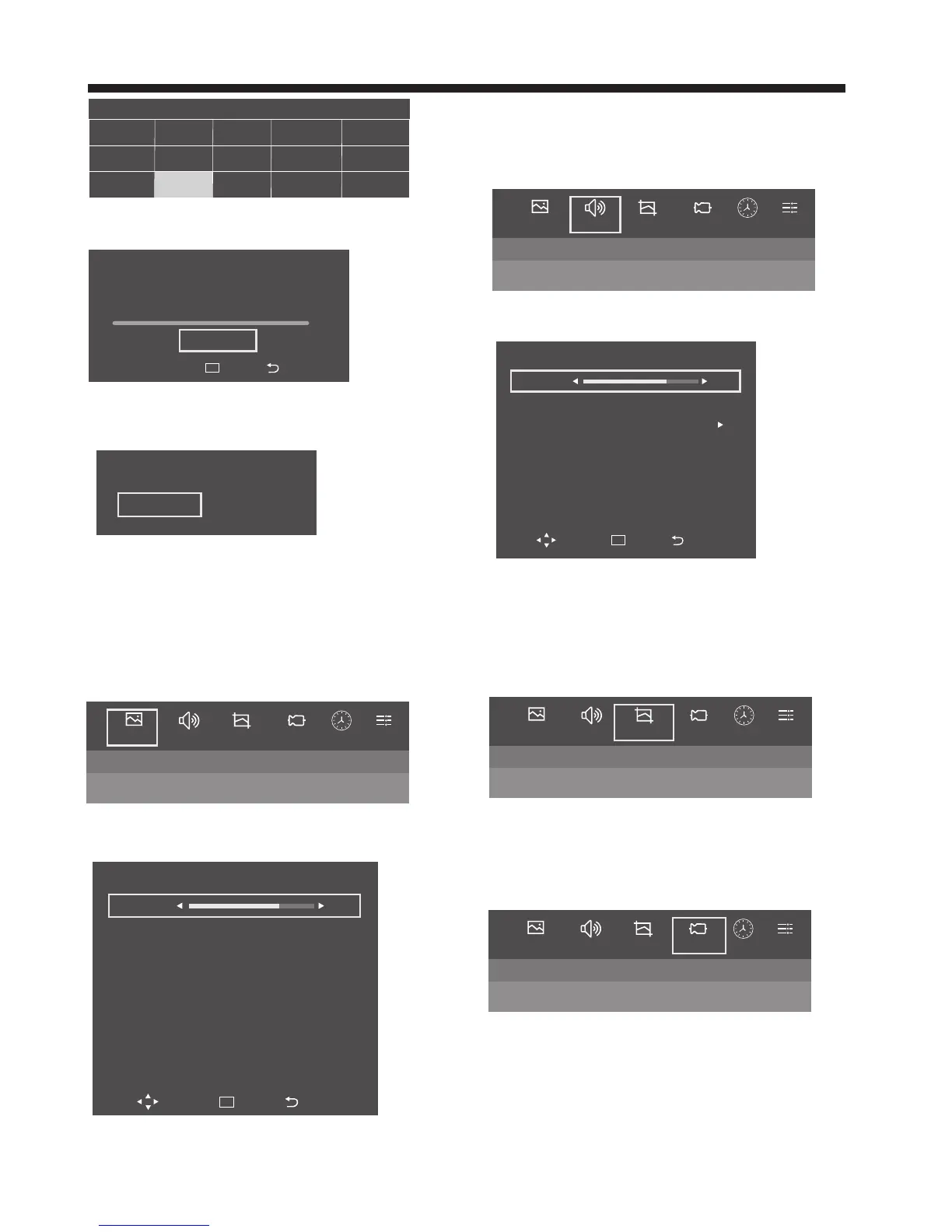
Audio
Bass 50
Treble
Equilizer
AVC
Surround
SPDIF Output
Balance
50
off
off
PCM
50
Move Enter Back
OK
Are you sure to exit DTV tuning?
YES NO
Auto Tune
Search: 0 DTV 0 Radio 0 Data
VHF CH 0 Freq 0 MHZ
0%
Start Search
Enter Back
OK
-12-
TV OPERATION
1. Picture MENU
1). Press the MENU button and then press the ◀▶ buttons to
select the Picture menu and then press the ▼ button.
2). Press the ◀▶ buttons to select submenu
ECO/Standard/User/Mild/Vivid Mode.
●User Mode:
Picture: You can adjust picture effect here, such as
brightness, color, sharpness etc.
Sound: You can adjust the sound effect here, such as bass,
treble, balance etc.
4). Channel tuning will commence. This operation may take up
to some minutes . The display will show the progress of the
tuning and the number of channels found.
5). If you want to skip the Auto tuning, press the MENU button
to interrupt the tuning half way.
A pop-up screen will be displayed, press the OK button to to
onfirm. You will then go straight to Network.
6). After tuning is complete, the channels are arranged in a
preset order. If you wish to skip channels, modify the preset
order or rename channels, select Programme Edit under the
channel menu.
2. Audio MENU
1). Press the MENU button and then press the ◀▶ buttons to
select the Audio MENU and then press the ▼ button.
2). Press the ◀▶ buttons to select submenu.
Standard/Music/Theatre/User
●User Mode:
Picture: You can adjust picture effect here, such as
brightness, color, sharpness etc.
3. Wide Mode MENU
1). Press the MENU button and then press the ◀▶ buttons to
select the Wide Mode MENU and then press the ▼ button.
2). Press the ◀▶ buttons to select submenu.
Auto/16:9/4:3/Zoom1/Zoom2/Just Scan
4. Channel MENU
1). Press the MENU button and then press the ◀▶ buttons
to select the Channel MENU and then press the ▼ button.
2). Press the ◀▶ buttons to select submenu.
Antenna Type/Auto Tune/Manual Tune/Program Edit/Signal
Information.
4.1 Antenna Type
1). Press the MENU button and then press the ◀▶ buttons
to select the Channel MENU and then press the ▼ button.
2). Press the ◀▶ buttons to select Antenna Type and press
OK to confirm.
3). press the ◀▶ to select Air or Cable.
Picture Audio Channel TimeWide Mode Setup
Standard VividECO User
Picture
Contrast 50
Brightness
Color
Sharpness
Tint
Back Light
Image Noise Reduction
Color Temperature
50
50
50
50
100
Weak
Normal
Move Enter Back
OK
Picture Audio Channel TimeWide Mode Setup
Standard Music Theatre User
Picture Audio Channel TimeWide Mode Setup
Auto16:9 4:3 Zoom1 Zoom2 Just Scan
Picture Audio Channel TimeWide Mode Setup
Antenna Type Auto Tune Manual Tune Program Edit Signal Information
Mild
Country
Nigeria
India
Iran
Malaysia
Thailand Saudi Arabia
Israel
Iraq
Pakistan
Benin
Philippines Egypt
Kuwait
Indonesia
Morocco



 To Next Page