GET TO KNOW YOUR REMOTE CONTROL
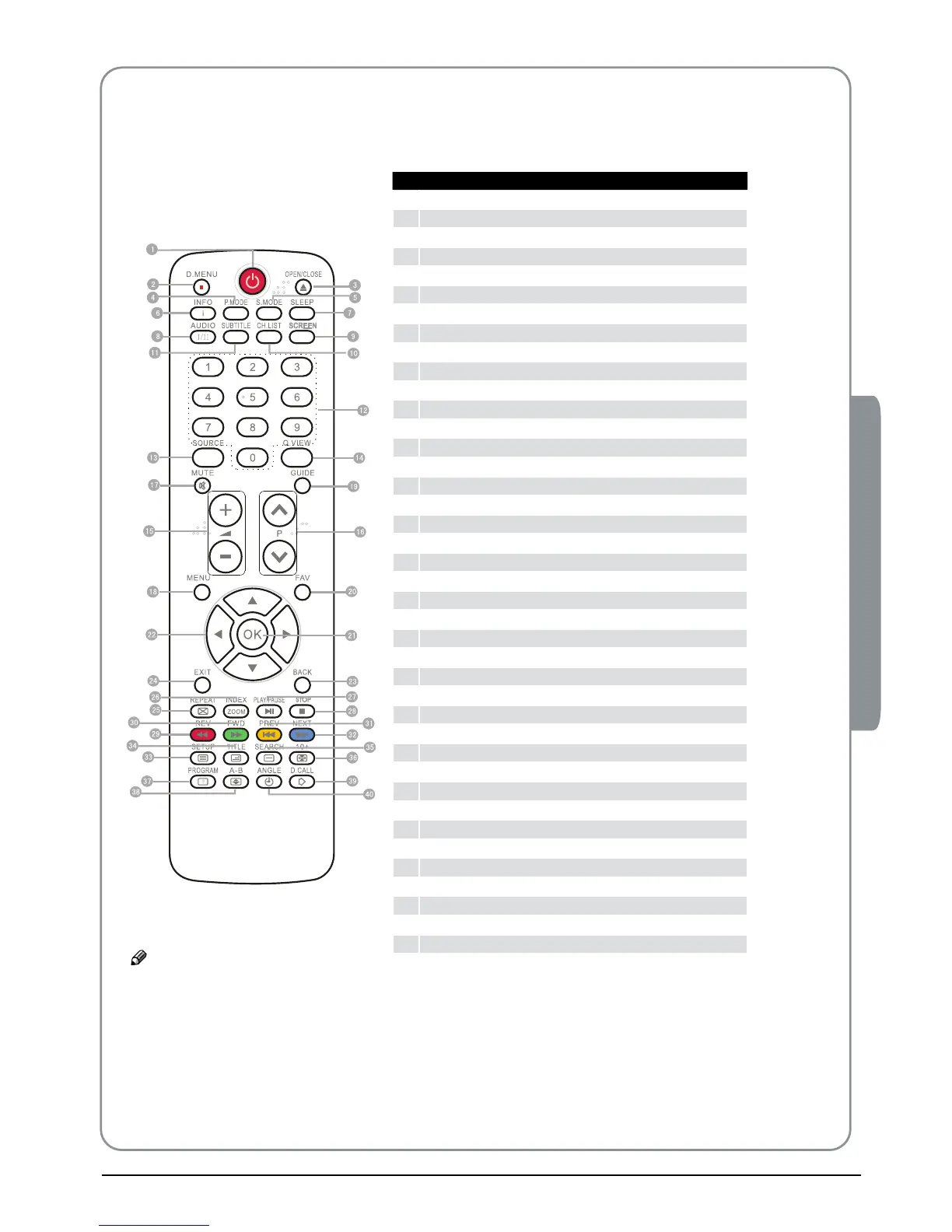
When using the remote control, aim it towards the remote sensor on the TV.
1
Stand By
2
DVD Menu / REC
3
DVD open / close
4
Picture Mode
5
Sound Mode
6
Call Screen Display
7
Sleep button
8
DTV Audio / NICAM / DVD Audio
9
Aspect Ratio Control button
0
Channel list button
A
Subtitle button
B
Program Number Channel selection
C
Source Exchange
D
Q.VIEW / Swap Channel
E
V+/V-: Volume selection
F
P+/P-: Channel selection
G
Mute
H
Menu button
I
GUIDE button (only for DTV)
J
Favourite list button (only for DTV)
K
OK button
L
Cursor Mover button
M
Back button (only for USB)
N
Exit Screen Display
O
REPEAT (only for DVD & USB)/CANCEL button
P
Zoom (only for USB)/Teletext index (only for TV) / REC index
Q
Play / Pause button (only for DVD & USB) / Timeshift
R
Stop (only for DVD, USB, REC & Timeshift)
S
Fast Reverse (only for DVD, USB, REC & Timeshift)
T
Fast Forward (only for DVD, USB, REC & Timeshift)
U
Previous (only for DVD ,USB & REC )
V
Next (only for DVD ,USB & REC )
W
DVD Set up / Text
X
DVD Title / Teletext Mix
Y
DVD Search / Teletext Subcode
Z
DVD 10+ / Teletext Hold
[
DVD Program / Teletext Reveal
\
DVD A-B Repeat / Teletext Size
]
DVD Call / Teletext Mode
`
DVD Angle/Teletext Time
Note
RED button, GREEN button, ❏ BLUE button and YELLOW
button are fast text button in analog signal. Function
button in DVBT (just reference the OSD)
Maybe some buttons of the remote control do not work ❏
,for they are only used for the model with DVD .



 To Next Page