2: Installing the QE65000
►
Procedure
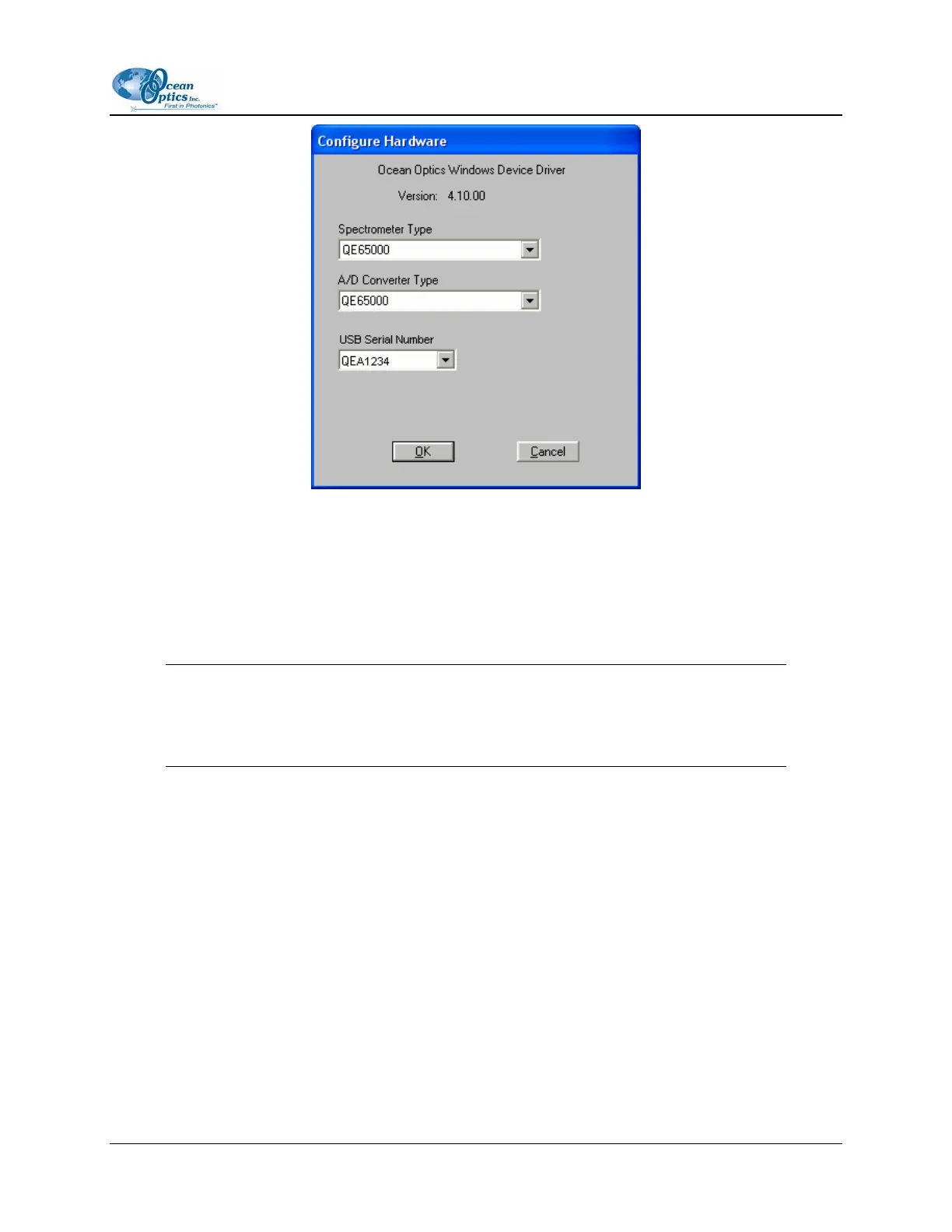
To configure hardware in USB mode,
1. Specify QE65000 in the Spectrometer Type drop-down menu.
2. Specify QE65000 in the A/D Converter Type drop-down menu.
3. Specify the serial number of the QE65000 under the USB Serial Number drop-down menu.
Note
The system pre-fills this drop-down menu with the serial numbers of all discovered
QE65000 Spectrometers.
4. Click the OK button to accept the selected options.
5. The spectrometer should now be able to acquire data and respond to light. Exit and restart
OOIBase32 to save configuration data to disk.
Spectrometer Configuration Screen
The Spectrometer Configuration screen prompts you to configure specific channel-level spectrometer
information, if necessary.
► Procedure
1. Select Spectrometer | Configure from the menu and set system parameters.
2. Select the Wavelength Calibration tab. OOIBase32 pre-fills the coefficients for the QE65000
from information on a memory chip in the spectrometer.
220-00000-000-02-0605 9



 To Next Page