32
Enable DMZ
If the DMZ Host Function is enabled, it means that you set up DMZ host at a particular computer
to be exposed to the Internet so that some applications/software, especially Internet / online
game can have two-way connections.
DMZ Host IP
Address
Enter the IP address of a particular host in your LAN which will receive all the packets originally
going to the WAN port/Public IP address above.
Note: You need to give your LAN PC clients a fixed/static IP address for DMZ to work properly.
Save
After completing the settings on this page, click Save to save the settings.
Reset
Click Reset to restore to default values.
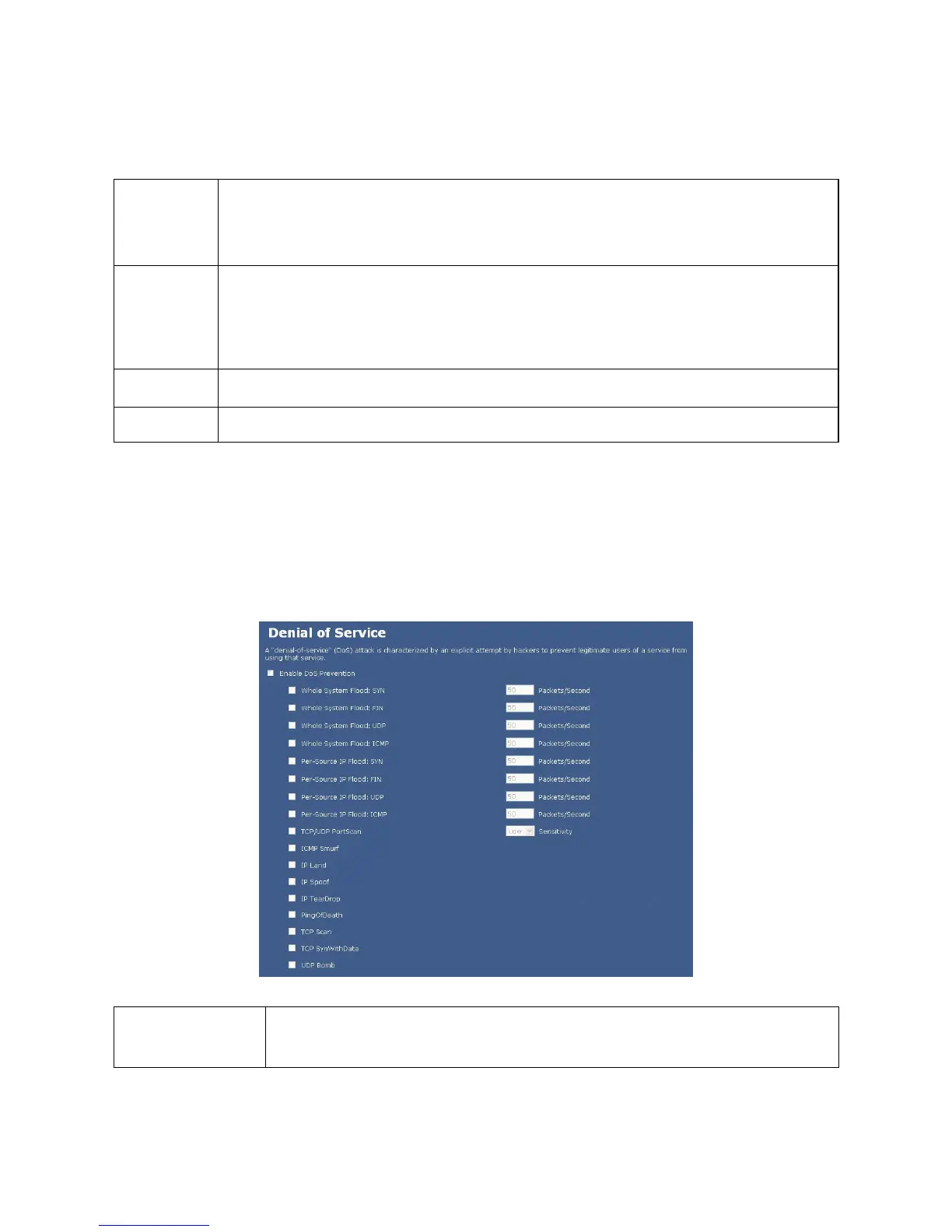
DoS Setting
DoS (Denial of Service) attacks can flood your Internet connection with invalid packets and connection requests,
using so much bandwidth and so many resources that Internet access becomes unavailable. The Wireless
Router incorporates protection against DoS attacks. This screen allows you to configure DoS protection.
Enable DoS
Prevention
Check to enable the DoS prevention function. Select the item listed to enable.


 To Next Page