11
COUNT: Showing your current speed. Range
DISTANCE: Displays ashing “0” for presetting the distance during setup, from
100 meter to 9.9 kilometer, and counts down from the preset value. If no value
is preset, displays the distance you are traveling during exercise, from 1 meter
up to 9.999 kilometers.
CALORIES: Displays ashing “0:0” for presetting the calories burned during
setup, from 1 to 999 Kcal, and counts down from the preset value. Displays the
calories burned, from zero up to 999.9 Kcal. NOTE: The calorie readouts are an
estimate for an average user. It should be used only as a comparison between
workouts on this unit.
5.3 USER-Programs ( P11-P15)
Press UP(+), DOWN(-) greeable hour hand tums this revolve button to select
the user.
Press ENTER to conrm your choice, and enter into time setting window.
The time display will ash, and then press UP(+), DOWN(-) revolve button to set
up the desired time to do the exercise. Press ENTER to conrm the value.
The distance will ash, and then press UP(+), DOWN(-) greeable hour hand tums
this revolve button to set up the desired distance value. Press ENTER to conrm
the value.
The calories will ash, and then press UP(+), DOWN(-) greeable hour hand tums
this revolve button to set up the desired calories to be consumed. Press ENTER
to conrm the value.
The rst resistance level will ash, and then press UP(+), DOWN(-) greeable hour
hand tums this revolve button to set the desired load resistance. Press ENTER
to conrm. Then repeat above operation to set the resistance from 2 to 10.
Press start to begin exercise
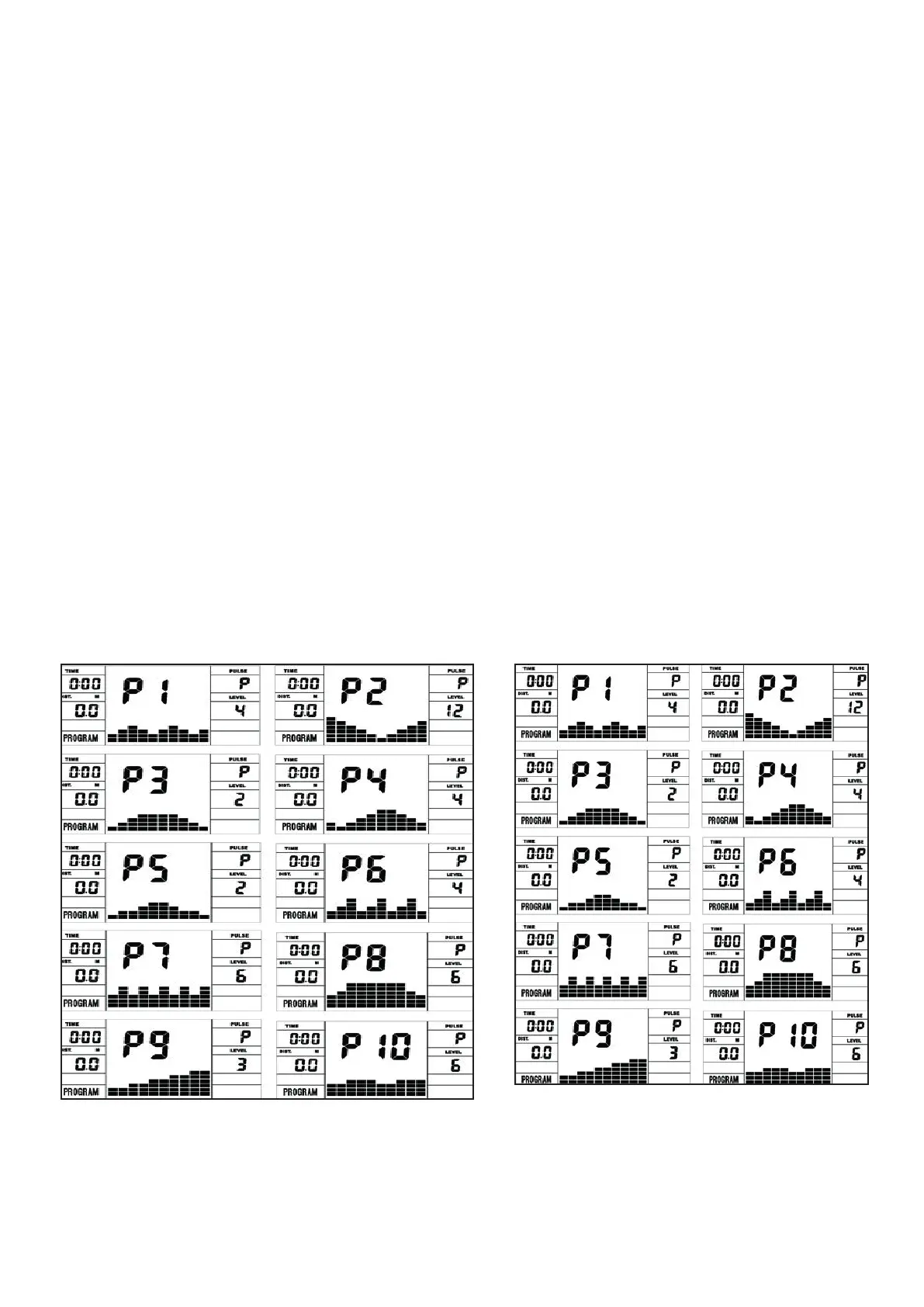
5.4 Manual Program and Fitness Programs P1-P10
The computer has a manual program and 10 different training programs with
different load peaks.
P1: ROLLING P2:VALLEY P3: FATBURN P4:RAMP P5:MOUNTAIN
P6: INTERVAL P7:CARDIO P8:ENDURANCE P9:SLOPE P10:RALLY
Press UP(+), DOWN(-) greeable hour hand tums this revolve button to select
the Program.
Press ENTER to conrm your choice, and enter into time setting window.
The time display will ash, and then press UP(+), DOWN(-) revolve button to set
up the desired time to do the exercise. Press ENTER to conrm the value.
The distance will ash, and then press UP(+), DOWN(-) greeable hour hand tums
this revolve button to set up the desired distance value. Press ENTER to conrm
the value.
The calories will ash, and then press UP(+), DOWN(-) greeable hour hand tums
this revolve button to set up the desired calories to be consumed. Press ENTER
to conrm the value.
Press start to begin exercise
COUNT: zeigt die aktuellen Ruderschläge an.
DISTANCE: Es kann die maximale Entfernung von 100m bis 9.9km vorgegeben werden.
Wird kein Wert vorgegeben, dann zählt der Wert bis 9.999km aufwärts.
CALORIES: Es kann die maximal zu verbrennende Kalorienanzahl von 1-999 Kcal
vorgegeben werden. Wird kein Wert vorgegeben, dann zählt der Wert bis 999.9 Kcal
aufwärts.
5.3 BENUTZER-Programme (P11-P15)
Drehen Sie UP (+), DOWN (-), um den Benutzer auszuwählen. Drücken Sie ENTER um
die Auswahl zu bestätigen. Die Zeitanzeige blinkt drehen Sie dann die Drehtaste UP (+),
DOWN (-) um die gewünschte Zeit einzustellen. Drücken Sie ENTER, um den Wert zu
bestätigen.
Die Entfernung blinkt und drücken Sie dann UP (+), DOWN (-), um den gewünschten
Entfernungswert einzustellen. Drücken Sie ENTER, um den Wert zu bestätigen.
Die Kalorien blinken, und drücken Sie dann UP (+), DOWN (-), um den gewünschten
Kalorienverbrauch einzustellen. Drücken Sie ENTER, um den Wert zu bestätigen.
Die erste Widerstandsstufe blinkt, und drücken Sie dann die Taste UP (+), DOWN (-),
um den gewünschten Widerstand einzustellen. Drücken Sie zur Bestätigung ENTER.
Wiederholen Sie dann den obigen Vorgang, um den Widerstand von 2 auf 10 einzustellen.
Drücken Sie START und das Training beginnt.
5.4 Manuelles Programm, und Trainingsprogramme P1-P10
Der Computer hat ein Manuelles Programm und 10 verschiedene Trainingsprogramme
mit unterschiedlichen Belastungsspitzen.
P1: ROLLING P2:VALLEY P3: FATBURN P4:RAMP P5:MOUNTAIN
P6: INTERVAL P7:CARDIO P8:ENDURANCE P9:SLOPE P10:RALLY
Drehen Sie UP (+), DOWN (-), um ein Programm auszuwählen. Drücken Sie ENTER um
das Programm zu bestätigen. Die Zeitanzeige blinkt drehen Sie dann die Drehtaste UP
(+), DOWN (-) um die gewünschte Zeit einzustellen. Drücken Sie ENTER, um den Wert zu
bestätigen.
Die Entfernung blinkt und drücken Sie dann UP (+), DOWN (-), um den gewünschten
Entfernungswert einzustellen. Drücken Sie ENTER, um den Wert zu bestätigen.
Die Kalorien blinken, und drücken Sie dann UP (+), DOWN (-), um den gewünschten
Kalorienverbrauch einzustellen. Drücken Sie ENTER, um den Wert zu bestätigen.
Drücken Sie START und das Training beginnt.






 To Next Page