4V LITHIUM RECHARGEABLE SCREWDRIVER 13
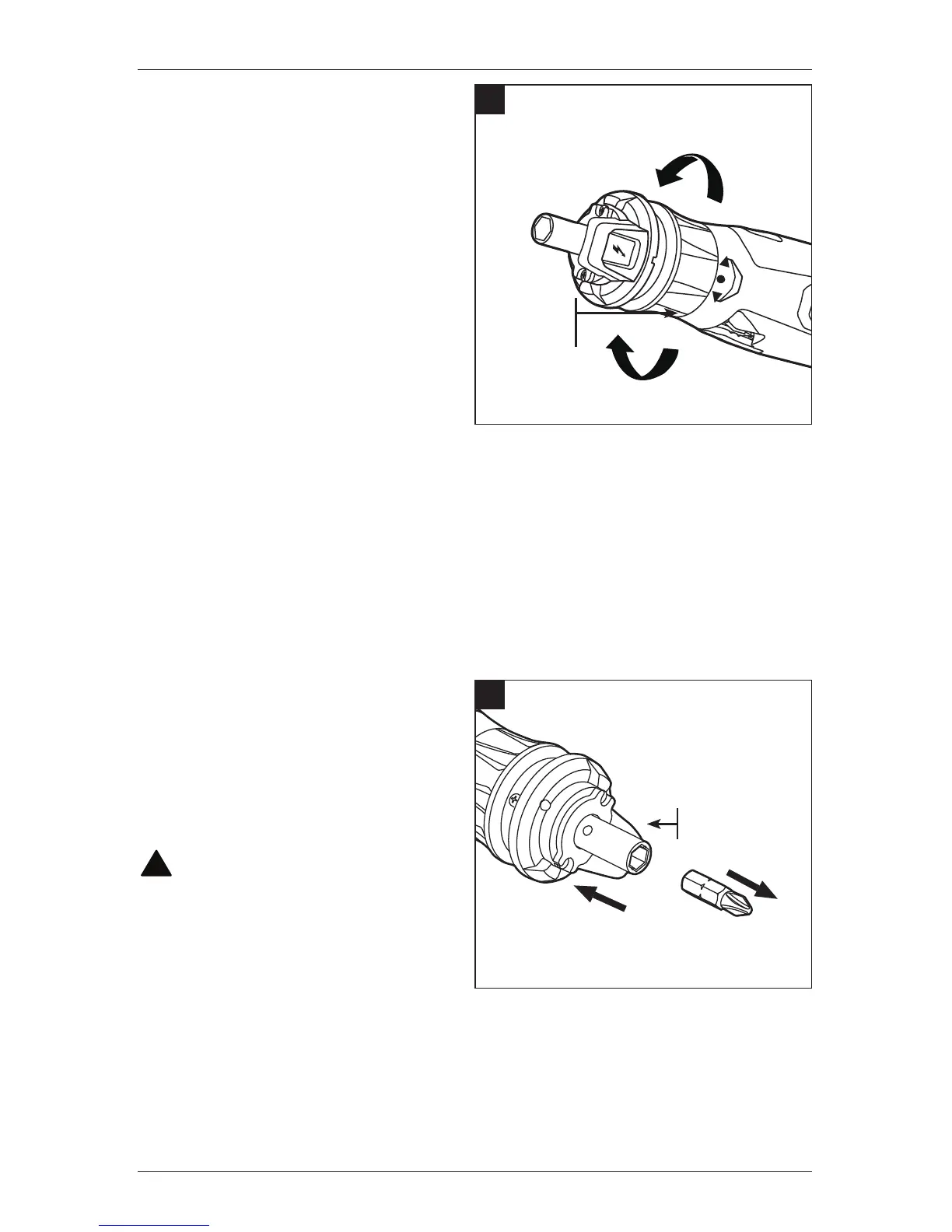
2. Forward/Reverse Selector
The forward/reverse selector
determines the rotating direction of
the tool and also serves as a tool on/
off switch. With the tool held in the
normal operating position, as shown
in Figure 2.
a. To tighten a screw, rotate
the forward/reverse selector
clockwise.
b. To loosen a screw, rotate
the forward/reverse selector
counterclockwise.
c. To turn off the tool, release the
forward/reverse selector.
3. LED Worklights
Two LED worklights, located on the head of the tool, illuminate when the forward/reverse
selector is rotated. This provides additional light on the surface of the work piece for
operation in lower-light areas. The LED worklights will automatically turn off 20 seconds
after the forward/reverse selector is released.
4. Installing and Removing Bit
a. To install a screwdriver bit, push
it into the collet until it is rmly
in place.
b. To remove a screwdriver bit, pull
it straight from the collet.
!
WARNING
CAUTION: To avoid possibly
serious injury, take care not to activate
the forward/reverse selector when
installing or removing bits.
2
FORWARD/
REVERSE
SELECTOR
REVERSE
FORWARD
4
6.35MM HEX
COLLET



 To Next Page