MOC.YABNOTPMAH7
Please contact 1-800-527-0998 for further assistance.
Assembly — Hanging the Fan
1
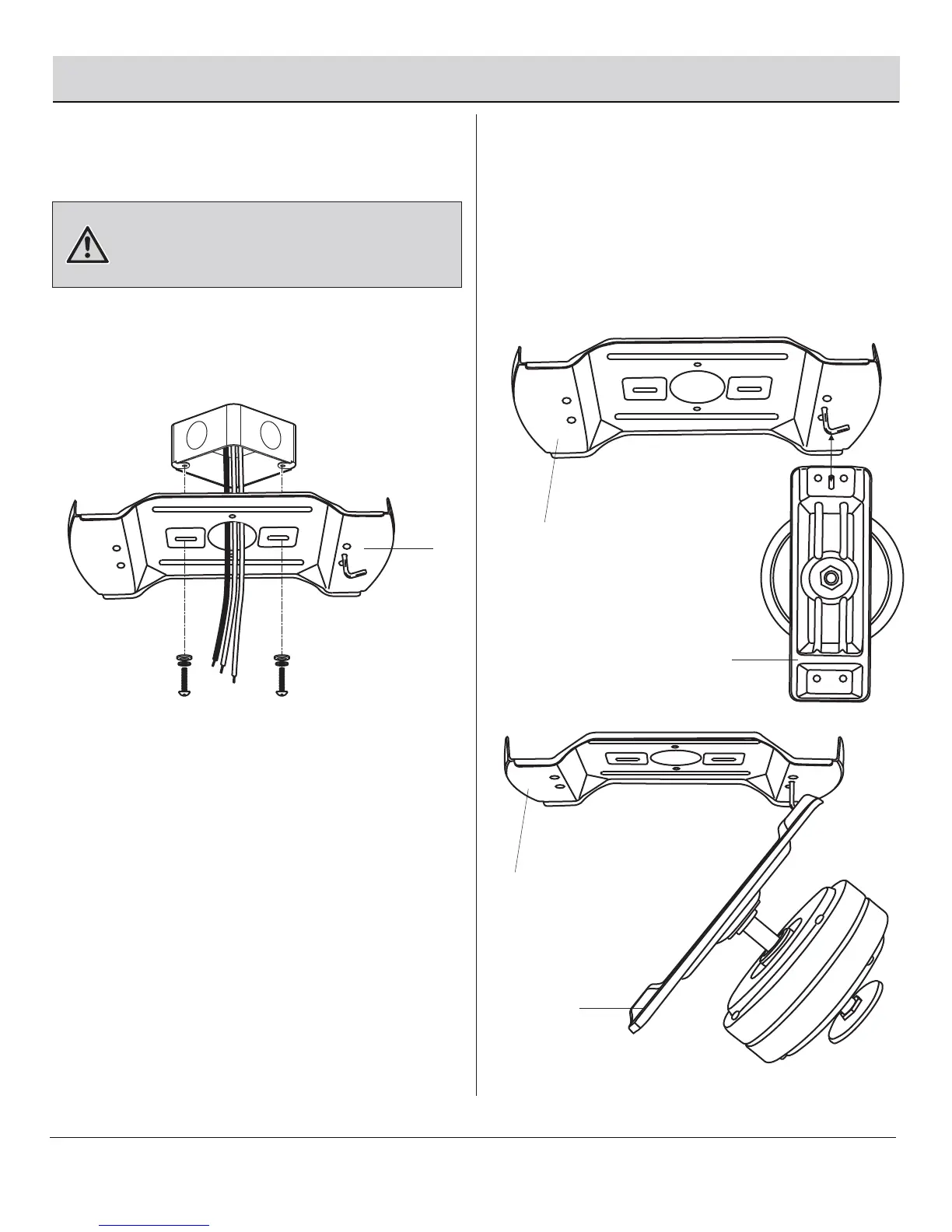
Attaching the mounting plate to
the electrical box
Hanging the fan motor assembly
from the mounting plate
□
Attach the mounting plate (C) to the outlet box with two
screws and washers provided with the outlet box.
Make sure the mounting plate (C) is tight and secured.
WARNING: To reduce the risk of fire, electric shock or
other personal injury, mount the fan only to an outlet box or
supporting system marked acceptable for fan support and
use the mounting screws provided with the outlet box.
□
Align the slot hole in the fan motor assembly mounting
bracket (I) to the J hook on the mounting plate (C).
□
Lift the mounting bracket (I) onto the J hook, making sure
the slot hole is seated properly on the J hook, and allow it to
hang freely.
C
2
C
I
I
C



 To Next Page