9 HAMPTONBAY.COM
Please contact 1-800-527-0998 for further assistance.
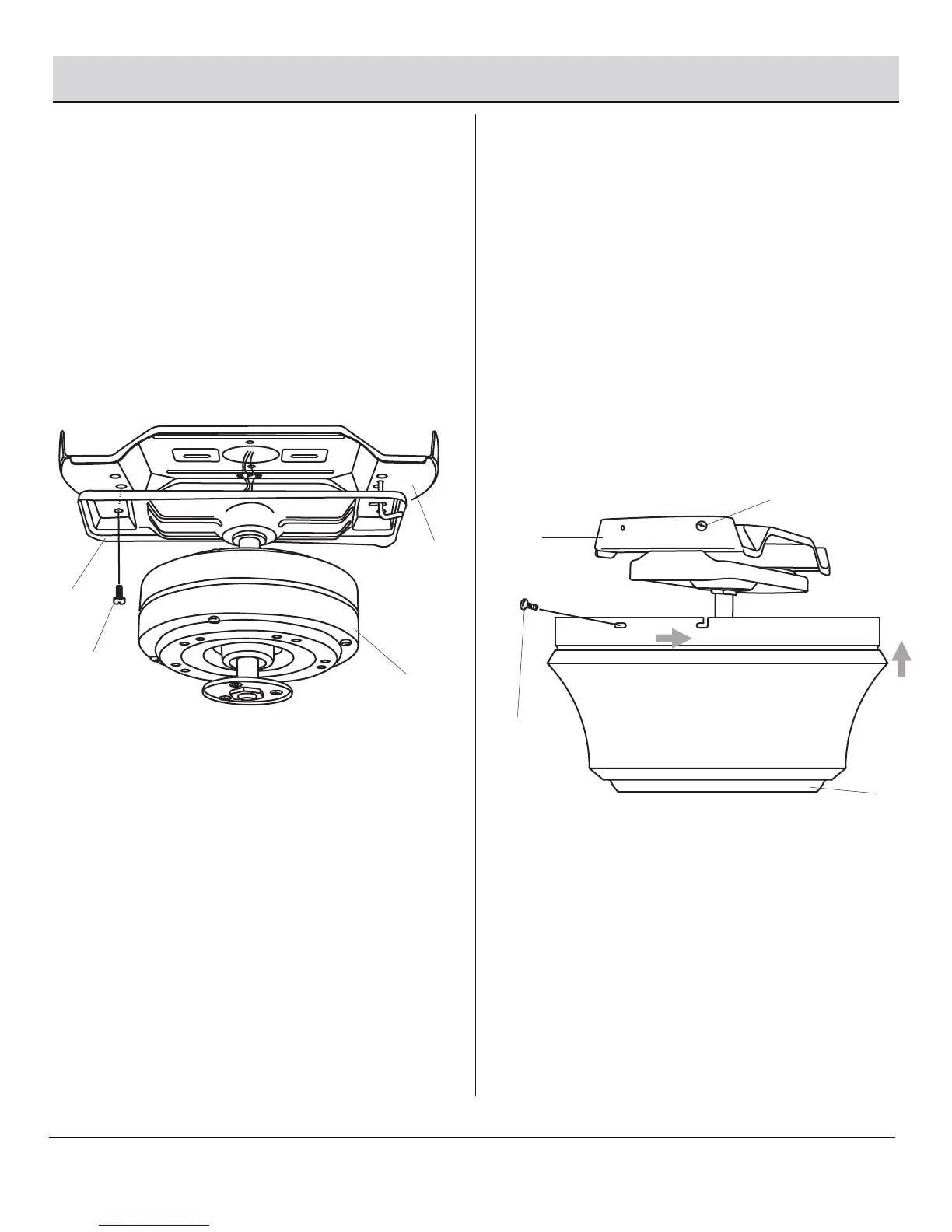
□ After completing the electrical connections, align the four
screw holes between the mounting bracket (I) and the
mounting plate (C).
□ Insert the mounting plate screws (DD) through the
mounting bracket (I) and into the mounting plate (C).
Tighten all screws securely.
Assembly — Hanging the Fan (continued)
4
Finishing the fan installation
5
Attaching the fan motor assembly
to the mounting plate
□ Remove the two screws (UU) and loosen the two screws (VV)
on the mounting plate (C).
□ Install the fan housing (E) to the mounting plate (C) by aligning
the key holes in the fan housing (E) with the two screws (VV)
in the mounting plate (C), then lifting the fan housing (E) up
and turning clockwise.
□ Re-tighten the two screws (VV) and re-install the two screws
(UU). Tighten all screws securely.
C
C
UU
VV
E
D
I
DD



 To Next Page