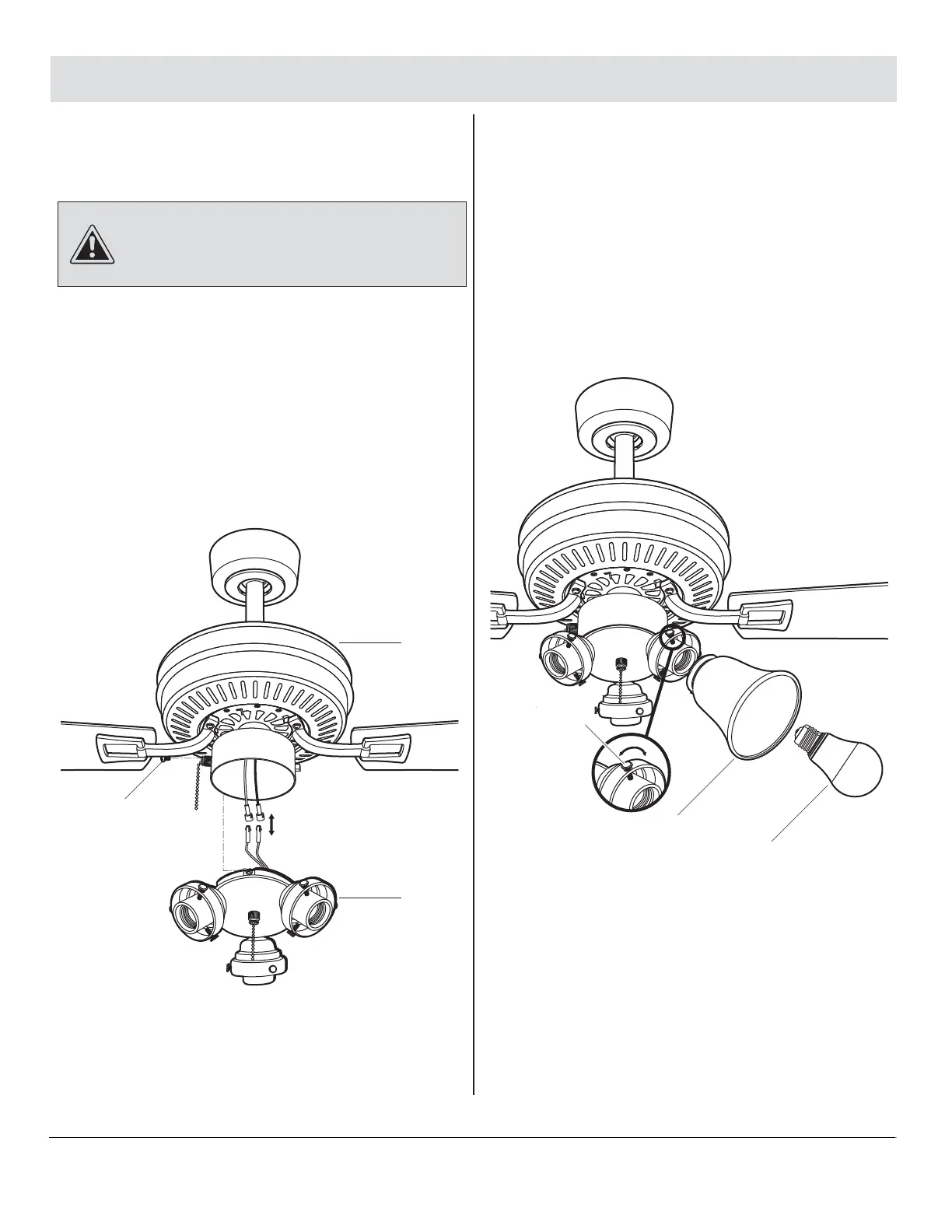
□ Mount the glass shades (I) to the light sockets by
unscrewing partway the three light holder
thumbscrews (CC) on each glass holder. Insert the
glass shades (I), then gently tighten the thumbscrews
(CC) by hand evenly to the glass shades (I). Do not
overtighten.
□ Install three 9.5 Watt LED bulbs (KK) (included).
12
Attaching the light kit to
the switch housing
13
Mounting the glass shades and
installing the light bulbs
Assembly — Installing the Light Kit
13 HAMPTONBAY.COM
Please contact 1-855-HD-HAMPTON for further assistance.
CAUTION: Before starting installation, disconnect the
power by turning off the circuit breaker or removing the fuse
at the fuse box. Turning power off using the fan switch is not
sufficient to prevent electric shock.
□ While holding the light kit (H) under your fan motor
assembly (E), locate two single white and blue wires
in the switch housing labeled "FOR LIGHT". Make the
polarized plug connections:
- White to white
- Blue to black
□ Carefully push all wires back into the switch housing.
Install the light kit (H) onto the switch housing with
the three light kit mounting screws (II) provided. Be
sure to tighten all screws.
H
E
II
CC
I
KK



 To Next Page