WG‐500PHotspotinaPrinter
27
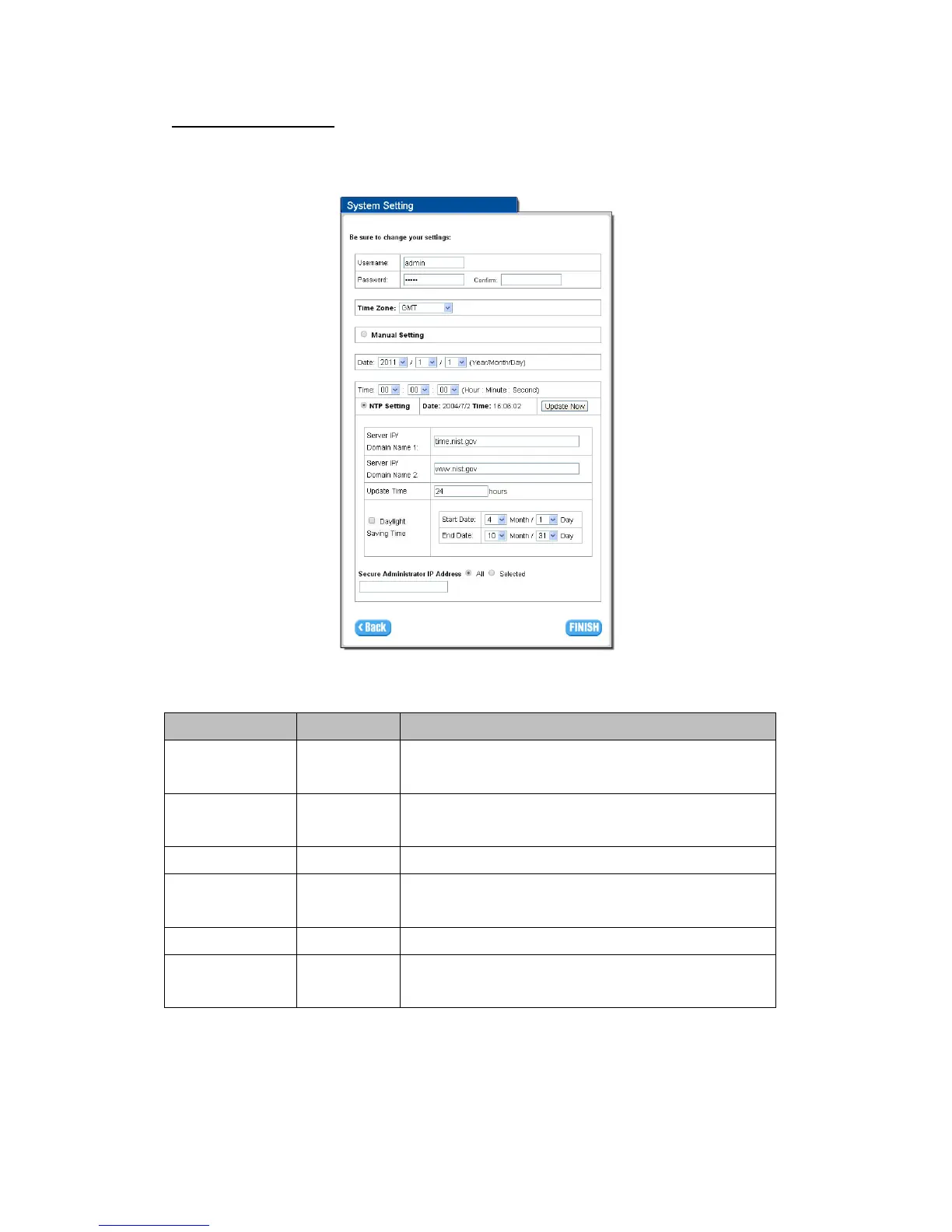
Step6:SystemSetting
SystemSetting:WG‐500Pallowstochangetheadministrator’sUsernameand
Password,andanNTPserversetting.
Figure3‐1‐11SystemSettingScreen
Item Default Description
Username admin Enter the user name. The user name can consist of up to 80
alphanumeric characters and is case sensitive.
Password admin Enter the user password. The password can consist of up to 80
alphanumeric characters and is case sensitive.
Time Zone GMT Enter the Time Zone for the system.
Manual Setting YYYY/MM/DD
HH:MM:SS
Click Manual Setting to set the system date and time.
NTP Setting
Click Update button to correct the system date and time.
Secure Administrator
IP Address
All This function allows remote user to management the device. You can
specify one or any IP addresses for remote control the system.
ClickFINISHbuttontosavethesettingsthenthesystemwillrestart.


 To Next Page