EasyManua.ls Logo

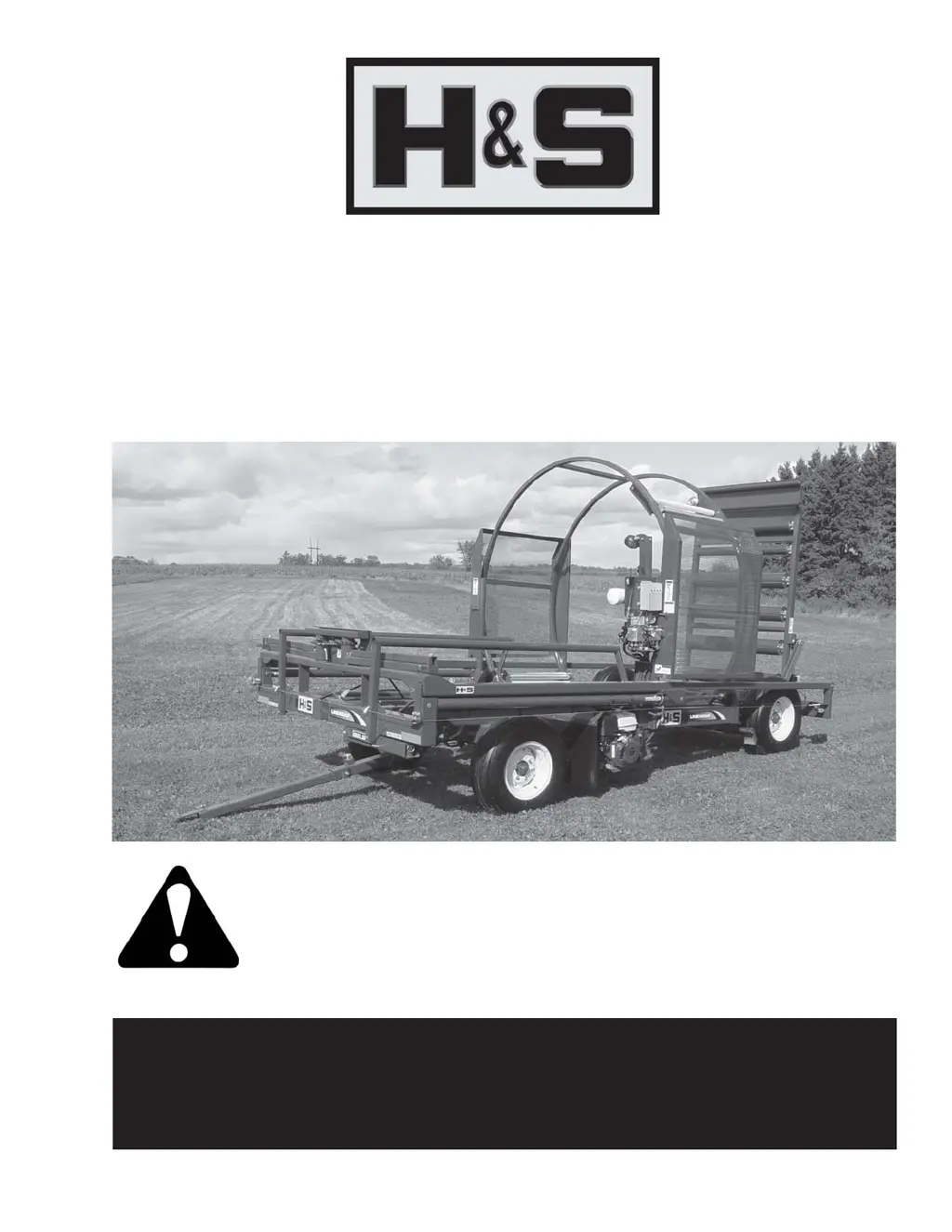
H&S BW1000 LINEWRAP BW1000 LINEWRAP - User Manual

Default Icon
38 pages
Print Icon
To Next Page IconTo Next Page
Loading...
Manufactured By
H&S MANUFACTURING CO.,INC.
P.O. BOX 768 (715) 387-3414 FAX (715) 384-5463
MARSHFIELD, WISCONSIN 54449
WARNING
HSMFG0414 Part #59665
Revision #03
Starting Serial #412271
READ AND UNDERSTAND THIS MANUAL
BEFORE OPERATING THIS EQUIPMENT.
UNSAFE OPERATION OR MAINTENANCE OF
THIS EQUIPMENT CAN RESULT IN SERIOUS
INJURY OR DEATH.
BW1000 LINEWRAPBW1000 LINEWRAP
BW1000 LINEWRAP
OPERAOPERA
OPERAOPERA
OPERA
TT
TT
T
OR’S MANUOR’S MANU
OR’S MANUOR’S MANU
OR’S MANU
ALAL
ALAL
AL

Questions and Answers

  • S
    Shannon BradleyAug 16, 2025
    What to do if the engine of my H&S BW1000 LINEWRAP BW1000 LINEWRAP Farm Equipment doesn't start?
    • J
      Justin SuttonAug 16, 2025
      If the engine doesn't start, several factors could be the cause. First, ensure the engine has gas. Second, verify that the gas shut-off is open. Lastly, check if the engine is getting gas and set the choke to full if needed.
  • R
    rlynchAug 19, 2025
    What to do if my H&S Farm Equipment machine doesn't wrap in remote, manual, or automatic modes?
    • M
      Matthew RamirezAug 19, 2025
      If the machine isn't wrapping in any mode, try the following: First, press the start/reset button. Second, ensure the wiring harness is properly connected to the control box. Third, make sure the wiring harness is properly connected to the engine.
  • D
    Dr. Jessica FischerAug 22, 2025
    What to do if my H&S BW1000 LINEWRAP BW1000 LINEWRAP Farm Equipment machine doesn't wrap in the automatic mode?
    • K
      karnoldAug 22, 2025
      If the machine doesn't wrap in automatic mode: * Press the start/reset button. * Ensure the pusher is in the home position. If it's not, switch to manual mode and manually return the pusher to the home position. The machine won't start a wrapping cycle unless the pusher is in the home position (the limit switch stopping the pusher at the cycle's end must be activated).
  • J
    Jeffrey WellsAug 26, 2025
    What to do if my H&S Farm Equipment machine doesn't wrap in the manual mode?
    • S
      Stacey JacksonAug 26, 2025
      If the machine doesn't wrap in manual mode: * Press the start/reset button. * Make sure the mode selection switch is in manual mode.
  • M
    Michael TaylorAug 28, 2025
    What to do if there is no power at the control box of my H&S BW1000 LINEWRAP BW1000 LINEWRAP Farm Equipment?
    • S
      Sarah DunnAug 28, 2025
      If there's no power at the control box: * Check the 25 Amp fuse located in the engine start box. * Check the wiring connections from the engine start box to the main control box.
  • S
    Samantha ZavalaAug 31, 2025
    What to do if no functions operate when a function switch is activated on my H&S BW1000 LINEWRAP BW1000 LINEWRAP Farm Equipment?
    • S
      Stephanie MillerAug 31, 2025
      If no functions operate when a function switch is activated: * Check that the power switch is on. * Check the vehicle wiring for power into the system. * Check the display for system status. * Check for proper grounding of the vehicle’s electrical circuit. * Check the vehicle’s hydraulic system.
  • J
    John MorganSep 3, 2025
    What to do if certain functions do not work on my H&S BW1000 LINEWRAP BW1000 LINEWRAP Farm Equipment?
    • E
      Eric RhodesSep 3, 2025
      If certain functions aren't working: * Check the wiring connection from the system to the valve coil or the output function that doesn't work. * Check the function’s coil. * Check the display for system status. * Check the vehicle’s hydraulic system. * Check the vehicle’s electrical system.
  • A
    Alvin HarperSep 6, 2025
    What to do if a function operates intermittently on my H&S Farm Equipment?
    • G
      grantlewisSep 6, 2025
      If a function operates intermittently: * Check for a loose connection at the function switch. * Check for a loose connector at the valve coil. * Check the display for system status.
  • S
    Shelley LiuSep 9, 2025
    Why does the plastic tear between the tensioner and bale on my H&S BW1000 LINEWRAP BW1000 LINEWRAP?
    • R
      Richard WallaceSep 9, 2025
      If the plastic tears between the tensioner and bale: * Make sure film holders are free. Turn holders by hand until free. * Use a higher quality plastic, as some brands are more tear-resistant. * If the film on the roll is damaged, unroll the film until the damaged area has been removed. * Tensioners may be tacky. If tensioners are built up with adhesive from wrapping in hot weather, clean with mineral spirits.
  • E
    Eric WhiteSep 12, 2025
    How to fix wrinkles that appear in plastic while wrapping with H&S BW1000 LINEWRAP BW1000 LINEWRAP?
    • R
      rbrownSep 12, 2025
      To address wrinkles appearing in the plastic during wrapping, check to make sure the wrap is threaded properly.

Summary

Warranty Information

Warranty Registration Process

Form for registering the product warranty.

Safety Information

Be Alert: Your Safety is Involved

General safety warning about personal safety.

Recognizing Safety Information

Explains the safety-alert symbol and signal words.

Understanding Signal Words

Defines DANGER, WARNING, and CAUTION.

Observe Maximum Transport Speed

Details maximum safe transport speed and related risks.

More Safety Information

Help Avoid Injury: General Precautions

Lists general precautions and advice for safe operation.

Danger: Tail Section Warning

Warning about the danger of the raised tail section.

Warning: High Pressure Oil Leaks

Warning about hazards of high-pressure oil leaks.

Warning: Do Not Remove Shields

Warning against removing safety shields.

Critical Operational Safety Precautions

Lists critical safety precautions for operation.

Study Safety Rules and Be Alert

Final reminder to study safety rules and be alert.

Emergency Stop Function Operation

Explains the electric emergency stop switch and its operation.

Cap Screw Torque Values

Tool Usage Caution for Metric Hardware

Warning about using correct tools for metric hardware.

General Torque Value Usage Note

Note that torque values are general and need periodic checks.

Set-Up & Assembly Instructions

Assembly and Adjustment Procedures

Instructions for assembling and adjusting the machine.

Wheel Attachment and Torquing

Steps for attaching wheels and torquing lug nuts.

Tire Inflation Check

Instruction to check and inflate tires to correct pressure.

Hydraulic Oil Level and Lubrication

Guidance on checking hydraulic oil and complete machine lubrication.

Transporting the Linewrap

Highway Towing Regulations and Speed

Regulations and speed limits for towing on public highways.

Safety Reflectors Information

Information about safety reflectors on the machine.

Preparing for Operation

Battery and Fuel Preparation

Steps for preparing the battery and fuel for operation.

Engine Warm-up and Hydraulic Pressurization

Procedures for warming up the engine and pressurizing hydraulics.

Tail;Ramp, Brake, and Control Box Initialization

Instructions for operating tail/ramp, brake, and initializing control box.

Operation of the Linewrap

Positioning, Film Installation, and Bale Guides

Guidance on positioning, loading film, and adjusting bale guides.

Bale Risers for Round and Square Bales

Instructions for using bale risers for different bale types.

Controls, Emergency Stop, and Bale Adjustments

Overview of controls, emergency stop, and bale adjustment switches.

Core Wrapping and Finishing Procedures

Detailed steps for wrapping and completing the process.

Operational Modes: Manual, Automatic, Remote

Step-by-step guides for operating in manual, automatic, and remote modes.

Bale Push-Off and Transport Preparation

Procedures for bale push-off and preparing the wrapper for transport.

Service and Adjustments

Maintenance Precautions for Electronics

General safety precautions for maintenance work on electronic systems.

Routine Maintenance Tasks

Tasks for regular maintenance of the electronic system.

Remote Control System Description

Description of the remote control system components and display.

Further Service Information

Transmitter Indicator Lights

Explanation of the indicator lights on the transmitter and receiver.

Address Programming Procedure

Steps for programming transmitter and receiver addresses.

Optional Equipment

Remote Control Option Details

Details on the optional remote control system.

Electric-Over-Hydraulic Steer Control

Information on the optional hydraulic steering control.

Optional Light Kit and Bale Riser Shelf

Information on optional light kit and square bale riser shelf.

Lubrication Guide

General Fluid Disposal Note

Important note on fluid disposal during service.

Wheel Bearing Maintenance Procedure

Detailed procedure for wheel bearing maintenance.

Hydraulic Oil Level and Pusher Slides Lubrication

Guidance on checking hydraulic oil and lubricating pusher slides.

More Lubrication Details

Grease Fitting Maintenance

General advice on grease fittings and their importance.

Specific Lubrication Points and Intervals

Specific lubrication points and their frequency.

Decal Location Information

Decal Importance Warning

Warning about the importance of decals for safety and information.

List of Machine Decals

A list of all decals on the LINEWRAP with part numbers and descriptions.

Troubleshooting Guide

Tensioner Issues

Troubleshooting issues related to plastic film tensioners.

Engine Starting and Wrapping Problems

Troubleshooting engine start and general machine wrapping issues.

Mode-Specific Wrapping Problems

Specific troubleshooting for automatic and manual mode wrapping.

Further Troubleshooting

Control Box Power Issues

Troubleshooting power issues with the control box.

Electronics: Outputs, Inputs, and Display

Information on electronic outputs, inputs, and display diagnostics.

Troubleshooting Charts

Status Display Error Code Chart

Chart mapping display error codes to problems and solutions.

General Problem Solution Chart

General chart for solving common functional problems.

Service Notes

Specifications

H&S BW1000 LINEWRAP BW1000 LINEWRAP Specifications

General IconGeneral
BrandH&S
ModelBW1000 LINEWRAP BW1000 LINEWRAP
CategoryFarm Equipment
LanguageEnglish

Related product manuals