1-888-628-1730 • Mini Maxx Installation Manual 17
MINI MAXX OPERATING INSTRUCTIONS
These operating instructions are split into sections:
•SECTION 1: Button Navigation
•SECTION 2: Install Download
•SECTION 3: Exploring the Main Screen
•SECTION 4: Exploring the Menu System
•SECTION 5: Vehicle Setup
•SECTION 6: Other Mini Maxx Features
•SECTION 7: Vehicle Specic Features
•SECTION 8: Unplugging the Head Unit
SECTION 1: BUTTON NAVIGATION
Mini Maxx OPERATION
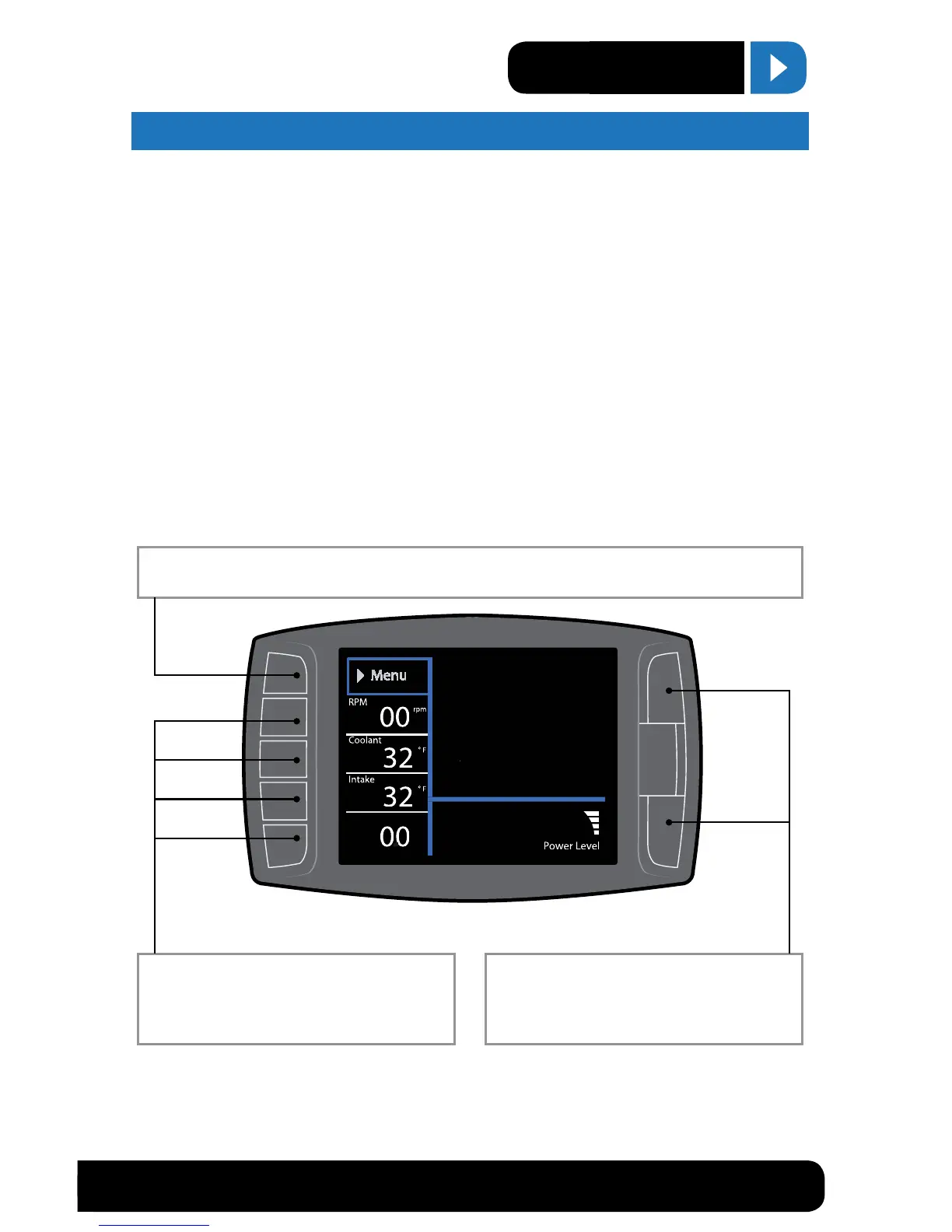
Press the top left button to enter the Main Menu, also use this button to exit menus.
Press any of the four buttons on the left to
select items on the screen that are adjacent to
the button position.
In general these buttons work as up and down
buttons, they may also be used to select items
on the screen adjacent to these buttons.
Speed
MPH


 To Next Page