EasyManua.ls Logo

Hanna Instruments pH 213 - User Manual

Hanna Instruments pH 213
16 pages
Print Icon
To Next Page IconTo Next Page
Loading...
Instruction Manual
pH 210 pH 211
pH 212 pH 213
Microprocessor-based
Bench pH/mV/°C Meters
Manufacturers since 1978
These Instruments are in
Compliance with the CE Directives
http://www.hannainst.com
HANNA LITERATUREHANNA LITERATURE
HANNA LITERATURE
MANPH213R2 02/00
Hanna publishes a wide range of catalogs and
handbooks for an equally wide range of applications.
The reference literature currently covers areas such
as:
• Water Treatment
• Process
• Swimming Pools
• Agriculture
• Food
• Laboratory
• Thermometry
and many others. New reference material is constantly
being added to the library.
For these and other catalogs, handbooks and leaflets,
contact your dealer or the Hanna Customer Service
Center nearest to you. To find the Hanna Office in
your vicinity, check our home page at
www.hannainst.com.
Question and Answer IconNeed help?

Do you have a question about the Hanna Instruments pH 213 and is the answer not in the manual?

Summary

CE Declaration of Conformity

Recommendations for Users

Guidelines for safe and effective use of the instrument in various environments.

Preliminary Examination

General Description

Functional Description pH 210 and pH 211

Specifications pH 210 and pH 211

Functional Description pH 212 and pH 213

Specifications pH 212 and pH 213

Operational Guide

Accessories

Troubleshooting Guide

pH Calibration

One-Point Calibration

Procedure for calibrating the pH meter using a single buffer solution.

Two-Point Calibration

Procedure for calibrating the pH meter using two buffer solutions for higher accuracy.

Temperature Correlation for pH Sensitive Glass

Reset Function

Cleaning Procedure

Periodic Maintenance

Temperature Calibration (pH 212 and pH 213 Only)

Electrode Conditioning & Maintenance

pH Values at Various Temperatures

mV Calibration (pH 213 Only)

Interface with PC (pH 212 and pH 213 Only)

Summary

CE Declaration of Conformity

Recommendations for Users

Guidelines for safe and effective use of the instrument in various environments.

Preliminary Examination

General Description

Functional Description pH 210 and pH 211

Specifications pH 210 and pH 211

Functional Description pH 212 and pH 213

Specifications pH 212 and pH 213

Operational Guide

Accessories

Troubleshooting Guide

pH Calibration

One-Point Calibration

Procedure for calibrating the pH meter using a single buffer solution.

Two-Point Calibration

Procedure for calibrating the pH meter using two buffer solutions for higher accuracy.

Temperature Correlation for pH Sensitive Glass

Reset Function

Cleaning Procedure

Periodic Maintenance

Temperature Calibration (pH 212 and pH 213 Only)

Electrode Conditioning & Maintenance

pH Values at Various Temperatures

mV Calibration (pH 213 Only)

Interface with PC (pH 212 and pH 213 Only)

Overview

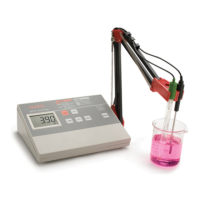
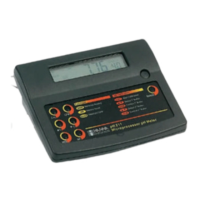
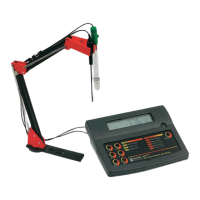
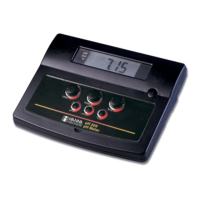
This document describes the Hanna pH 210, pH 211, pH 212, and pH 213 microprocessor-based bench pH/mV/°C meters. These instruments are designed for accurate pH and temperature measurements, with the pH 211 and pH 213 models also capable of measuring ion concentration (ISE) and Oxidation Reduction Potential (ORP) in the mV range.

Function Description

The primary function of these meters is to measure pH and temperature. The pH 211 and pH 213 models extend this functionality to include ISE and ORP measurements. The instruments feature a large, easy-to-read Liquid Crystal Display (LCD) that simultaneously shows pH (or mV) and temperature, along with graphic symbols to guide the user.

Usage Features

  • pH Measurement:

    • To begin pH measurement, switch the instrument on using the ON/OFF switch. The meter automatically defaults to the pH measurement mode.
    • Submerge the tip (approximately 4 cm or 1½") of the pH electrode and the temperature probe into the sample to be tested. Allow sufficient time for the electrode to stabilize before taking a reading.
    • The pH reading is displayed on the primary LCD, and the temperature on the secondary LCD.
    • For pH 211 and pH 213, pressing the "RANGE" key allows viewing of the mV reading.
    • Temperature compensation for pH measurements can be done manually or automatically using the HI 7669/2W temperature probe. If the temperature probe is disconnected, manual temperature compensation is activated, and the display will show a default 25°C or the last recorded temperature, blinking. The temperature can then be adjusted using the ▲C and ▼C keys.
    • For successive measurements in different samples, it is recommended to rinse the electrode thoroughly with deionized water, or tap water followed by some of the next sample, to condition the electrode.
  • ORP Measurement (pH 211 and pH 213 only):

    • An optional ORP electrode is required for these measurements.
    • Switch the meter on and press the "RANGE" key to enter the mV mode.
    • Submerge the ORP electrode tip (approximately 4 cm or 1½") into the sample and allow a few minutes for the reading to stabilize.
    • The mV reading is displayed on the primary LCD. If readings are out of range, "--" will appear on the LCD.
  • Temperature Measurement:

    • Connect the HI 7669/2W temperature probe and turn on the instrument.
    • Dip the temperature probe into the sample and allow the reading on the secondary display to stabilize.
  • Hold Function:

    • Press and hold the "MEM" key to freeze the last reading on the display. The "MEM" indicator will be shown on the LCD.
    • Press the "MR" key to recall previously memorized readings, also indicated by the "MEM" indicator.
  • Calibration:

    • pH Calibration: The calibration process is guided step-by-step through clear indications on the LCD. A stability indicator ensures an error-free calibration procedure.
      • Calibration should be performed often, especially when high accuracy is required, when the pH electrode is replaced, at least once a week, after testing aggressive chemicals, after pressing "RESET", or if higher accuracy is needed.
      • Preparation involves pouring small quantities of buffer solutions into clean beakers (preferably plastic to minimize EMC interferences). Use two beakers per buffer solution: one for rinsing and one for calibration.
      • The meters offer a choice of 5 memorized buffers: pH 4.01, 6.86, 7.01, 9.18, and 10.01. Two-point calibration is recommended, typically using pH 6.86 or 7.01 as the first point and pH 4.01 (acidic) or pH 9.18/10.01 (alkaline) as the second point. One-point calibration is also possible.
      • During calibration, immerse the pH electrode and temperature probe into the buffer solution. Press "CAL" to enter calibration mode. Use the ▲C or ▼C keys to select the desired buffer. Wait for the "NOT READY" indication to stop blinking, then press "CFM" to confirm. For two-point calibration, repeat with the second buffer.
      • If the measured value is not close to the selected buffer, "WRONG" will blink, indicating a need to check the buffer or refresh the electrode.
      • Press "RANGE" during calibration (pH 211, pH 212, pH 213 only) to display the temperature reading.
    • Temperature Calibration (pH 212 and pH 213 only, for technical personnel):
      • All meters are factory calibrated for temperature, and temperature probes are interchangeable, so recalibration is not typically needed when probes are replaced.
      • If recalibration is necessary, prepare vessels with ice water (0°C) and hot water (around 50°C). Use a ChecktempC or calibrated thermometer as a reference.
      • With the instrument off, press and hold "CAL" and then the "ON" switch. The "CAL" indicator will appear, and the secondary LCD will show 0.0°C.
      • Immerse the temperature probe into the ice water and use the ▲C or ▼C keys to set the reading on the secondary LCD to match the reference thermometer. Press "CFM" to confirm.
      • Then, immerse the probe into the hot water and repeat the process to set the 50.0°C point.
    • mV Calibration (pH 213 only, for technical personnel):
      • All meters are factory calibrated for mV, and ORP electrodes are interchangeable, so recalibration is not typically needed when replaced.
      • If recalibration is necessary, attach an mV simulator with a range of at least ±500.0 mV and an accuracy of ±0.1 mV to the BNC connector.
      • With the instrument off, press and hold "CFM" and then the "ON" switch. The "CAL" indicator will appear, and the primary LCD will show 380.0 mV.
      • Set 380.0 mV on the simulator. Wait 3 seconds, then press "CFM". The LCD will display -380.0 mV. Repeat the process for -380.0 mV, 500.0 mV, and -500.0 mV.
      • After mV calibration, the secondary LCD will display 0.0°C, allowing for temperature calibration if needed, or returning to normal operation by pressing "CAL".
  • Interface with PC (pH 212 and pH 213 only):

    • These models feature an RS 232C serial port for data transfer to a PC.
    • Hanna HI 92000 Windows® compatible application software (optional) simplifies data transmission and offers an on-line help feature.
    • The software allows users to elaborate data with graphics and statistical analysis.
    • To connect the meter to a PC, use the optional Hanna HI 920010 cable connector. Ensure the meter is switched off before connecting the cable to the meter's RS232C socket and the PC's serial port.
    • The baud rate of the meter and the external device must match. To set the baud rate, press "COMM". The primary LCD shows the current baud rate, which can be adjusted using the ▲C or ▼C keys (150, 300, 600, 1200 (factory setting), and 2400). Press "CFM" to confirm.
    • The command prefix can also be set (between 0 and 47) using the ▲C or ▼C keys, then confirmed with "CFM".
    • The meter can be remotely controlled from a PC using any terminal program. Commands are sent in the format <DLE><command><CR>. Examples of commands include "PHR" (sets range to pH), "MVR" (sets range to mV), "CAL", "CFM", "UPC" (increase temperature/buffer), "DWC" (decrease temperature/buffer), "MEM", "MRR", "COM", "OFF" (sets meter to standby), "pH?" (requests pH reading), "MV?" (requests mV reading), and "TM?" (requests temperature reading).

Maintenance Features

  • Electrode Conditioning & Maintenance:

    • Always remove the pH electrode from the solution before turning the meter off to prevent damage. If the meter is off, detach the electrode before immersing it in storage solution.
    • Preparation: Remove the protective cap. Salt deposits are normal and will disappear when rinsed with water. Air bubbles in the glass bulb can be removed by "shaking down" the electrode like a thermometer. If the bulb or junction is dry, soak the electrode in HI 70300 or HI 80300 Storage Solution for at least one hour.
    • Storage: To minimize clogging and ensure a quick response time, keep the glass bulb and junction moist. Replace the solution in the protective cap with a few drops of HI 70300 or HI 80300 Storage Solution, or, in its absence, Filling Solution (HI 7071 or HI 8071 for single junction; HI 7082 or HI 8082 for double junction electrodes). Never store the electrode in distilled or deionized water.
    • Periodic Maintenance: Inspect the electrode and cable regularly. Ensure the cable is intact, with no broken insulation or cracks on the stem or bulb. Connectors must be clean and dry. Replace the electrode if scratches or cracks are present. Rinse off any salt deposits with water.
    • For refillable electrodes: If the electrolyte filling solution is below 2½ cm (1") from the fill hole, add HI 7082 or HI 8082 3.5M KCl Electrolyte Solution for double junction, or HI 7071 or HI 8071 3.5M KCl+AgCl Electrolyte Solution for single junction electrodes. For faster response, unscrew the fill hole screw during measurements. Allow the electrode to stand upright for 1 hour after refilling.
    • For AmpHel® electrodes: If the electrode does not respond to pH changes, the battery may be run down and the electrode should be replaced.
  • Cleaning Procedure:

    • General Cleaning: Soak the electrode in Hanna HI 7061 or HI 8061 General Cleaning Solution for approximately ½ hour.
    • Removal of films, dirt, or deposits:
      • Protein: Soak in Hanna HI 7073 or HI 8073 Protein Cleaning Solution for 15 minutes.
      • Inorganic: Soak in Hanna HI 7074 or HI 7074 Inorganic Cleaning Solution for 15 minutes.
      • Oil/Grease: Rinse with Hanna HI 7077 or HI 7077 Oil and Fat Cleaning Solution.
    • Important: After any cleaning procedure, rinse the electrode thoroughly with distilled water, refill the reference chamber with fresh electrolyte (if not gel-filled), and soak the electrode in HI 70300 or HI 80300 Storage Solution for at least 1 hour before taking measurements.
  • Troubleshooting (Electrode Performance):

    • Noise (fluctuating readings): Could be due to a clogged/dirty junction (refer to cleaning procedure) or loss of shielding due to low electrolyte level (refill with fresh electrolyte).
    • Dry Membrane/Junction: Soak in HI 70300 or HI 80300 Storage Solution for at least 1 hour.
    • Drifting: Soak the electrode tip in warm (approx. 50-60°C) Hanna HI 7082 or HI 8082 Solutions for one hour, rinse with distilled water, and refill with fresh electrolyte.
    • Low Slope: Refer to the cleaning procedure.
    • No Slope: Check the electrode for cracks in the glass stem or bulb and replace it.
    • Slow Response/Excessive Drift: Soak the tip in HI 7061 or HI 8061 Solutions for 30 minutes, rinse, and follow the cleaning procedure.
  • Troubleshooting (Meter Issues):

    • Slow response/faulty readings: Electrode may not be working or reference junction clogged (clean or replace electrode).
    • Meter does not accept 2nd buffer: Out of order pH electrode (follow cleaning, then replace if needed).
    • Reading drifts: Defective pH electrode (replace).
    • Display shows "---" (out of range pH scale): Recalibrate, ensure pH sample is in range, check electrolyte level and electrode state.
    • Display shows "---" (out of range temperature scale): Ensure temperature is within 0-100°C and probe is plugged in.
    • Display shows "---" (out of range mV scale): Electrode not connected.
    • Display shows "WRONG BUF" (erroneous buffer for offset calibration): Ensure correct and fresh buffer, replace if needed.
    • Display shows "WRONG SLP" (erroneous buffer for slope calibration): Ensure correct and fresh buffer, replace if needed.
    • Meter does not work with temperature probe: Out of order temperature probe (replace).
    • Meter fails to calibrate or gives faulty readings: Out of order pH electrode (replace).
  • RESET Button:

    • The "RESET" button should only be used if the instrument displays erroneous messages due to strong electrical interference or if the power supply was disconnected before the meter was switched off.
    • Always recalibrate the unit after pressing "RESET".

These instruments are designed for reliable and accurate measurements, with comprehensive features for both operation and maintenance to ensure long-term performance.

Hanna Instruments pH 213 Specifications

General IconGeneral
pH Resolution0.01 pH
pH Accuracy±0.01 pH
mV Resolution1 mV
Temperature Resolution0.1 °C
Temperature Accuracy±0.5 °C
TypepH Meter
mV Accuracy±0.2 mV
CalibrationUp to 5 points
Temperature CompensationAutomatic
Environment0 to 50 °C
Measurement Range-2.00 to 16.00 pH
mV Range±1999 mV

Related product manuals