Maintenance
34
Symptoms Problems Solution
Readings uctuate up
and down (noise).
EC probe sleeve not
properly inserted; air
bubbles inside sleeve.
Reinstall the sleeve. Tap the probe to
remove air bubbles. Move to center
of beaker. Verify top hole in sleeve is
covered with solution.
The meter does not
accept the standard
solution for calibration.
Wrong Standard used or
the EC probe is defective.
Follow the cleaning procedure. If still
no results replace the probe. Verify
correct standard is selected.
The display shows EC,
TDS or Salinity readings
blinking.
Out of range in EC, TDS or
Salinity scale.
Verify the plastic shipping spacer has
been removed from probe. Recalibrate
the probe. Make sure the solution is in
speci ed range. Make sure the range is
not locked. (Select Auto range)
The meter does not
measure temperature.
“----” is displayed on
second LCD line.
Broken temperature
sensor.
Replace the probe.
The meter fails to
calibrate Salinity.
Incorrect EC calibration. Recalibrate the meter in EC range. Set
cell constant to 1.
At startup the meter
displays all LCD tags
permanently.
One of the keys is stuck. Check the keyboard or contact your
local Hanna O ce.
CAL “Prod” message at
startup.
Instrument was not
factory calibrated or lost
factory calibration.
Contact Hanna Technical Support for
help.
Troubleshooting
Guide
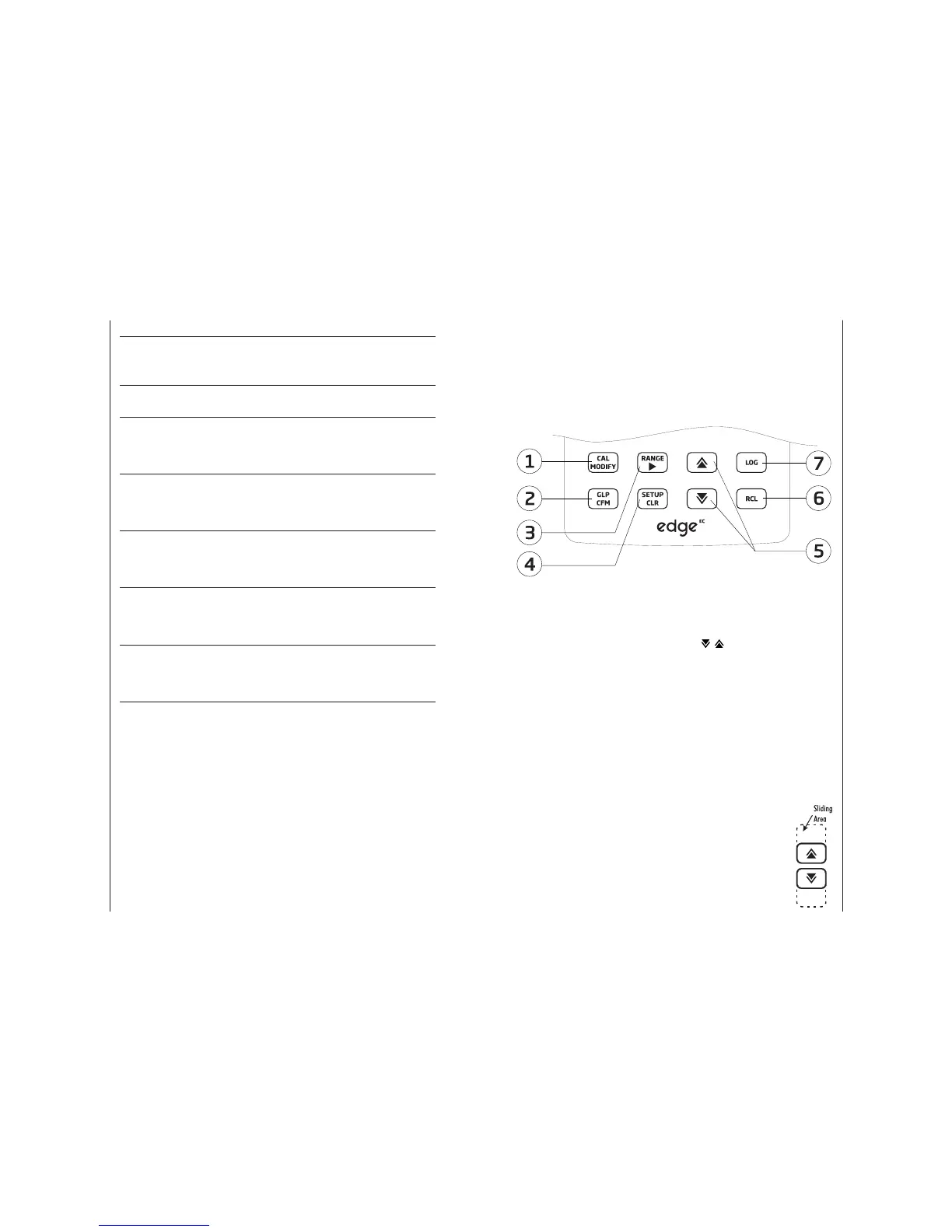
Diagram 7
Keypad
Function
1. CAL/MODIFY - Used to enter
and exit calibration mode. In
SETUP, used to initiate changes of a
con guration setting.
2. GLP/CFM - Used to display GLP
calibration information. In SETUP,
used to con rm change made. In
calibration, used to accept calibration
points.
3. RANGE/u - Used to select
measurement range. In SETUP, used
to move to right in pick list. In log RCL,
used to view GLP data for a data point.
4. SETUP/CLR - Used to enter/exit
SETUP mode. During calibration, used
to clear previous calibration data. In
log RCL, used to clear log records.
5.
/ - Used to scroll through
SETUP menu. Used to change
selection when modifying a
parameter in SETUP.
6. RCL (Recall) - Used to view
logged records or view % log memory
used.
7. LOG - Used to log data by
manual log on demand or manual log
on stability or to start/stop interval
logging.
Note: You can increase/
decrease the speed to
change the value of a
parameter.
Proceed as follows:
Press and hold down the
p or q key, then slide the
nger toward the double
apex to increase the speed
that a value changes.


 To Next Page