Diagram
8
Guide to
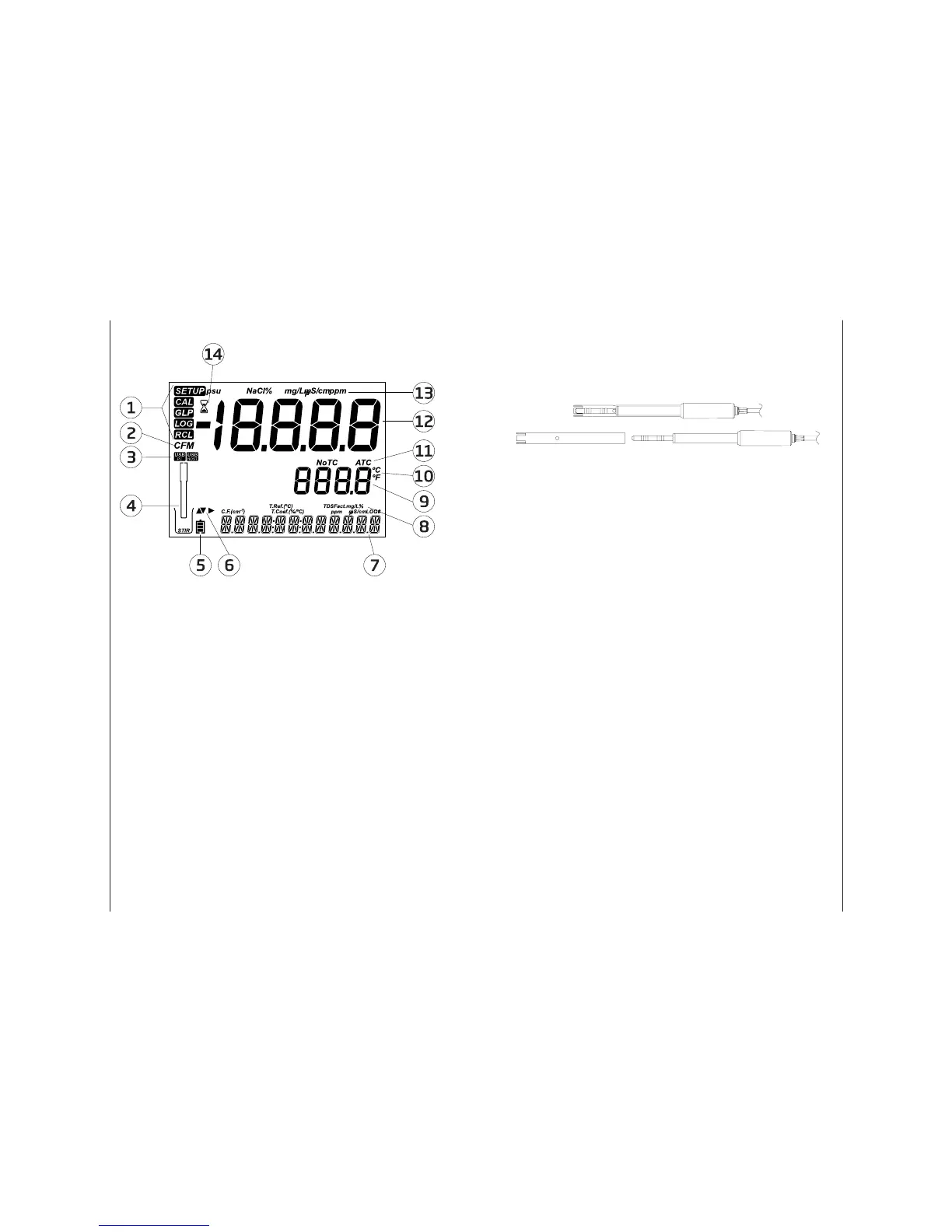
Indicators
1. Mode tags
2. Con rm tag
3. USB connection status
4. Probes symbol
5. Battery symbol
6. Arrow tags, displayed when they
are available
7. Third LCD line, message area
8. Labels
9. Second LCD line, temperature
measurement
10. Temperature units
11. Temp. Compensation status
12. Measurement line
13. Measurement units
14. Stability Indicator
The third line of the LCD (9) is a dedicated message line. During measurement
the user may use the pq arrows to select desired message. Options include
date, time, calibration data, battery charge or no message. If a measurement
error or log status change occurs during measurement, the third line will display
a pertinent message.
Maintenance 33
Rinse the probe with clean water after measurements. If a more thorough
cleaning is required, remove the probe sleeve and clean the probe with a cloth
or a nonabrasive detergent. Make sure to reinsert the sleeve onto the probe
properly and in the right direction. After cleaning the probe, recalibrate the
instrument.
The insulator used to support the platinum rings is made of glass. Use extreme
caution when handling this probe.
Maintenance
EC Probe
Maintenance


 To Next Page