English _35
! USING CONTROLLER MODE
3. Repeat: Select a day, a period, etc. you want to set.
~
Select Day: During the set dates, it runs only on selected days of the week. If you select days of the
week, <Everyday> and <Once> are deactivated.
~
Once: Even during the set period of the dates, it runs only once on the first date.
M
`
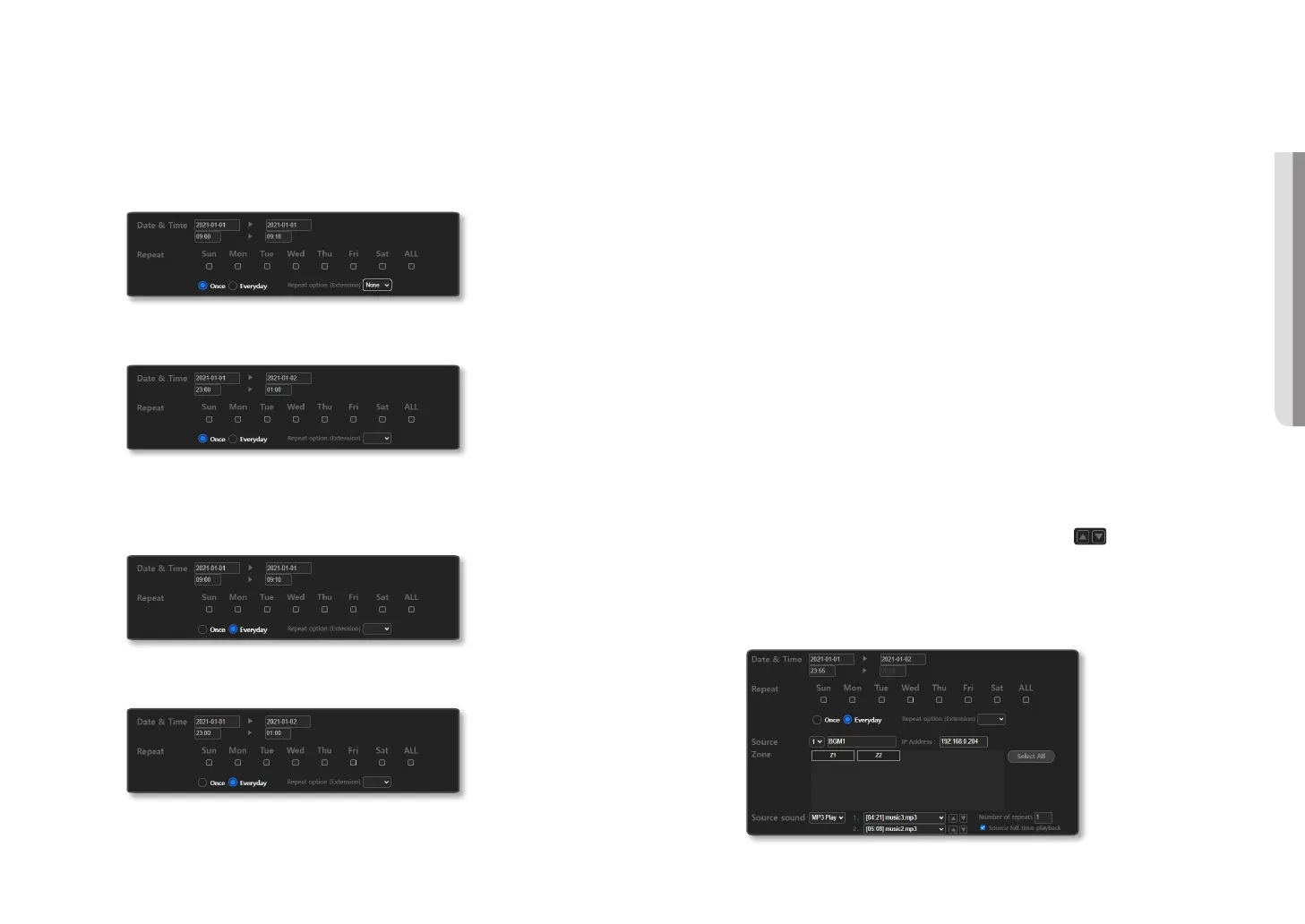
If you set it to the date (2021-01-01 / 2021-01-02), time (09:00 / 09:10), <Once>, the broadcast schedule is set up for
10 minutes from 9:00 to 9:10 on January 1st.
`
If you set it to the date (2021-01-01 / 2021-01-02), time (23:00 / 01:00), <Once>, the broadcast schedule is set up
continuously from 23:00 on January 1st to 1:00 on January 2nd.
~
Everyday: During the set period of dates, it runs repeatedly every day.
M
`
If you set the date (2021-01-01 / 2021-01-02), time (09:00 / 09:10), <Everyday>, the broadcast schedule is set up for
10 minutes from 9:00 to 9:10 from January 1st until January 2nd.
`
If you set the date (2021-01-01 / 2021-01-02), time (23:00 / 01:00), <Everyday>, the broadcast schedule is set up
twice from 23:00 on January 1st until 1:00 on January 2nd and from 23:00 on January 2nd until 01:00 on January 3rd.
~
Repeat Option (Extension): Sets the set schedule to repeat on a weekly, monthly, or yearly basis.
M
`
If you set up the <Once> or <Everyday> function, check that the set schedule is accurate on the [Weekly Calendar],
[Daily Calendar] screen.
`
When setting the <Repeat Option (Extension)>, the schedule period should not exceed one week for <Week>, 28 days
for <Month>, or 365 days for <Year>.
`
For <Week>, a schedule is set every week from the selected day of the week.
`
For <Month> and <Year>, if you select a specific day, the schedule is set on the specific date for every month or year.
`
If you specify a date range in <Month> or <Year> and select days of the week in [Everyday], the schedule is set only
for those days of the week which exist within the date range.
`
You can delete a specific day from the schedule date range or delete all recurring events.
4. Source: Indicates registered source ID and IP Address.
M
`
To be registered as the source of Annual Scheduler, the <CTRL> menu’s checkbox of the <Source Registration> should
be deactivated.
5. Zone: Indicates a registered <Zone>.
You can select <Zone> one by one. Or, you can select/deselect all.
6. Source sound: Select an audio source type to be broadcast from schedules.
~
MP3 Play: Displays a list of audio sources registered in BGM Play.
The length of the selected audio will automatically be reflected to the end time of <Date &
Time> and displayed as being deactivated.
If you input the <Number of Repeats>, an audio source will play repeatedly and automatically
displayed at the end time.
If you uncheck <Source full-time playback>, you can directly enter the end time so that it is
broadcast only at the time you want.
The playing order of the audio can be changed using the [ ] button for each file.
M
`
If the date is 2021-01-01 / 2021-01-01, the time starts at 23:55, and the length of the selected audio source is 10
minutes, the end date and end time will be set to 2021-01-02 and 24:05 automatically.
If it is set to <Once>, the broadcast schedule is set from 23:55 on January 1st to 0:05 on January 2nd continuously.
If it is set to <Everyday>, the continuous broadcast schedule is set twice from 23:55 on January 1st to 0:05 on January
2nd and from 23:55 on January 2nd to 0:05 on January 3rd.



 To Next Page