8
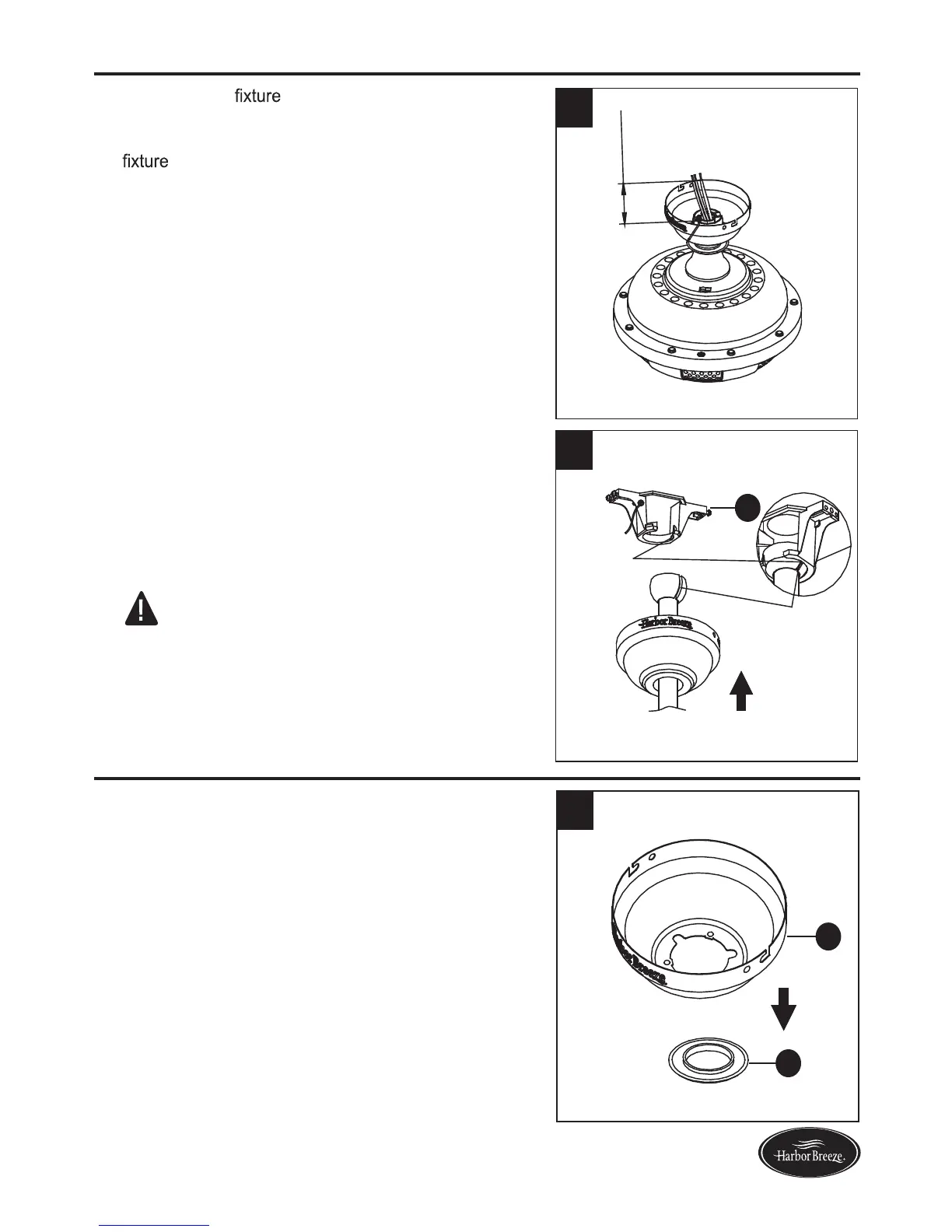
3. Cut off excess
wires approximately 6 to 9
inches above top of the downrod assembly (B).
Strip insulation off 1/2 in. from the end of each
wire.
STANDARD/ANGLE-MOUNTING INSTRUCTIONS
FLUSHMOUNT INSTRUCTIONS
Lowes.com/harborbreeze
3
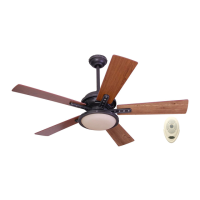
4. Carefully lift the fan and place the hanger ball of
downrod assembly (B) in the mounting bracket (A)
attached to the outlet box.
1. Remove canopy cover (D) by pressing out on the inner
edges until it releases from the canopy (C).
NOTE: Be sure the slot in the hanger ball is lined up
with the tab on the mounting bracket (A).
DANGER: Be careful when aligning the tab to the
slot! If not fully engaged, there is a possiblity of the
fan falling, which may result in serious injury or death.
Proceed to WIRING on page 10.
Tab
A
Slot
4
1
C
D


 To Next Page