
 Need help?
Do you have a question about the Harbor Breeze ARMITAGE CC52WW5C1 and is the answer not in the manual?
Ensure outlet box is securely attached and supports fan weight.
Mount fan to approved box, use correct wiring, avoid dimmer switches, use provided parts, shut off power.
Ensure outlet box is properly grounded. Check all screws, bolts, and nuts for security.
Verify all parts are present and undamaged before assembly.
Estimated assembly time is 120 minutes. Gather required tools.
Disconnect power at circuit breakers and wall switch before installation.
Ensure blades are 7 ft from floor and 30 in from obstructions. Flushmount only.
Remove nuts and washers from mounting bracket.
Attach mounting bracket to outlet box using provided hardware.
Remove motor screws and lock washers for later use. Discard plastic blocks.
Hang motor assembly on 'J' hook of mounting bracket for wiring support.
Illustrates connections for pull chains only, pull chain/wall switch, and two wall switches.
Wrap wire connectors with tape. Ensure no bare wire is visible. Place connections neatly.
Do not use dimmer switches for fan speed control to avoid humming and shock.
Secure motor assembly to mounting bracket using washers and nuts.
Align and secure motor housing to mounting bracket with screws and lock washers.
Attach blade arms to blades using blade screws and fiber blade washers.
Secure blade arms to motor using motor screws and lock washers.
Secure shade fitter plate with screws and washers. Thread pull chains.
Install the light bulb. Allow cooling before touching bulb or shade.
Align glass shade slots with plate protrusions. Turn clockwise to secure.
Attach pull chain extensions to fan and light pull chains as needed.
Use pull chain to select HIGH, MEDIUM, LOW, or OFF fan speed.
Use pull chain to turn the light ON or OFF.
Use reverse switch for seasonal airflow optimization. Wait for fan to stop.
DOWN for summer (wind chill), UP for winter (heat circulation).
Ensure reverse switch is fully UP or DOWN for fan operation.
Check and tighten screws twice yearly. Clean housing and blades with soft cloth.
Use 60W max. candelabra bulbs or 13W CFLs. Allow cooling before replacement.
Check reverse switch, power, and wiring connections for troubleshooting.
Check blade tightness, cracks, dimmer switch, and motor housing security.
Tighten blades, re-install blade arms, balance blades, or check mounting security.
Check bulb installation, wiring in outlet box, and wall switch status.
Covers defects. Excludes finish changes, damage from misuse, or unauthorized service.
Present sales receipt. All removal/reinstallation costs are purchaser's responsibility.
Lists part numbers for Mounting Bracket (A), Blade Arm (F), and Blade (G).
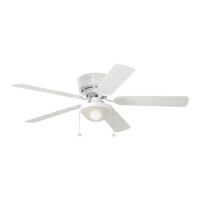
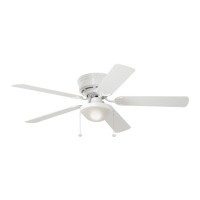
The Harbor Breeze Armitage Ceiling Fan (Model #CC52WW5C1, Item #0020776) is a flushmount ceiling fan designed for indoor use. It features a traditional design with five blades and an integrated light kit. The fan is suitable for rooms where a minimum clearance of 7 feet from the blades to the floor and at least 30 inches from the end of the blades to any obstruction can be maintained.
The Armitage Ceiling Fan provides both air circulation and illumination. The fan speed is controlled by a pull chain, offering four positions: HIGH (one pull), MEDIUM (two pulls), LOW (three pulls), and OFF (four pulls). The light kit is controlled by a separate pull chain, allowing it to be turned ON or OFF independently. For enhanced seasonal performance, the fan includes a reverse switch located on the switch housing. In warmer weather, setting the reverse switch to the DOWN position creates a downward airflow for a wind chill effect. In cooler weather, setting the switch to the UP position generates an upward airflow to help move stagnant, hot air off the ceiling area. It's crucial that the reverse switch is set either completely UP or completely DOWN for the fan to operate; a middle position will prevent the fan from functioning.
 General
| Brand | Harbor Breeze |
|---|---|
| Model | ARMITAGE CC52WW5C1 |
| Category | Fan |
| Language | English |






 To Next Page