10
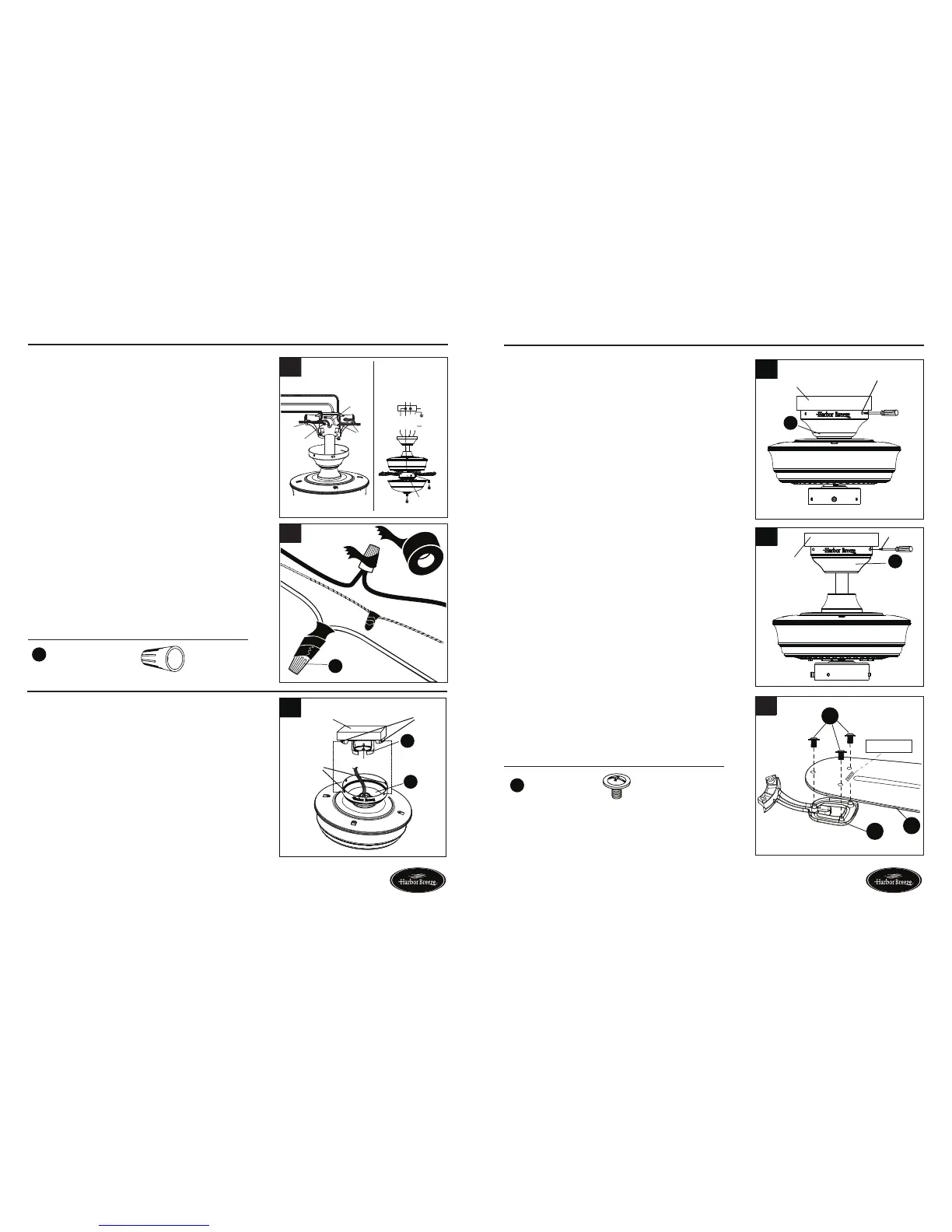
WIRING
Hardware Used
1. Connect the BLACK and BLUE wires from the
fan to the house BLACK wire. Connect the
WHITE wire from fan to the house WHITE wire.
Connect all GROUNDED (GREEN) wires together
from fan to the house GREEN/GROUND wire.
Note: BLACK wire is hot power for fan. BLUE
wire is hot power for light kit in case of future light
kit installation. WHITE wire is common for fan
and light kit. GREEN wire is ground wire. If house
wires are different colors than referred to above,
stop immediately. Consult a licensed electrician to
determine proper wiring.
2. To connect wires, twist wire ends together and
screw wire with wire connectors (AA) in a clockwise
direction. Tape the wire connectors (AA) and wires
together with electrical tape (not included). Be sure
no bare wire or wire strands are visible after making
connection.
Place GREEN and WHITE connections on opposite
side of box from the BLACK and BLUE connections.
The splices should be turned upward and pushed
carefully up into the outlet box.
1
2
x 4
Wire Connector
AA
Page 10 Page 11
FINAL INSTALLATION
You may now proceed to Step 4.
3. Directly align the locking slots of the canopy (B) with
the two screws previously loosened (step 3, page 6)
in the mounting bracket (A). Push up to engage the
slots and turn clockwise to lock in place. Immediately
tightenthetwoscrewsrmly,thenre-installthetwo
screws that were previously removed (step 3, page 6)
to fully secure the canopy (B) to the mounting bracket
(A).
4. Attach blade (G) to a blade bracket (F) using three
blade screws (DD).
Repeat for remaining blade assemblies.
11
2. Re-install the two screws that were previously removed
(step 3, page 6) to fully secure the canopy (B) to the
mounting bracket (A).
Ground/Green
Black
White
Ground/
Green
Black
Blue
White
Supply circuit
Speed switch
Outlet box
blue
black
white
green
white
GREEN/
GROUND
black
AA
FINAL INSTALLATION
If you installed the fan with “Closemount Style Fan
Mounting”, continue to Steps 1 and 2. If you installed
the fan with “Downrod Style Fan Mounting”, skip to
Step 3.
1
Outlet
box
Screws
hook
Locking
slots
B
A
1. Remove the fan from the hook on the mounting
bracket (A). Align the locking slots of the canopy
(B) with the two screws previously loosened (step
3, page 6) in the mounting bracket (A). Push up to
engage the slots and turn clockwise to lock in place.
Immediatelytightenthetwoscrewsrmly.
2
Screw
Outlet box
B
3
B
Screw
Outlet box
DD
Blade Screw x 16
Hardware Used
G
DD
F
THIS SIDE UP
4
Lowes.com/harborbreeze Lowes.com/harborbreeze



 To Next Page