#43149 Page 5
Installing Batteries (continued).
The life of the batteries can be extended by using headphones (not included), which require less power
than the built-in speaker. See the section on headphones below.
Caution: Always remove old or weak batteries; old batteries can leak chemicals that can damage
electronic parts. If you do not plan to use the Metal Detector for a week or more, always remove the
batteries. Use only fresh batteries of the required size. Never mix old and new batteries or different
types of batteries.
Testing Batteries:
Test the battery power when the Metal Detector does not turn on, or has weak volume, or will not tune
properly or operates erratically.
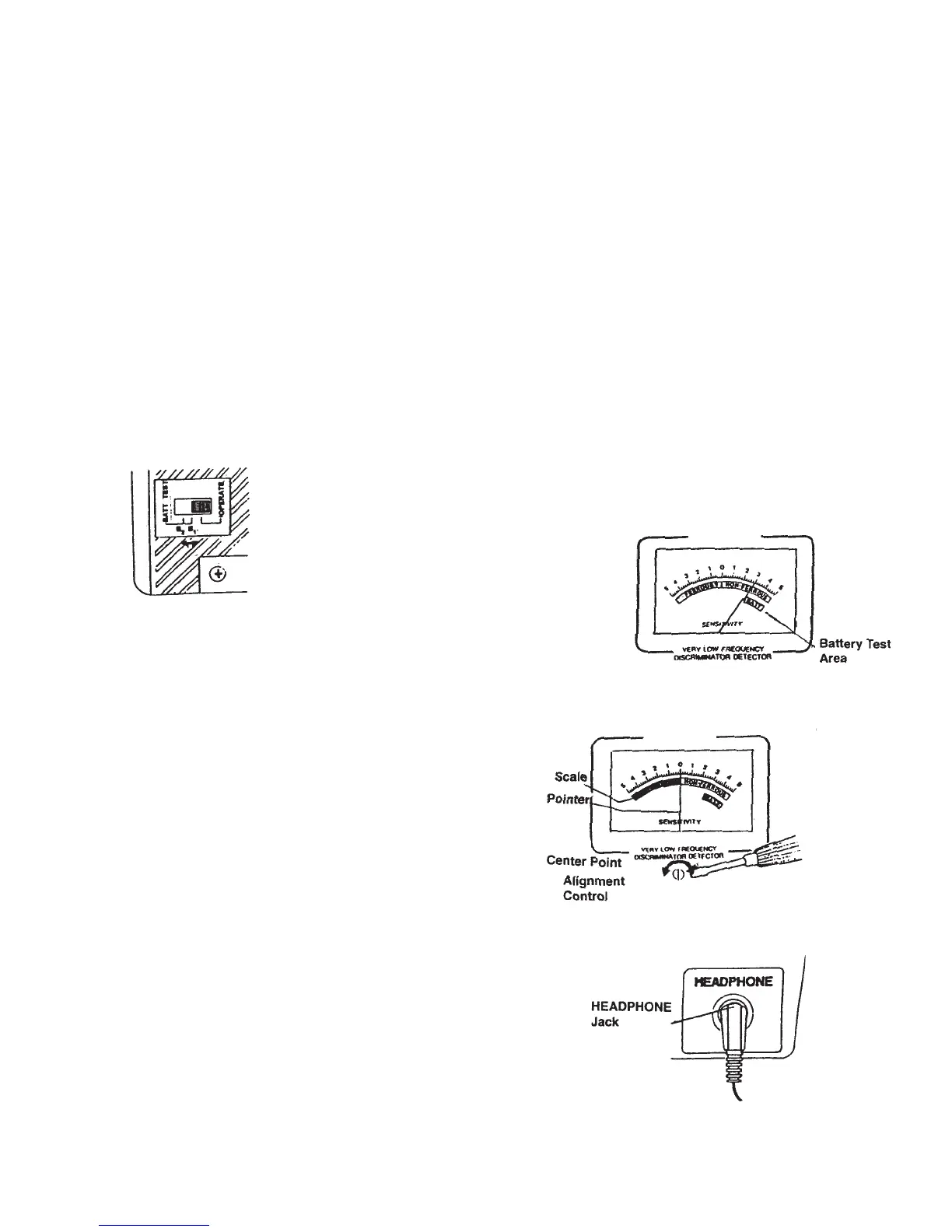
Set the MODE to VLF (very low frequency). To test the batteries in the left battery compartment, set
BATT TEST to B1. To test the battery in the right battery compartment, set BATT TEST to B2 (see
Figure 9).
If the pointer on the viewmeter is within the BATT scale’s green area, the
batteries have enough power. If the pointer is not within the green area,
the batteries need to be replaced (see Figure 10).
Figure 9
Figure 10
To Adjust the Meter:
Set MODE to OFF. Using a screwdriver, adjust the alignment control until the
pointer lines up with O on the scale (see Figure 11).
Figure 11
Using Earphones:
Stereo earphones (not included) can be connected to
the Metal Detector. Using earphones saves battery
power and makes it easier to identify changes in the
sound patterns. Earphones are connected to the ear
jack on the side of the Control Housing (see Figure 12).
When using earphones, protect your hearing by:
a. Set the volume to the lowest setting before you begin listening.
Adjust the volume to a comfortable level.
b. Never listen at extremely high volume levels;
permanent hearing loss can result.
c. Once the volume is set, do not increase it. Over time,
your ears adapt to the volume level, so a volume level that
does not cause discomfort might still damage your hearing.
Figure 12



 To Next Page