SKU 92304 For technical questions, please call 1-800-444-3353. Page 6
Setting up The Controls
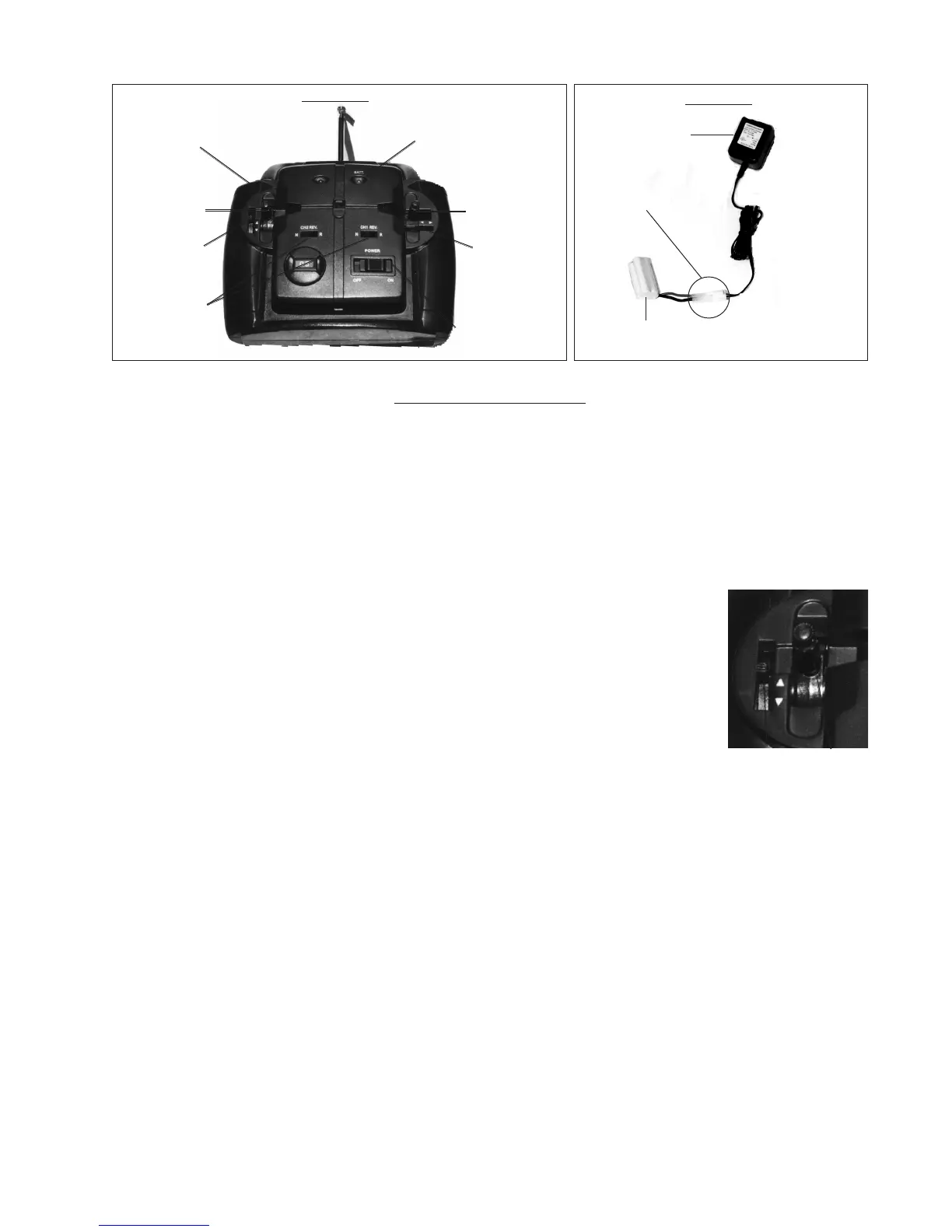
1. Tie the Ribbon (17) to the end of the antenna, as shown in Figure 3.
2. Make certain that your hands are clear of the Propellers and any moving parts. Turn on the
switch on the Airplane.
3. If both trims are adjusted properly, the Propellers (4) should be still when the Airplane is initially
turned “ON”.
4. Each control stick has a Trim Adjustment next to it, as shown to the right.
This is used to fine-tune the neutral position of the control.
5. Pulling downward on the left hand control stick (see Figure 3) will cause
the Propellers (4) to spin faster. Returning the left hand control stick to the
center position should stop both Propellers (4) from spinning if both trims
are adjusted correctly.
6. If neither of the Propellers stop spinning when the left hand control stick
is in the center position, you will have to adjust the left hand trim slowly,
just until one of the propellers stop. The propellers should start spinning
when the control stick is moved even slightly, if not then the left hand trim
is adjusted too far.
7. The right hand control stick controls the left and right Propellers (4). Move the control stick
right to speed up the left Propeller (4), turning right; and left to speed up the right Propeller
(4), turning left. When the control stick is in the center position, neither Propeller (4) should be
spinning.
8. If one of the propellers still spins while both sticks are released, then adjust the right hand trim
until both propellers are stationary. If the left hand trim was not adjusted properly, the propellers
may still spin and steps 5-7 should be repeated until the controls operate the plane reliably.
9. Practice these steps until you are comfortable activating the Propellers (4).
10. To steer the Airplane, move the right hand control stick to the left to steer to the left, and right to
steer it right. Move the right hand control stick slightly to adjust for minor changes in direction
and tilt of the Airplane.
11. The reverse toggles can be used to reverse the operation of each of the control sticks. Each
reverse toggle controls the Control Stick nearest it. There are two settings: “N”=Normal
Operation; “R”=Reversed Controls (left=right, forward=backward, and vice-versa).
Control
Stick
Trim
Adjustment
Left Hand
(Throttle) Controls
Left-hand
control stick
Right-hand
control stick
“On/Off”
Figure 3
Battery
indicator light
Remote Control (10)
Left-hand
trim
Right-hand
trim
Reverse
toggles
Battery Pack (13)
Charger (12)
Plug Battery Pack (13)
into Charger (12)
Figure 4
REV 03/05


 To Next Page