EasyManua.ls Logo

Hardinge SUPER-PRECISION HC - Page 15

Default Icon
23 pages
Print Icon
To Next Page IconTo Next Page
To Previous Page IconTo Previous Page
Loading...
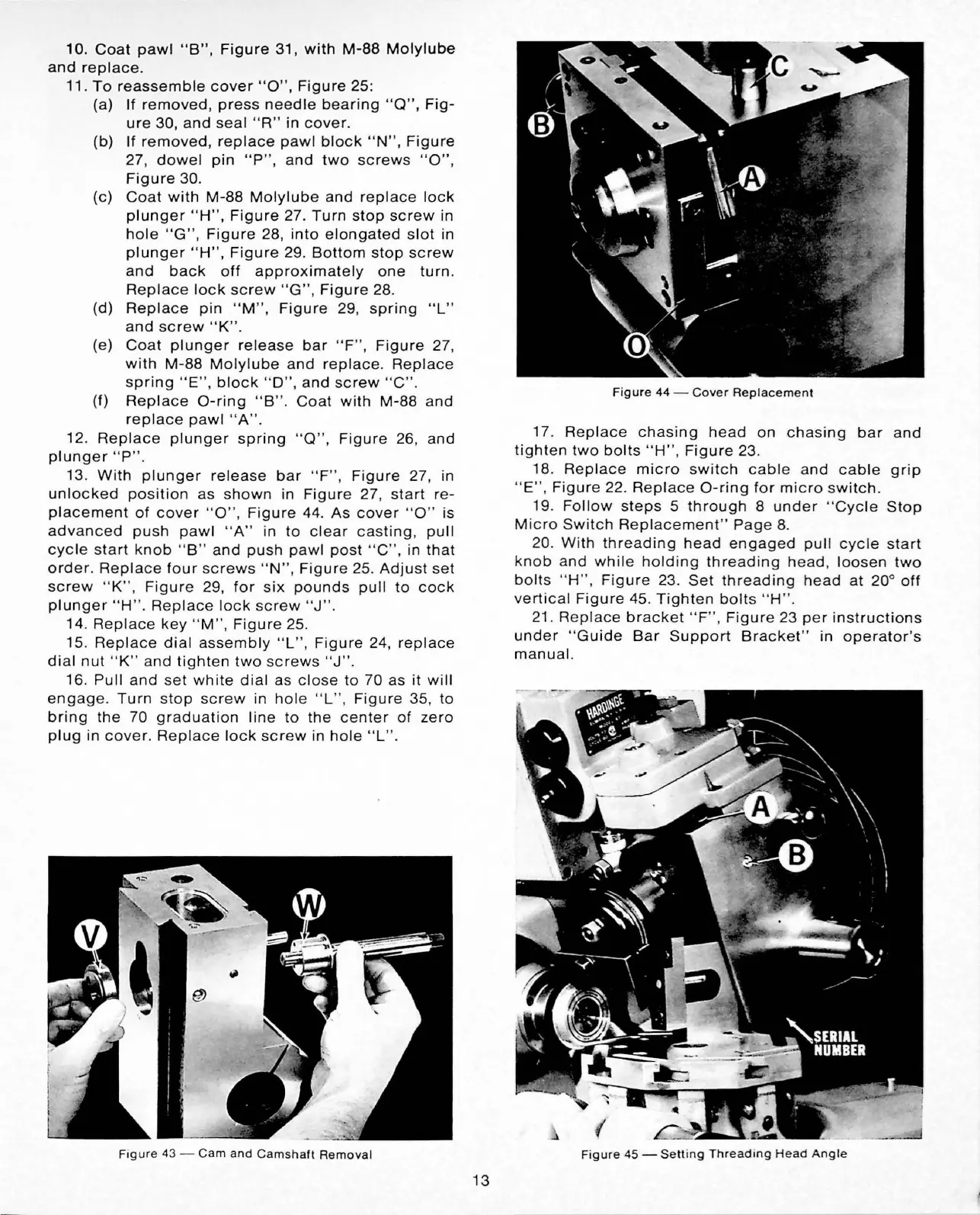
10.
Coat
pawl
"B",
Figure
31,
with
M-88
Molylube
and
replace
.
11.
To
reassemble
cover
"O
",
Figure
25:
(a) If
removed,
press
needle
bearing
"Q",
Fig-
ure
30,
and
seal
"R"
in
cover
.
(b) If
removed,
replace
pawl
block
"N",
Figure
27,
dowel
pin
"P
",
and
two
screws
"O",
Figure
30
.
(c)
Coat
with
M-88
Molylube
and
replace
lock
plunger
"
H",
Figure
27.
Turn
stop
screw
in
hole
"
G",
Figure
28,
into
elongated
slot
in
plunger
"H",
Figure
29
.
Bottom
stop
screw
and
back
off
approximately
one
turn
.
Replace
lock
screw
"G
" ,
Figure
28.
(d)
Replace
pin
"M",
Fi
gure
29
,
spring
"L"
and
screw
"K"
.
(e)
Coat
plunger
release
bar
" F
",
Figure
27,
with
M-88
Molylube
and
replace
.
Replace
spring
"E"
,
block
''D
",
and
screw
"C"
.
(f)
Replace
O-ring
"B
".
Coat
with
M-88
and
replace
pawl
" A" .
12
.
Replace
plunger
spring
" Q
",
Figure
26,
and
plunger
"P
" .
13
.
With
plunger
release
bar
"
F"
,
Figure
27, in
unlocked
position
as
shown
in
Figure
27,
start
re-
placement
of
cover
" O" ,
Figure
44.
As
cover
" O"
is
advanced
push
pawl
"A
"
in
to
clear
casting
,
pull
cycl
e s
tart
knob
"B"
and
push
pawl
po
st
"
C"
, in
that
order.
Repla
ce
four
s
crews
" N " ,
Figure
25.
Adjust
set
screw
" K
",
Figure
29,
for
six
pounds
pull
to
cock
plunger
" H " .
Replace
lo
ck
screw
"J"
.
14
.
Replace
key
" M" ,
Figure
25.
15
.
Replace
dial
assembly
" L" ,
Figure
24,
replace
dial
nut
" K" a
nd
tighten
two
screws
"J
" .
16.
Pull
a
nd
se
t
whit
e
dial
as
c
lo
se
to
70
as
it
will
engag
e.
Turn
s
top
scre
w
in
hole
" L
",
Figure
35
,
to
bring
the
70
graduation
lin
e
to
the
center
of
zero
plug
in
cover
.
Replace
lock
sc
rew
in
hole
" L
".
F
igure
43 -
Cam
and
Ca
msha
ft
Remova
l
13
Fi
gure
44
-
Cover
Re
pl
ace
men
t
17.
Replace
chasing
head
on
chasing
bar
and
tighten
two
bolts
" H
",
Fi
gure
23.
18. Re
pla
ce
micro
switch
cab
le
and
cable
grip
"E",
Figure
22.
Replace
O
-r
ing
for
mi
c
ro
switch
.
19.
Follow
steps
5
through
8
under
"
Cycle
Stop
M
icro
Switch
R
eplacement"
Pag
e 8.
20.
With
t
hrea
d
in
g
he
ad
engaged
pull
cycle
start
k
nob
and
while
holding
threading
head
,
loosen
two
bolts
"H
" , F
ig
ur
e 23.
Set
threading
head
at
20
°
off
vertical
Figure
45.
Tighten
bolt
s " H" .
21.
Repl
a
ce
bracket
"F
",
Figur
e
23
per
instructions
under
"
Gu
i
de
Bar
Support
Bracke
t"
in
operator
's
ma
nu
al.
Fig
ur
e
45
-
Setting
T
hr
ea
ding
H
ead
Angle

Related product manuals