EasyManua.ls Logo

Hardinge SUPER-PRECISION HC - Page 19

Default Icon
23 pages
Print Icon
To Next Page IconTo Next Page
To Previous Page IconTo Previous Page
Loading...
2.
To
replace
guide
bar
and
knockout
piston:
(a)
Replace
0-ring
"P",
Figure
60
.
(b)
Replace
guide
bar,
"J",
Figure
58,
and
replace
pin
"H".
Adjustment
of
two
screws
"G
"
will
be
made
after
knockout
assembly
is
replaced
on
machine.
(c)
Replace
piston
shaft
"F",
Figure
58
.
Line
up
dowel
pin
"Q",
Figure
60,
with
locating
hole
in
piston
.
(d)
Replace
0-ring
"O",
Figure
59, in
seal
"
N"
.
Replace
0-ring
and
seal
on
piston
ring
"M"
and
replace
piston
ring
"M".
NOTE:
Use nut
"C
", Figure 55, to start
these parts
in
cylinder wall liner.
(e)
Replace
0-ring
"L",
Fi
gure
59,
piston
plate
"K"
and
nut
"E",
Figure
57.
(f)
Replace
spring
"D",
Figure
56,
and
nut
"C",
Figure
55.
(g)
Replace
adjusting
collar
"
B".
Replace
brass
plug
and
set
screw
"A".
Adjustment
of
collar
"B
"
will
be
made
after
knockout
assembly
is
replaced
on
machine
.
3.
To
replace
micro
switch
mount
" X
",
Figure
52:
(a)
Replace
trip
rod
"D",
Figure
54, in
mount
while
replacing
springs
"
J",
three
re-
taining
rings
and
cam
"H".
Tighten
set
screw
"G
".
(b)
Replace
mount
and
four
screws
"B",
Fig-
ure
53
.
(c)
Replace
stop
collars
"Z"
and
"A",
Figure
52,
two
brass
plugs
and
two
screws
"Y".
Adjustment
of
stop
collars
will
be
made
after
knockout
ass
e
mbly
is re
placed
on
machine.
4.
To
re
place
micro
switche
s:
(a)
Replac
e
micro
switches
" G" a
nd
"H
",
Fig-
ure
50,
two
screws,
wa
shers
and
nuts
"
W",
Figure
52.
Mount
micro
switches
as
shown
Figur
e 52.
Clearance
in
mounting
holes
will
a
llow
mi
c
ro
sw itc
hes
to
be
se
t
so
that
mov
eme
nt
of
trip
rod
in e
ith
er
direction
will
trip
the
intended
switch
and
both
will
be
released
at
rest
position
.
(b) Re
plac
e
red
wire
from
air
valve
on
"nor
-
mally
ope
n" te
rmin
al
of
micro
s
wit
ch " H"
Fig
ure
50
. Re
pl
ace red
jump
er
wir
e
o~
"
common
"
terminal
of
switch
"H".
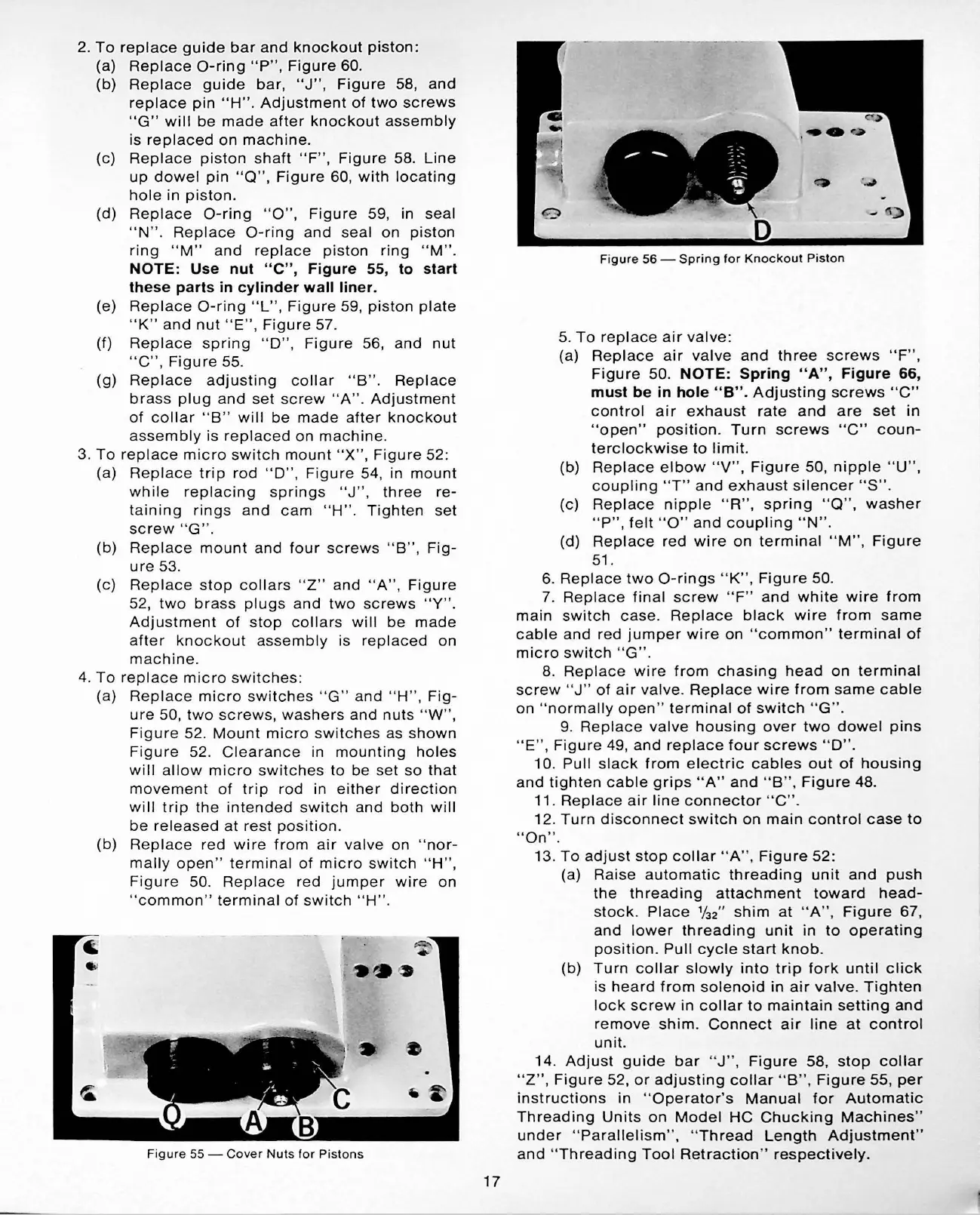
F
igur
e 55 -
Cover
Nut
s f
or
Pistons
17
Figure
56
-
Spring
for
Knockout
Piston
5.
To
replace
air
valve:
(a)
Replace
air
valve
and
three
screws
" F
",
Figure
50
.
NOTE:
Spring
"A",
Figure
66,
must
be
in
hole
"B".
Adjust
i
ng
screws
"C"
control
air
exhaust
rate
and
are
set
in
"open"
position.
Turn
screws
"C"
coun-
terclockwise
to
limit.
(b)
Replace
elbow
"
V",
Figure
50,
nipple
"U
" ,
coupling
"T"
and
exhaust
silencer
"
S".
(c)
Replace
nipple
"R",
spring
"Q
" ,
washer
"P",
felt
"O"
and
coupling
"
N"
.
(d)
Replace
red
wire
on
terminal
" M
",
Figure
51
.
6.
Replace
two
0 -
rings
" K" ,
Figure
50.
7.
Replace
final
screw
"
F"
and
white
wire
from
main
switch
cas
e.
Replace
black
wire
from
same
cable
and
red
jumpe
r
wire
on "
common
"
terminal
of
micro
switch
" G" .
8.
Replace
wire
from
chasing
head
on
terminal
screw
"J
"
of
a
ir
valve
.
Replace
wire
from
same
cable
on
"
normally
open
"
terminal
of
switch
" G" .
9.
Replace
valve
housing
over
two
dowel
pins
"E"
,
Figure
49,
and
replace
four
screws
"
D".
10
.
Pull
slack
from
e
lectric
cables
out
of
housing
and
tighten
cable
grips
"
A"
and
"B
",
Figure
48.
11.
Replace
air
line
connector
" C" .
12.
Turn
di
sconnect
switch
on
main
control
case
to
"On".
13.
To
adjust
stop
collar
"A",
Figure
52
:
(a)
Raise
automatic
threading
unit
and
push
the
threading
attachment
toward
head-
s
to
ck.
Plac
e %
2
"
shim
at
" A" ,
Figure
67,
a
nd
lower
thr
ea
ding
unit
in
to
op
e
rating
position
.
Pull
cycle
start
knob
.
(b)
Turn
coll
ar
slowly
into
trip
fork
until
click
is
heard
from
solenoid
in
air
valve.
Tighten
lock
screw
in
collar
to
maintain
setting
and
re
move
shim
.
Connect
air
line
at
control
unit.
14.
Adjust
guid
e
bar
"
J"
,
Figure
58
,
stop
collar
"Z"
,
Figure
52,
or
adjusting
collar
"
B"
,
Figure
55,
per
instructions
in "
Operator's
Manual
for
Automatic
Thr
ea
ding
Units
on
Model
HC
Chucking
Machines"
und
er " P
ara
ll
e
lism
" , "
Thread
Length
Adjustment
"
and
"
Threading
Tool
Re
traction
"
respectively.

Related product manuals