EasyManua.ls Logo

Harman VP4 ROW - Emergency - Police

Harman VP4 ROW
272 pages
Print Icon
To Next Page IconTo Next Page
To Previous Page IconTo Previous Page
Loading...
Uconnect™ ACCESS USER’S MANUAL 149
•
Distance
•
ABC (Search)
NOTE: In case of
emergency,
please contact the facility
to verify their
availability before
proceeding.
Touch
the
desired Hospital
and
touch
Yes to
confirm
the
destination.
NOTE:
•
If
you
are
currently
on a
route guidance and you
select
a
Hospital the system will ask you
to
choose one
of the
following
•
Cancel previous
route
•
Add as first destination
•
Add as last destination
•
You can
touch
the
back arrow soft-key
to
return
to the
previous screen
or the X
soft-key
to exit.
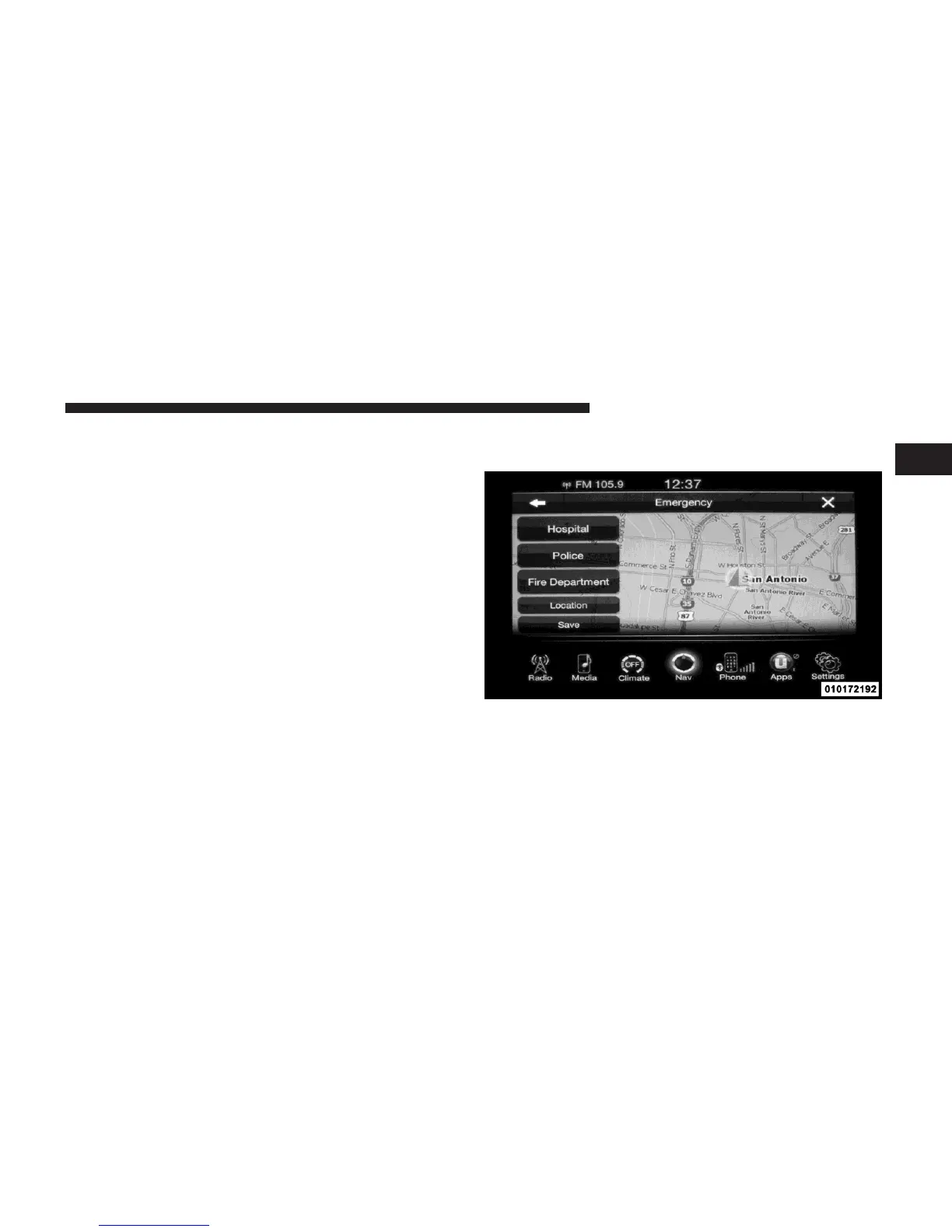
Emergency – Police
1
To search for a Police Station close to your current
location, touch Emergency from
the
Nav Main Menu
and
then touch the Police
Station
soft-key.

Table of Contents