AL600 / AL600HD: Owner’s Manual
19MAR2021 | MKT-000174 REV A
8
OPERATION
AL600 / AL600HD: SECTION 3
SECUREMENT WITH OPTIONAL
HOLD-DOWN ARM
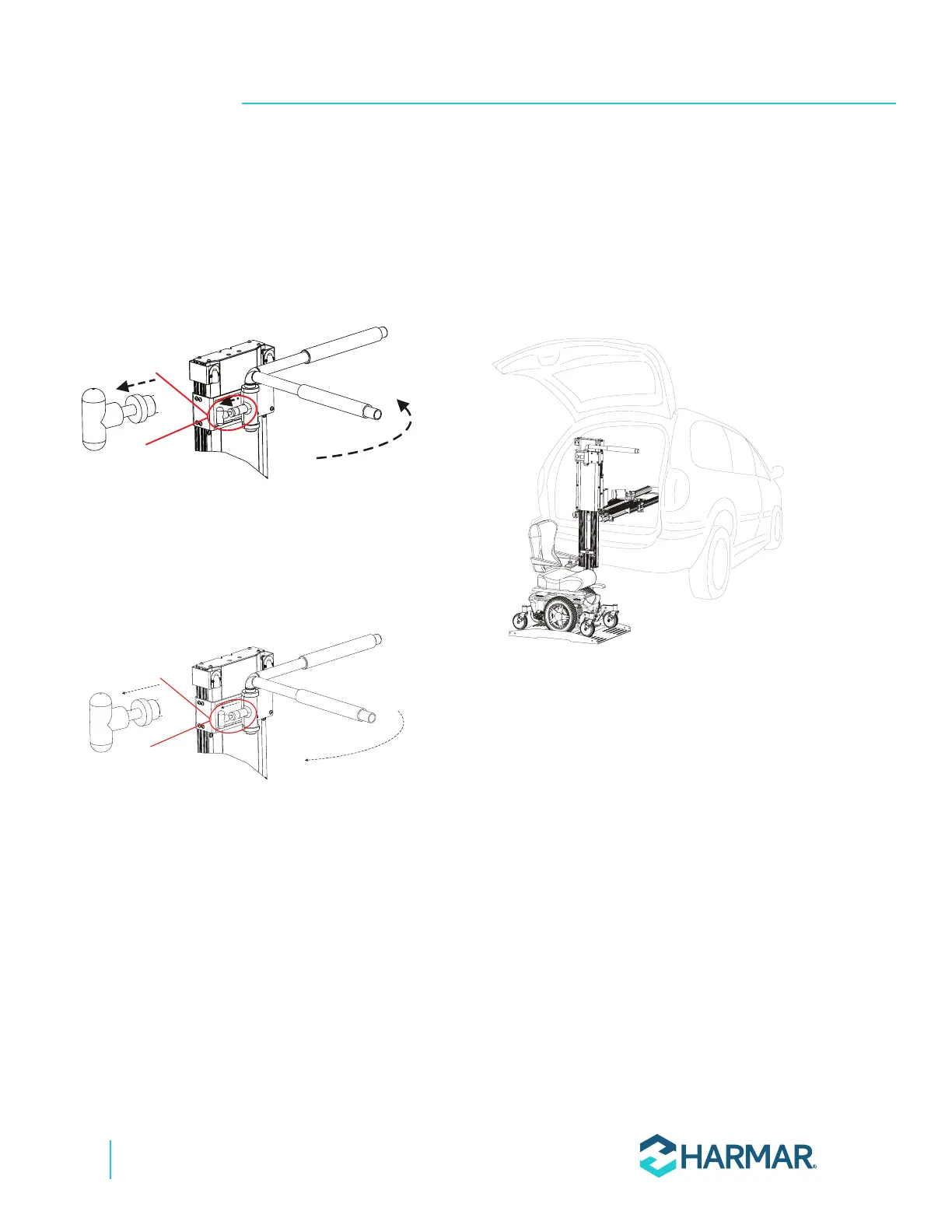
1. If applicable, the hold-down arm may be rotated
out of the way. Pull the T-handle and rotate the
hold-down arm to the desired posion. Release
the T-handle to lock in place. See Figure 3-3.
Figure 3-3
2. If applicable, the hold-down arm can be
rotated over the center of the seat. Pull the
T-handle and rotate the arm to the desired
position. Release the T-handle to lock in place.
See Figure 3-4.
Figure 3-4
SECUREMENT WITH CAMBUCKLE
RETENTION STRAPS
1. Each corner of the AL600 platform has a
restraint attached, with a hook on the end.
Place each hook in either the anchor plate slot,
each U-bolt, or tie-down loop attached to the
mobility device. See Figure 3-5.
Figure 3-5
2. Pull the loose end of each strap tight. To
release, simply press the release tab on the
cambuckle, pull and remove the hooks.
See Figure 3-6.









 To Next Page