AL600 / AL600HD: Owner’s Manual
19MAR2021 | MKT-000174 REV A
9
OPERATION
AL600 / AL600HD: SECTION 3
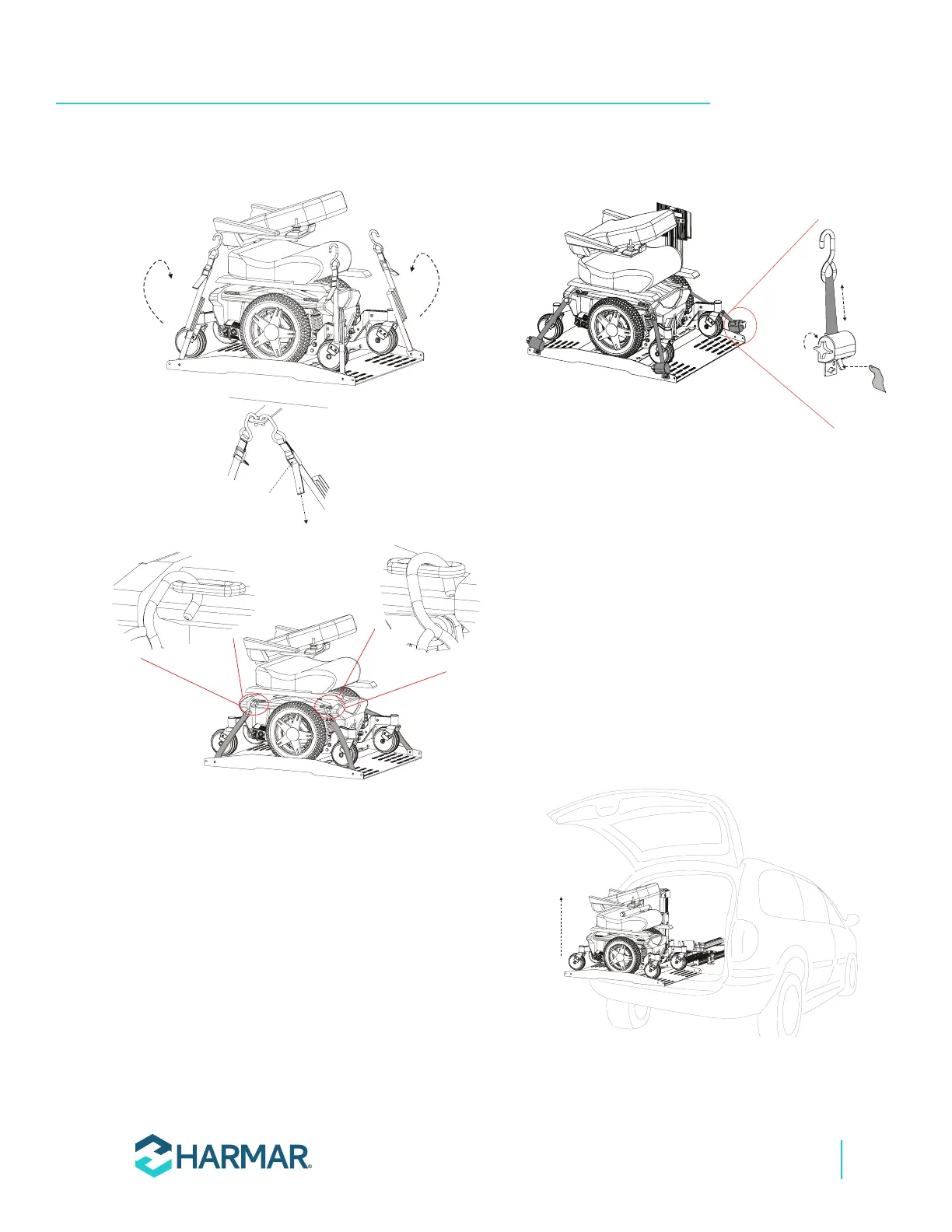
PULL to
TIGHTEN
PUSH to
RELEASE
Figure 3-6
3. If you ordered your lift with the optional
Q’Straint retractors, place each hook in the
appropriate anchor plate slot, U-bolt, or tie-
down loop. The straps will automatically retract
and secure the mobility device. Make sure each
strap retracts without any interference or slack
in the strap. Adjust if necessary. To release,
press and hold the lever to release the straps
and then remove the hooks. See Figure 3-7.
PUSH TO
RELEASE
TURN TO
TIGHTEN
Figure 3-7
4. If your chair has a folding seatback, you may
want to place it in the down position for easier
clearance when loading the chair into the
vehicle. Depending on the size of your chair,
you may need to remove the headrest as well.
5. Double-check that the mobility device is
secured properly on the platform. While
holding the hand control, stand to the side and
away from the lift. Press the “Up” button.
When the platform stops retracting, release
the button. The platform will automatically
lock itself into a travel position. Close the door
slowly, making sure that no part of the mobility
device or other objects in the cargo area
contacts the door. See Figure 3-8.
Figure 3-8









 To Next Page