AL6000 / AL6000HD: Owner’s Manual
27AUG2021 | 630-00152 REV A
12
OPERATION
AL6000 / AL6000HD: SECTION 3
PUSH to
RELEASE
Figure 3-14
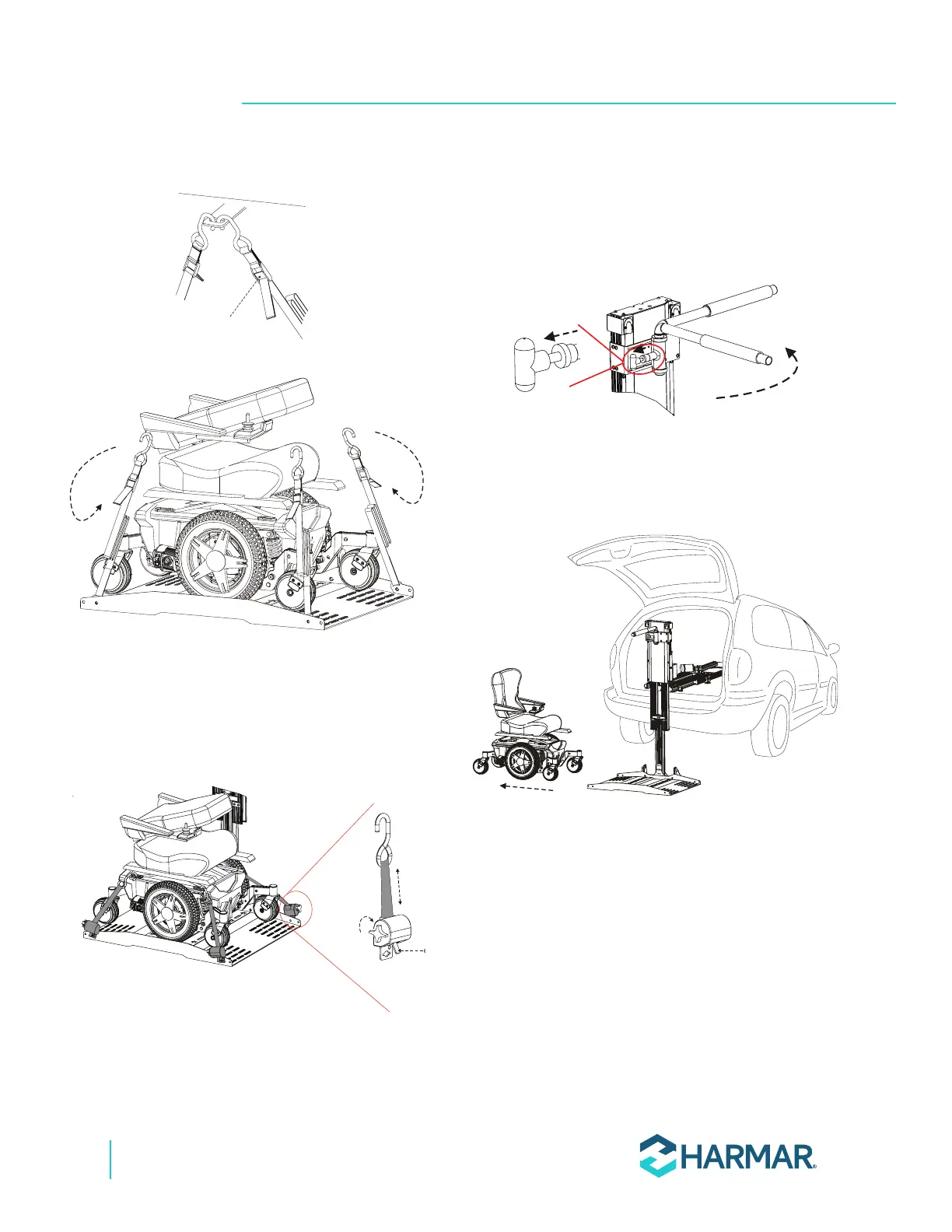
3. If the lift has the optional Q’Straint retractors,
press and hold the red lever to release the
straps and unhook them from the anchor plates,
U-bolt, or tie-down loops. See Figure 3-15.
PUSH TO
RELEASE
TURN TO
TIGHTEN
Figure 3-15
4. If the lift is equipped with the optional hold-
down arm, the hold-down arm may need to be
rotated out of the way. Pull the T-handle and
rotate the hold-down arm. Release the T-handle
to lock in place. See Figure 3-16.
Figure 3-16
5. Slowly walk the mobility device off of the
platform, backing out the same way the
platform was entered. See Figure 3-17.
Figure 3-17
6. Press and hold the UP button to stow the
unloaded platform back into the vehicle.








 To Next Page