AL6000 / AL6000HD: Owner’s Manual
27AUG2021 | 630-00152 REV A
8
OPERATION
AL6000 / AL6000HD: SECTION 3
Do not ride on the mobility device when loading and
unloading the plaorm.
CAUTION
!
Note: Please ensure hand control wire does not interfere
with the movement of the lift. Improper operation can
result in damage not covered by manufacturers warranty.
SECUREMENT WITH CAMBUCKLE
RETENTION STRAPS
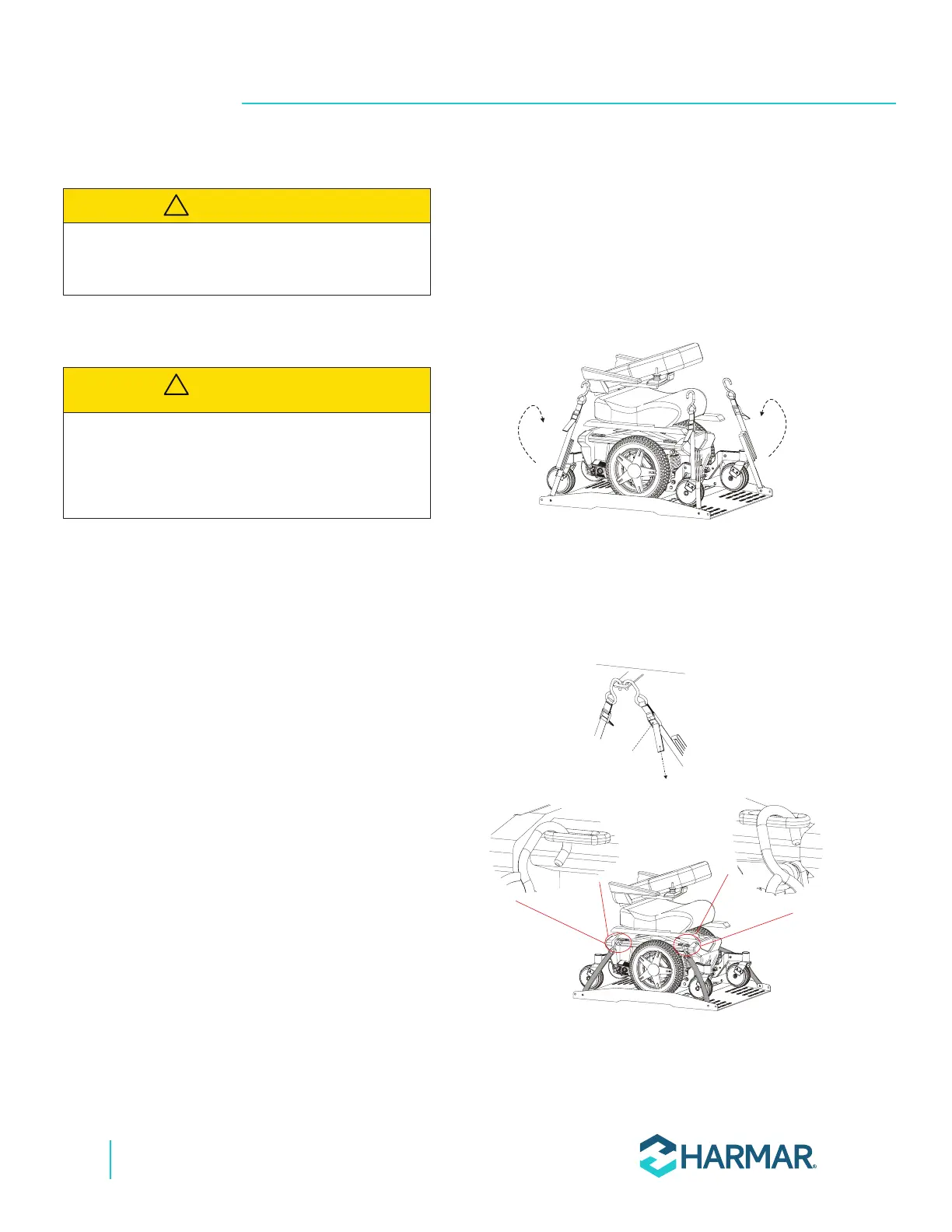
1. Each corner of the AL6000 platform has a
restraint attached with a hook on the end.
Place each hook in either the anchor plate slot,
each U-bolt, or tie-down loops attached to the
mobility device. See Figure 3-3.
PULL to
TIGHTEN
PUSH to
RELEASE
Figure 3-3
2. Pull the loose end of each strap tight. To
release, simply press the release tab on the
cambuckle, pull and remove the hooks.
See Figure 3-4.
PULL to
TIGHTEN
PUSH to
RELEASE
Figure 3-4
Ensure no part of the mobility device extends
beyond the space of the plaorm. Pay parcular
aenon to areas above the plaorm as cargo
openings are oen more compact towards the top.
CAUTION
!








 To Next Page