EasyManua.ls Logo

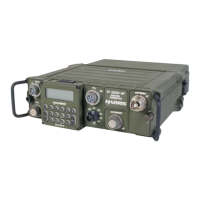
Harris RF-5832H-PA - User Manual

Default Icon
114 pages
Print Icon
To Next Page IconTo Next Page
Loading...
PUBLICATION NUMBER: 10515-0124-4200
FEBRUARY 2001
Rev. A
Tactical Radio Products
next level solutions
RF-5800H
125-WATT COMMUNICATION
SYSTEM
SYSTEM INSTALLATION/
MAINTENANCE MANUAL

Table of Contents

Questions and Answers

  • M
    Morgan KramerAug 15, 2025
    What to do if Harris Conference System displays PA OVERTEMP or THERMAL WARNING?
    • A
      Amy BakerAug 15, 2025
      If your Harris Conference System displays PA OVERTEMP or THERMAL WARNING, unkey the RF-5800H-MP and allow the RF-5832H-PA to cool. Ensure the RF-5832H-PA is well-ventilated and not in direct sunlight. If the problem continues, replace the RF-5832H-PA.
  • B
    bjenkinsAug 18, 2025
    What to do if Harris RF-5832H-PA Conference System displays PA LOW DC INPUT?
    • C
      Crystal CraigAug 18, 2025
      If the Harris Conference System displays PA LOW DC INPUT, check that the DC input voltage is within the specified range under both loaded and unloaded conditions. If the issue persists, replace the RF-5832H-PA.
  • K
    Katherine BanksAug 21, 2025
    What to do if Harris RF-5832H-PA displays PA HIGH DC INPUT?
    • L
      Lori SantosAug 21, 2025
      If your Harris Conference System shows PA HIGH DC INPUT, check that the level of DC input voltage is within specification and replace the RF-5832H-PA.
  • R
    Rachel RichardsAug 25, 2025
    What to do if Harris Conference System displays PA OVERCURRENT?
    • S
      Sara LongAug 25, 2025
      If your Harris Conference System displays PA OVERCURRENT, replace the RF-5832H-PA.
  • S
    Sophia RodriguezAug 27, 2025
    What to do if Harris RF-5832H-PA Conference System has low or no transmit power on all HF or all VHF frequencies?
    • J
      Jennifer CastroAug 27, 2025
      To troubleshoot low or no transmit power on all HF or all VHF frequencies with your Harris Conference System, check the RF cables and antenna, replacing them if necessary. Also, replace the RF-382A and the RF-5832H-PA.
  • N
    Nicole RosalesAug 30, 2025
    What to do if Harris RF-5832H-PA Conference System has low or no transmit power on some HF or VHF frequencies?
    • O
      ogibsonAug 30, 2025
      To troubleshoot low or no transmit power on some HF or VHF frequencies with your Harris Conference System, replace the RF-5832H-PA.
  • H
    hmyersSep 2, 2025
    What to do if Harris RF-5832H-PA displays PA WARNING?
    • J
      James AlexanderSep 2, 2025
      If the Harris Conference System displays PA WARNING, retune the RF-5800H-MP and rekey. If the fault clears, you can continue operating. If the problem persists, replace the RF-5832H-PA.
  • M
    Michael JenningsSep 5, 2025
    What to do if Harris RF-5832H-PA Conference System does not power up and shows COUPLER FAULT, HIGH VSWR, PA BAD FILTER, PA COMM FAULT?
    • K
      Kenneth RiceSep 5, 2025
      If the Harris Conference System does not power up and shows COUPLER FAULT, HIGH VSWR, PA BAD FILTER, PA COMM FAULT, refer to TAP-1 for vehicular or TAP-2 for base station or transit case system. Then: * Replace RF-382A. * Replace RF-5832H-PA. To address HIGH VSWR, also check RF cables and antenna, replacing them as needed. To address PA BAD FILTER, check RF cables, replacing them if necessary.
  • M
    mackenzie21Sep 8, 2025
    What to do if Harris RF-5832H-PA Conference System displays PA COMM FAULT?
    • W
      Whitney ThomasSep 8, 2025
      If the Harris Conference System displays PA COMM FAULT, replace the PA-R/T Control Cable and the RF-5832H-PA.

Summary

Limited One Year Warranty

What We Will Do

Harris's warranty obligations for repair or replacement of defective equipment.

What You Must Do

Customer requirements for reporting defects and returning equipment for warranty service.

Safety Summary

2. Personnel and Equipment Safety

General safety precautions for personnel and equipment, covering electrical, mechanical, thermal, chemical, and EMR hazards.

Do Not Service Equipment Alone

Grounding

Turn Off Power and Ground Capacitors

Keep Away From Live Circuits

Do Not Bypass Interlocks

4. Protection of Static-Sensitive Devices

Chapter 1 General Information

1.5 General System Description

1.5.1 RF-5800 H 125-Watt Vehicular System

Details the units and components of the vehicular system configuration.

1.5.2 RF-5800 H 125-Watt Base Station System

Details the units and components of the base station system configuration.

1.5.3 RF-5800 H 125-Watt Transit Case System

Details the units and components of the transit case system configuration.

1.6 General Equipment Descriptions

1.6.1 RF-5832 H-PA

Features and specifications of the 125-Watt Power Amplifier.

Chapter 2 Installation

2.2.1.1 Grounding

CRITICAL SAFETY WARNING about grounding hazards and CAUTION regarding equipment damage from improper grounding.

2.2.1.2 Vehicular Configuration Grounding

2.2.1.3 Base Station Configuration Grounding

2.2.1.4 Transit Case Configuration Grounding

2.3 Tools and Materials Required

2.5 Equipment Installation

2.5.1 Power Requirements

Details the voltage and power requirements for different system configurations.

2.5.5 Unit Removal and Installation Procedures

2.5.6 System Cabling Interconnect Information

2.5.7 Antenna Considerations

2.6 Installation Checkout

2.6.2 Initial Settings and Power Up

Procedure for powering up the system and executing Built-In Test (BIT).

Chapter 3 Operation

Chapter 4 Functional Description

Chapter 5 Scheduled Maintenance

Chapter 6 Troubleshooting

6.2 Troubleshooting Procedures

Outlines the process for diagnosing and resolving system faults.

6.2.2 Maintenance Turn-On Procedure

Procedure for powering up and performing self-tests to identify faults.

6.2.3 Non-BIT Troubleshooting

Procedures for troubleshooting faults not identified by BIT.

6.2.4 BIT Troubleshooting

Procedures for troubleshooting faults identified by the Built-In Test (BIT) function.

Chapter 7 Parts List

Appendix A

A.1 Technical Specifications

Provides detailed technical specifications for key system components like the PA, Power Supply, and Antenna Coupler.

Harris RF-5832H-PA Specifications

General IconGeneral
BrandHarris
ModelRF-5832H-PA
CategoryConference System
LanguageEnglish

Related product manuals