28 29
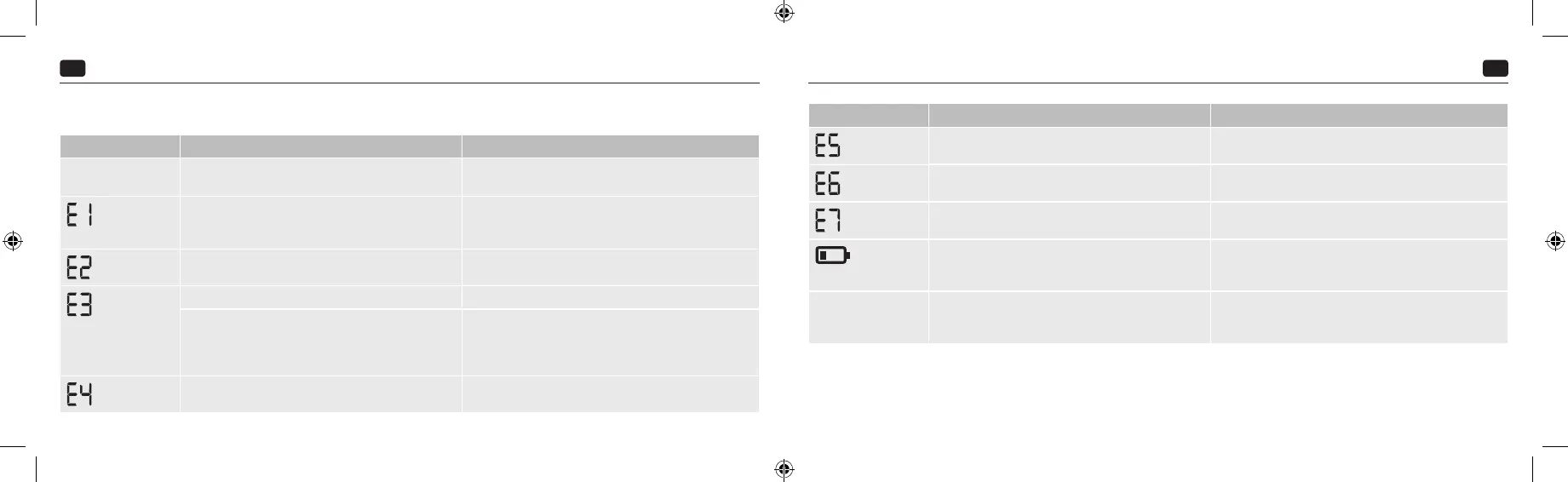
8. Explanation of error messages
Error Possible causes Remedy
Monitor cannot be
switched on
Batteries are missing, positioned incorrectly or at. Check the batteries. If necessary, replace with two new identical
batteries.
The measuring signals could not be detected at all or read correctly.
This can be caused by applying the cu incorrectly, by a cu
leakage, by moving or talking, or by a very weak pulse.
Check that the cu has been positioned correctly. Do not talk or move
during measurement.
Incorrect measurement due to movement. Do not talk or move during measurement.
The cu was not applied correctly. Check that the cu has been positioned correctly.
Air is released too fast or too slowly during the measuring
procedure. The cuff could have become detached or loosened.
Movement during the measuring procedure could also be the
reason. Error during air release or unusual reduction in pressure.
Check whether the cuff has been positioned correctly.
Do not move during the measurement.
Error during measurement. Contact customer service if this error message appears (see Chapter 11).
Error Possible causes Remedy
The ination pressure is higher than 300 mmHg.
The pressure is released automatically.
Please rest for at least 1 minute, then take the measurement again (see
Chapter 5
‘
Measuring your blood pressure
’
).
A system error has occurred.
Contact customer service if this error message appears.
The data could not be sent via Bluetooth
®
.
Proceed as described in Chapter 7
‘
Transferring measured values via
Bluetooth
® to
Veroval
® medi.connect app
’
.
If the battery symbol is permanently displayed, the batteries are
empty and must be replaced.
Insert new batteries of the same type (AAA/LR03). Then check the
date/time and, if necessary, reset them (see Chapter 4 ‘Preparing the
measurement’).
Implausible measurements Implausible measurements often occur if the device is handled
incorrectly or if mistakes were made during the measurement
process.
Please refer to Chapter 5
‘
Measuring your blood pressure
’
as well as the
safety information. Then repeat the measurement. If implausible values
still occur: please contact your doctor!
• Switch the monitor o if an error message appears.
• Check for all possible causes and follow the 10 golden rules (Chapter 5 ‘Measuring your blood pressure’) as well as the instructions for self-measurement from Chapter2
‘Important information’.
• Relax for 1 minute and then repeat the measurement.
IFU_9252050_020323.indd 28-29IFU_9252050_020323.indd 28-29 02.03.23 10:4202.03.23 10:42



 To Next Page