14
H
2
O Firmware Update through App
When there is an update available for the H
2
O system the following information will appear and the steps listed
will need to be followed.
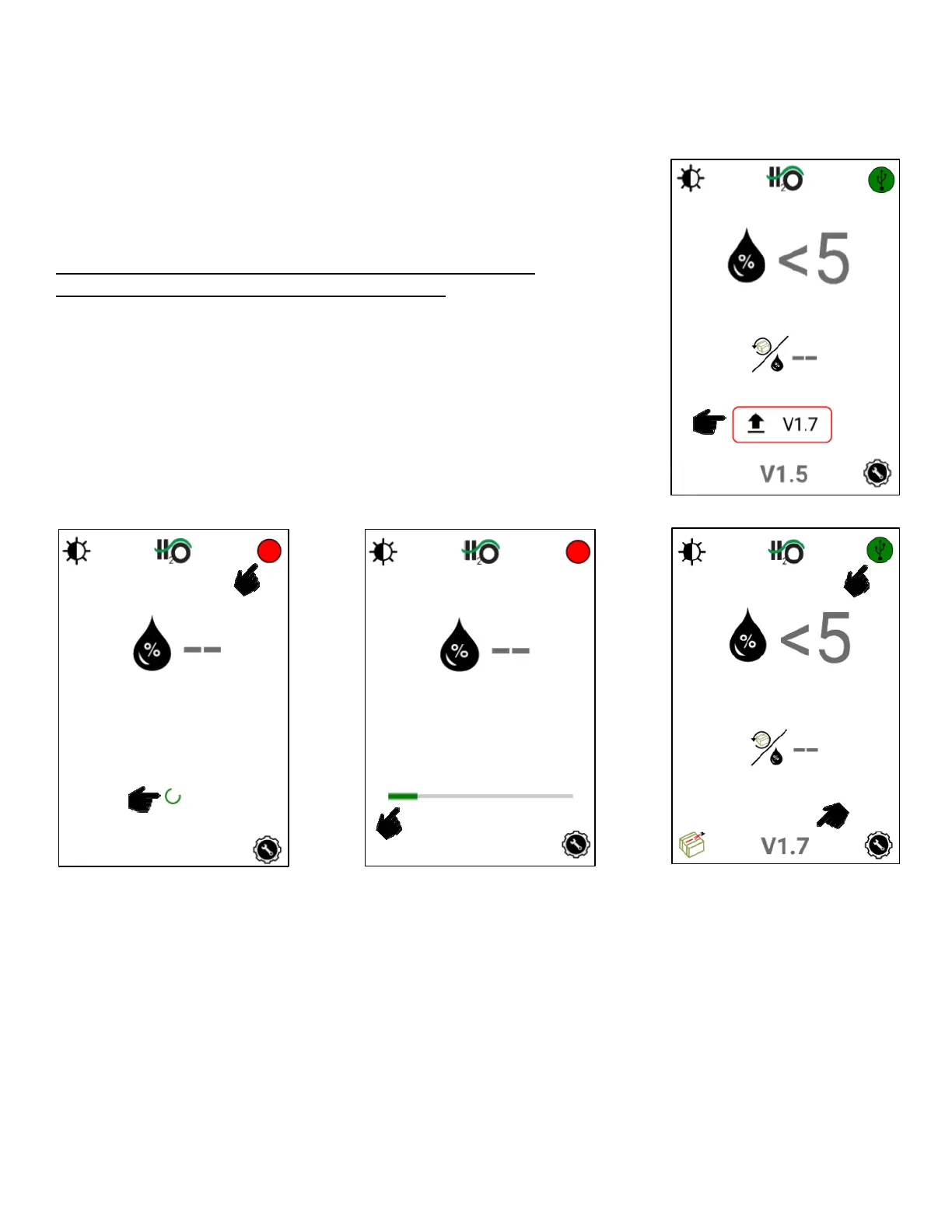
Once an operator downloads the app update (internet connection
required) the “update available” symbol will appear along with the
version number of the available update once connected to the system.
At this point the system can run without updating if the operator
chooses. The icon will simply remain on the screen.
Once the operator decides to perform the software update, they will
press the version number or upload arrow to begin.
Internet connection is not required to perform the update to the module
once the app is downloaded
Once the update is initiated, the system
will enter update mode
The status light will turn red
A green loading symbol will begin to
circulate on the screen
Once the status bar load completely, the
system will boot back up
The status light will again turn green
The updated version number will be
shown at the bottom of the screen


 To Next Page