PROG
Pr Hd
HorA
OK
"00" : 00
"13 :" 00
OK
13 ": 00"
13 ": 30"
di A
dd : L u
dd : U i
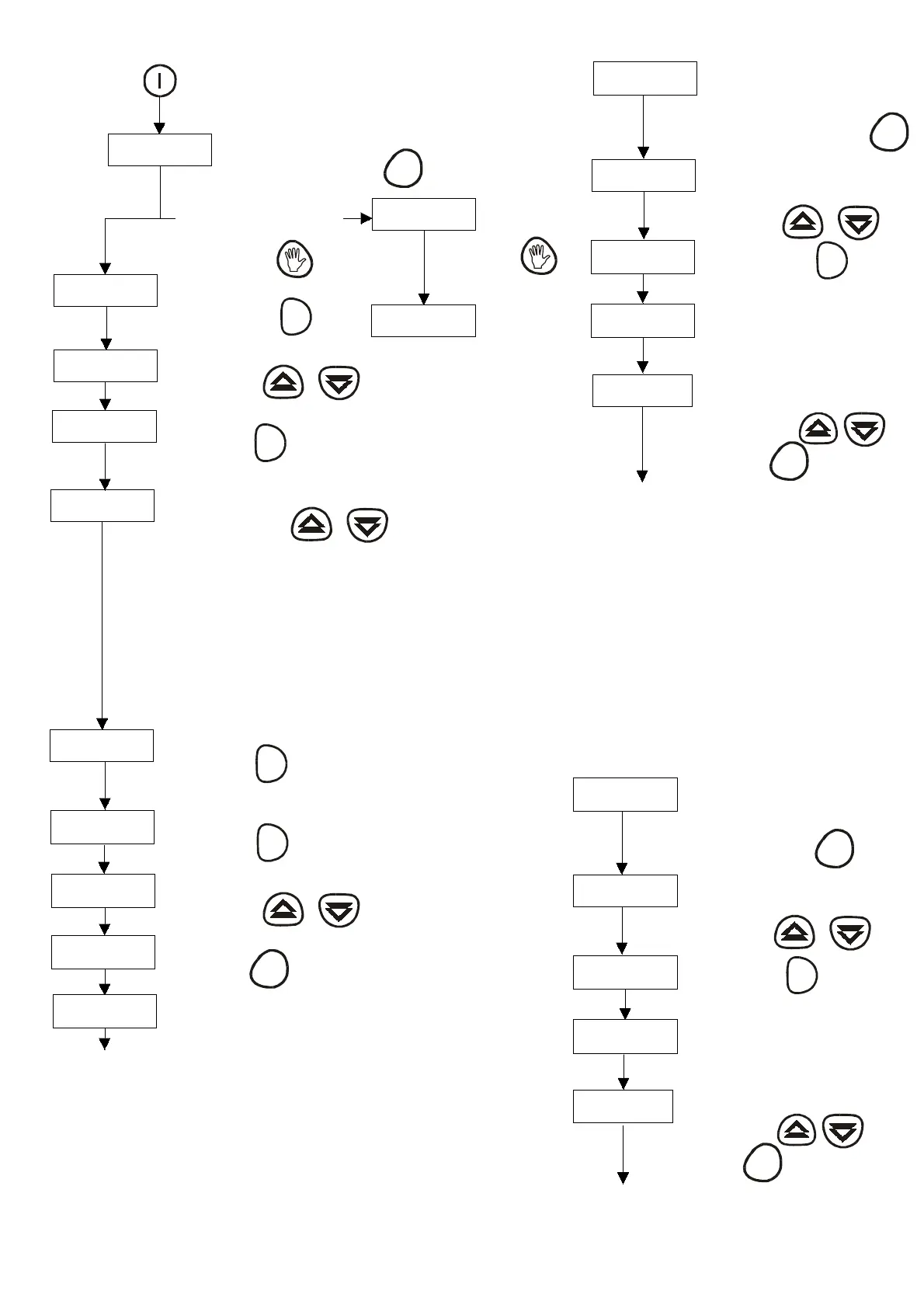
T he00 regarding the hours will start flickering.
For examplewechoose13:00 h
P ress ing this button the transmitter gets
switchedon.
You must programme the present
hour and the day when you connect
it for the first time.
With this we can s tart programming
the hour.
Now the 00 regarding the minutes will s tart flickering.
For examplewehavesetit to13:30.
Now we can pr ogr amme the day of the week .
Monday is the first day that
appear s .
L ets s uppos e today i s F r i day.
Press the button PROG 1,5 sec..
Press the button OK
Press the buttons
pr es s the button
S et it us ing the buttons
Press the button
OK
Press the button
OK
Press the buttons
Press the button
B AS I C PR OGR AMMI NG
PROG
Followin
thes e s teps the trans mitter is confi
ured with
the bas ic functions and will be able to work perfectly.
T hese steps shouldbe followed only when connectin
the trans mitter for the firs t time or when the trans mitter
has been dis connected for more than 20 minutes .
T he res t of the parameters (plans , pro
rammes ) r emain in
the memory.
Theconfi
ur ed parameter s ar e ones whi ch come from the
manufacturin
.
Comfort temperature : 22 º C
Economy T emperature:18 º C
P rogr ammed plan : P lan 1 : General Us e
CHANGING T HE COMF OR T T E MPE R AT U R E
19.0 C
Now the temper atur e of the r oom
appear s on t he di s pl ay.
19.0 C
T he room temperature appears on
thedisplay. Wearegoingto
change the comf or t temper atur e.
Press the button PROG 1,5 sec..
PROG
HorA
HOUR appears on the display.
Press the arrowbuttons till t ºC
appear s .
Pulsar las teclas
tº : C
Press the button OK
OK
22.0 C
Themanufacturingcomfort
temperature appears .
24 .5 C
Mar k the des i r ed comfor t temperatur e,
for example 24,5 º C
Press the buttons
Press the button PROG
PROG
F ollowing thes e s teps the trans mitters is configured to
a comfort temperatur e of 24, 5 º C i ns tead of 2 2 º C.
Configur e the temper atur e you des i r e.
CH AN GI N G T H E E CON OMY T E MP E R AT U R E
22.0 C
T he r oom temper atur e appear s i n
the di s pl ay. Now we ar e goi ng to
change the economy temper atur e.
Press the button 1,5 sec..
PROG
HorA
Hour appears in the display. Press
the s earch buttons till t E appears
in the display.
Press the buttons
tº : E
Press the button OK
OK
18.0 C
T he manufactur i ng economy
temperature appears in the display.
19 .5 C
Mar k the des i r ed temper atur e for
example 19. 5 º C
Press the buttons
Press the button PROG
PROG
Followin
thes e s teps the trans mitters is
con f i
ur ed to an economy temper atur e of
19.5 ºC instead of 18 ºC.
Confi
ure the desiredtemperature in
this way.
tiME
If you want you can change the
language. T he original language is
Spanish.
P ress ing the button
thelanguagewill
be English.
HEur
T he language is English
P ress ing the button
thelanguagewill beFrench.



 To Next Page