Explore a new world! www.cnfpv.com
Frequency Group Selection:
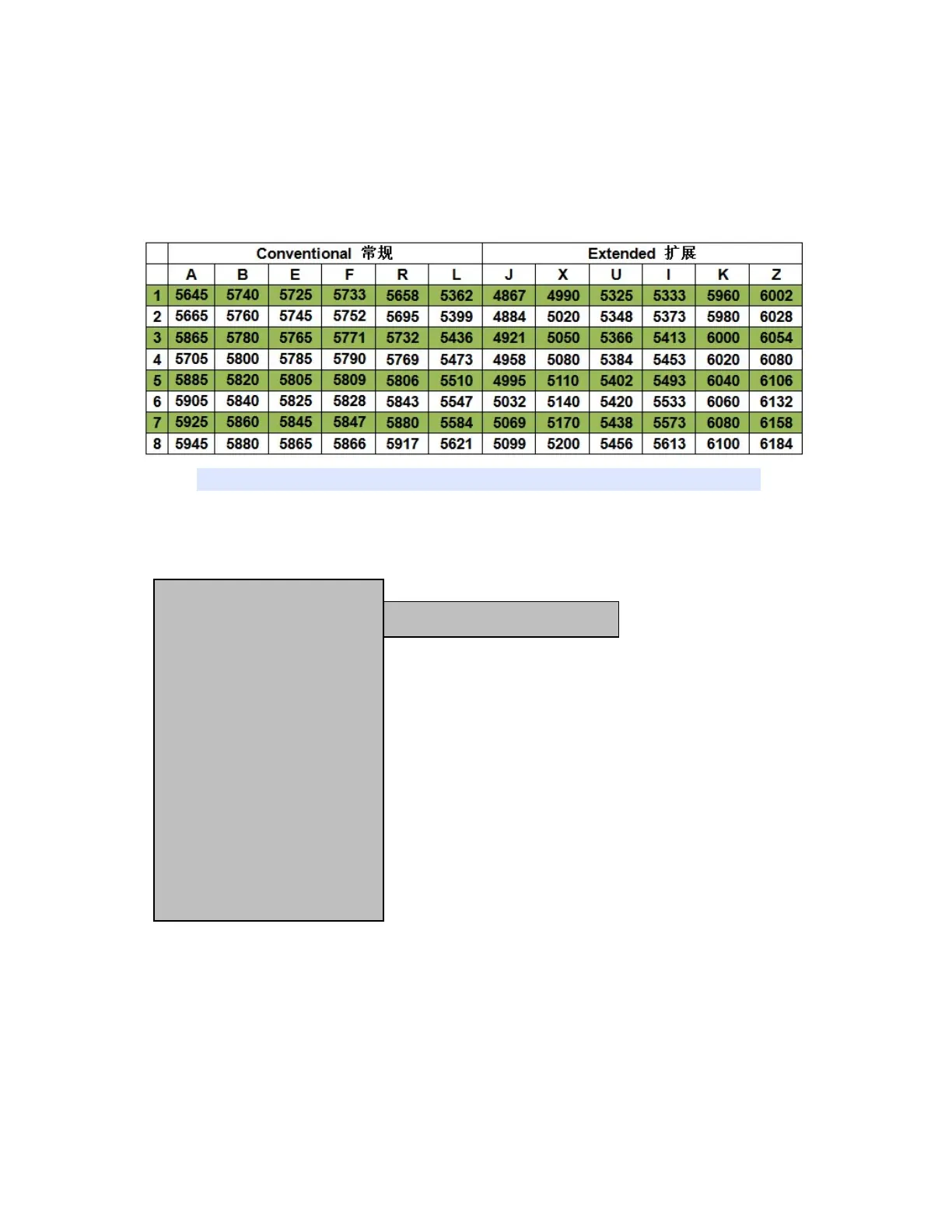
1.1 You can manually select the desired frequency from 12 groups: A, B,
E,F,R ,L,J,X,U,l,K and Z or select SCAN option to start auto search.
Dual 5.8G receivers cover 96 channels:
(Note: Currently, only data between 4.867G and 6.10 0G is supported)
1.2 You can manually input the frequency, The specific operation steps are as
follows:
Firstly, select " INPUT " in the FRQA option, then select the FRQB option, and confirm
with "OK" to enter the frequency point input mode.
if the current displayed frequency is 5645 and you are preparing to change it to
5665, you can use the buttons "OK", "UP", and "DOWM" to select the desired
frequency. Press "OK" to select the frequency position, and press "UP" and "DOWM"
to select the desired value. After all inputs are completed, press "OK" to confirm.
FRQA INPUT
FRQB 5645
FRQADJ OFF
FORMAT AUTO
BRI 20
CON 20
SAT 20
SHARP 07
GAMA C0
SPEAKER 20
LIGHT 20
ZOOM 16:9
VOLADJ +0.0V
LAN EN
RESET
EXIT
BETWEEN 4867 AND 6100


 To Next Page