*If the operation is unsuccessful, please repeat the above steps; or log in to the ocial agship
store, contact customer seice, and view the reset operation video.
1. Put the earbuds back into the charging case and ensure the earbuds have sucient power;
3. Press and hold again for 5s; please do not release when LEDs ash other color during the
process; after 5s, LEDs ash rose red twice and the reset is completed;
2. Press and hold both earbuds for 10s to power o, then release after LEDs ash rose red twice;
4. Close the charging case after reset; open the charging case again to pair after the breathing
lights of the earbuds are on;
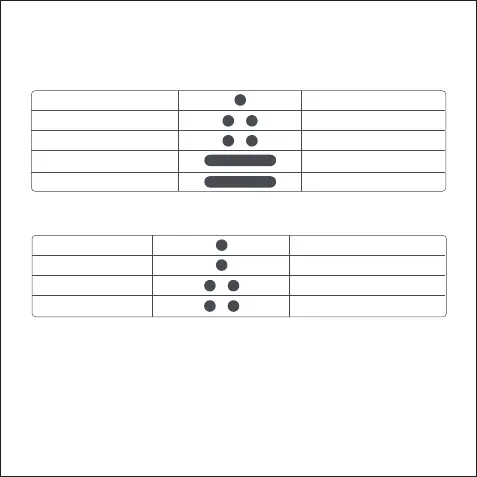
Playback Control
* You can only switch between Music/Cinema Mode after turning OFF Gaming Mode.
Play/pause
Skip track backward
Skip track forward
Call Control
Tap once
Double tap the left earbud
Double tap the right earbud
Enter/exit gaming mode*
Hang up a call
Reject an incoming call
Switch a third-pay call
Music/cinema mode
LEFT
RIGHT
Press and hold the left earbud
Press and hold the right earbud
Answer an incoming call
Tap once
Tap once
Double tap
Double tap
Restore Facto Settings


 To Next Page
 Loading...