Need help?
Do you have a question about the Haylou T19 and is the answer not in the manual?
Explains how to turn on the earbuds by opening the case lid.
Details methods to turn off the earbuds, including auto-off.
Guides users through the automatic pairing process with their device.
Describes various touch gestures for controlling playback, calls, and voice assistant.
Addresses the issue of one earbud being muted and suggests solutions.
Provides solutions for common charging issues with the earbuds and case.
Details the technical specifications for the Haylou T19 earbuds.
Details the technical specifications for the Haylou T19 charging case.
Important safety warnings regarding product use, temperature, and handling.
Recommendations for proper product usage and care to ensure longevity.
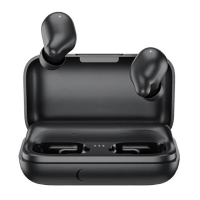
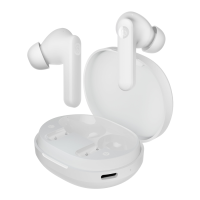
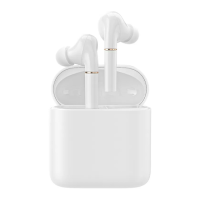
The Haylou T19 True Wireless Earbuds are designed to provide a seamless and intuitive audio experience, combining advanced features with user-friendly operation. These earbuds are a true wireless stereo (TWS) device, meaning they operate without any physical connection between the earbuds or to the audio source, offering complete freedom of movement.
The core function of the Haylou T19 earbuds is to deliver high-quality audio wirelessly via Bluetooth 5.0. This advanced Bluetooth standard ensures a stable and efficient connection, minimizing latency and maximizing audio fidelity. The earbuds support AptX and AAC codecs, which are crucial for delivering superior sound quality, especially when streaming music or engaging in calls. AptX is particularly beneficial for Android users, providing CD-like audio quality, while AAC is optimized for Apple devices, ensuring excellent sound reproduction across a wide range of content.
A key feature of the Haylou T19 is its four-way microphone system, which incorporates noise-canceling technology. This setup is specifically designed to enhance call clarity by effectively filtering out ambient noise, ensuring that your voice is heard clearly by the person on the other end, even in noisy environments. This makes the earbuds suitable for both personal and professional use, where clear communication is paramount.
The earbuds are equipped with infrared wearing detection. This intelligent feature automatically pauses music playback when you remove an earbud and resumes it when you put it back on. This not only conserves battery life but also provides a convenient and uninterrupted listening experience. The presence of a vibration feedback sensor further enhances the user experience by offering precise control through haptic responses, making interactions with the touch panel more intuitive and confirming commands.
The Haylou T19 earbuds also boast a master-slave switch capability. This means that either earbud can function independently as the primary connection, offering flexibility in how you use them. You can choose to use just one earbud for calls or to stay aware of your surroundings, or both for immersive stereo sound. This feature contributes to a stable connection, as the earbuds can seamlessly switch roles to maintain optimal performance.
For enhanced functionality and a personalized experience, the Haylou T19 offers an exclusive APP. This application allows users to connect to their earbuds with an opening lid animation, providing a visually engaging and streamlined pairing process. The APP likely offers additional customization options, such as equalizer settings, touch control remapping, and firmware updates, though specific details are not provided.
Using the Haylou T19 earbuds is designed to be straightforward and convenient. The "pick-up to use" feature means that once paired, the earbuds automatically connect to your device as soon as you take them out of the charging case, eliminating the need for manual connection every time.
Powering on the earbuds is as simple as opening the lid of the charging case. To power off, you just push the earbuds back into the case. Additionally, the earbuds have an auto power-off function that activates after 5 minutes of no connection, helping to conserve battery life.
Connecting the earbuds to your phone involves an auto-pairing process. After taking both earbuds out of the case, you search for "Haylou-T19_R/L" on your phone's Bluetooth settings and tap to connect. The system will then prompt you to connect the other earbud. If connection issues arise, placing the earbuds back into the case and trying again is recommended. The earbuds are pre-initialized from the factory, ensuring a smooth initial setup. Once connected, they will automatically re-connect to the last paired device when powered on, provided Bluetooth is active on your device.
The touch panel on each earbud allows for various controls:
For linking with the exclusive Haylou APP, users can scan a QR code provided on the package or download it from an APP market. For the first-time link, it's important to open the lid and keep the earbuds inside the case with Bluetooth turned on. Within the Haylou APP, users can tap "Adding Device" and follow the instructions to complete the linking process. It's crucial to ensure both earbuds and the case have sufficient battery and that Bluetooth remains active during this process. If connectivity issues persist, repeating the linking steps or performing a factory reset is advised. Currently, pairing animation is not available for iOS systems.
Proper maintenance is essential to ensure the longevity and optimal performance of the Haylou T19 earbuds. The manual provides several caveats and daily maintenance tips.
Charging: The earbuds charge by being placed into the carry case. An LED on the earbud will breathe white during charging and turn off when fully charged. The case itself can be charged via a USB cable or through wireless charging. When the case is charging, its LED glows solid red and turns white when fully charged. A low battery warning for the case is indicated by a blinking red LED when the battery level drops below 20%.
Factory Setting: If users encounter unusual issues, such as one earbud muting or persistent connectivity problems, a factory reset can often resolve them. The process involves charging the earbuds, opening the lid, tapping the touch button on the case 4 times (the LED will blink red and white for 3 seconds), then closing the lid. After this, users should remove any connectivity records on their phone and then power on the earbuds to re-connect.
The Haylou T19 True Wireless Earbuds are designed for a comprehensive and enjoyable audio experience, with a focus on sound quality, call clarity, and user convenience, all supported by clear guidelines for proper use and maintenance.
 General
| Bluetooth Version | 5.0 |
|---|---|
| Charging Port | USB-C |
| Water Resistance | IPX5 |
| Type | In-ear |
| Connectivity | Wireless |
| Wireless Technology | Bluetooth |
| Frequency Response | 20 Hz - 20 kHz |
| Microphone | Yes |
| Charging Time | Approx. 2 hours |
| Features | Touch control, Voice assistant support |
| Battery Life | 30 hours (with charging case) |
| Impedance | 32Ω |
| Weight | 4 grams per earbud |

 To Next Page