18
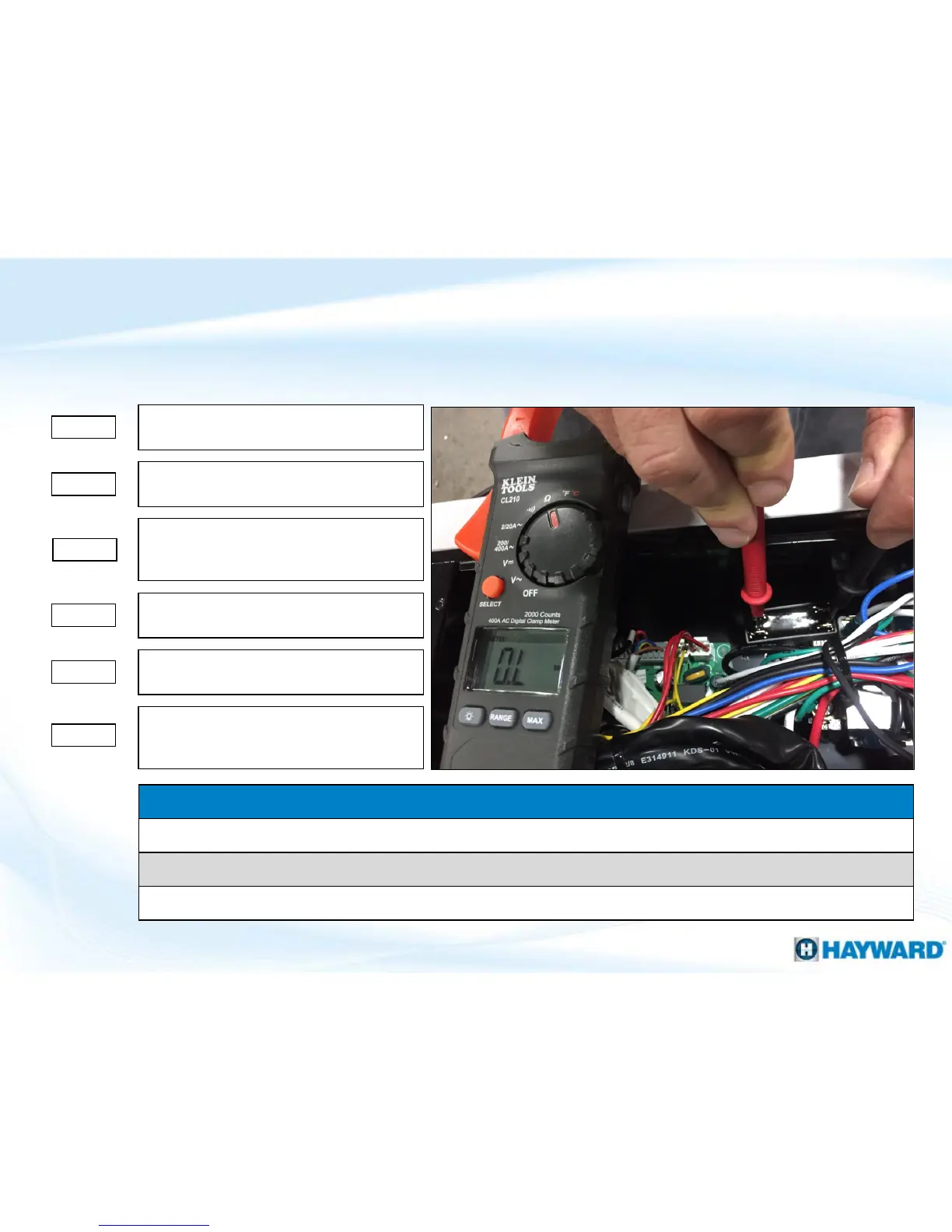
Follow these steps when attempting to test a capacitor (using an multi-meter).
How To: Check A Capacitor (multi-meter)
First, document how wires are attached
then remove all wires from capacitor.
Set multi-meter to ohms (60K range OR
highest possible option if less than 60K).
Touch one probe to one set of terminals,
and while looking at the meter touch the
other set.
For a slit second, the meter should show
are reading and return to OL or blank.
Step 1
Step 4
Step 3
Step 2
Step 5a
For a slit second, the meter should show
are reading and return to OL or blank.
Step 5b
If the meter’s display never shows a
reading, then the capacitor needs to be
replaced.
Visual Clues Warranting a Capacitor Replacement
If capacitor is swollen.
If any of the posts/terminals are loose.
More than one instance of a burned wire connecting to a capacitor




 To Next Page