4.2. Usage of wire controller
4.2.1
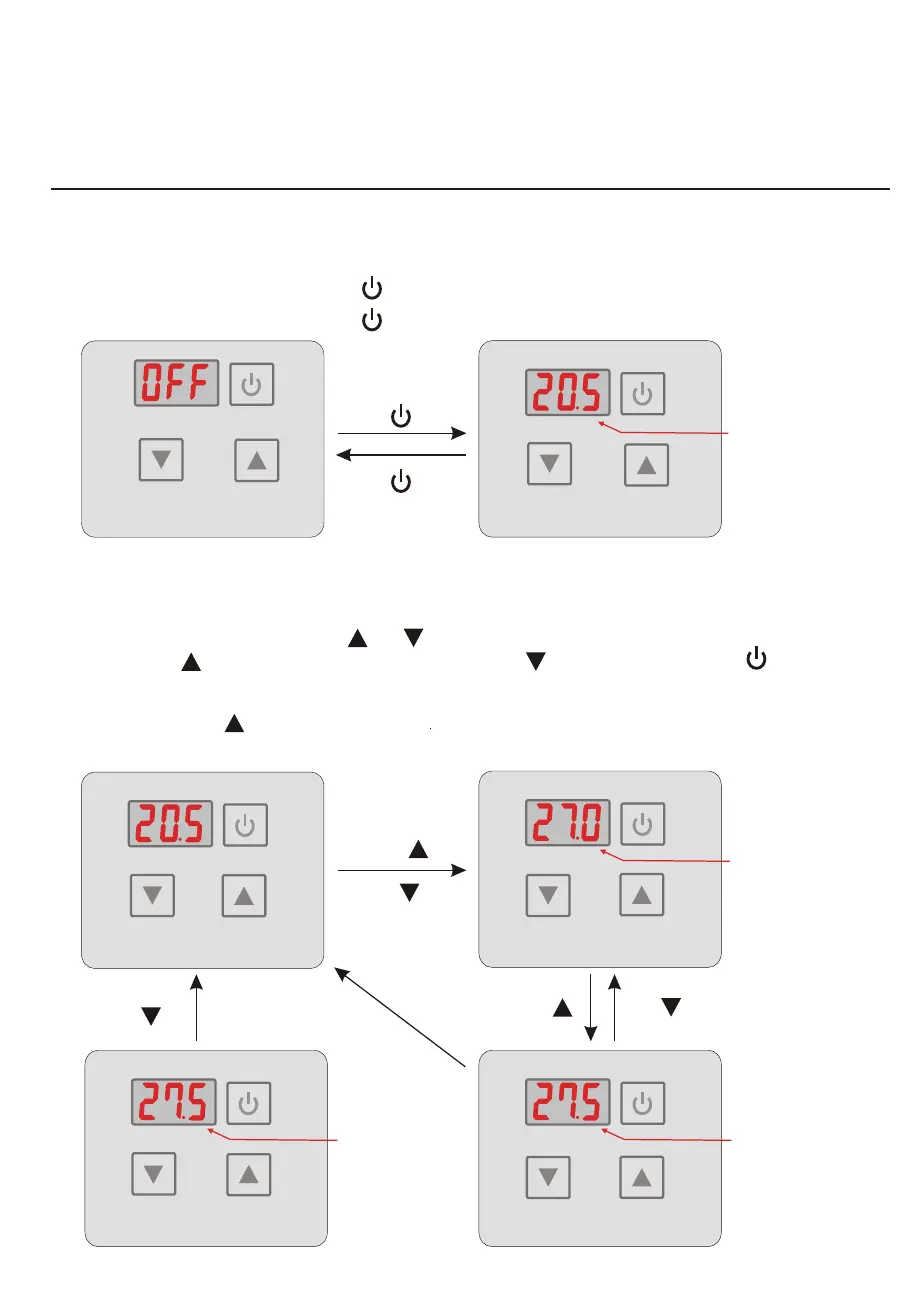
Turn ON/OFF the unit
4.2.2
Setting temperature
When the unit is off, press the key“ ”0.5s to turned on the unit;
When the unit is on, press the key“ ”0.5s to show down the unit.
Standinterfaceby Running interface
Press“ ”0.5s
Press“ ”0.5s
Heating/ Cooling
actual water Temp.
In the running interface,press“ ”or“ ”then the current mode target-temperature flashes,
then press“ ”to increase the temp.value, or press“ ”to decrease it. Press“ ”will not
save setting parameter but back to the main interface; Attention:If there is no operation for
5s,system would remember parameter setting and back to the main interface. In the main
interface,press“ ”for 2s you can see the outlet temp.The parameter is then flashed and the
display is back to the main interface after 10s.
Press“ ”
Press“ ” Press“ ”
Press“ ”2s
or “ ”
Heating/ Cooling
Target Temp.
Heating/ Cooling
Target Temp.
Outlet Temp.
System will save user's
setting and return back
to main interface if there
is no operation in 5s.
4. USAGE
10




 To Next Page