USE ONLY HAYWARD GENUINE REPLACEMENT PARTS
11
Programming the Daily Schedule
The daily 24 hour schedule can be programmed using the push button on the motor drive housing. Each of the three time intervals can be programmed to one
of the pump’s available speeds. In the programming information and diagrams below, they are represented as “Speed 1, Speed 2, etc.”, moving from fastest
to slowest. “STOP” is also a selection if you want the pump be off during an interval. Note that exact pump speeds may vary due to input voltage and system
conditions.
• Speed 1 (fastest)
• Speed 2
• Speed 3
• Speed 4
• Speed 5
• Speed 6 (slowest)
• STOP
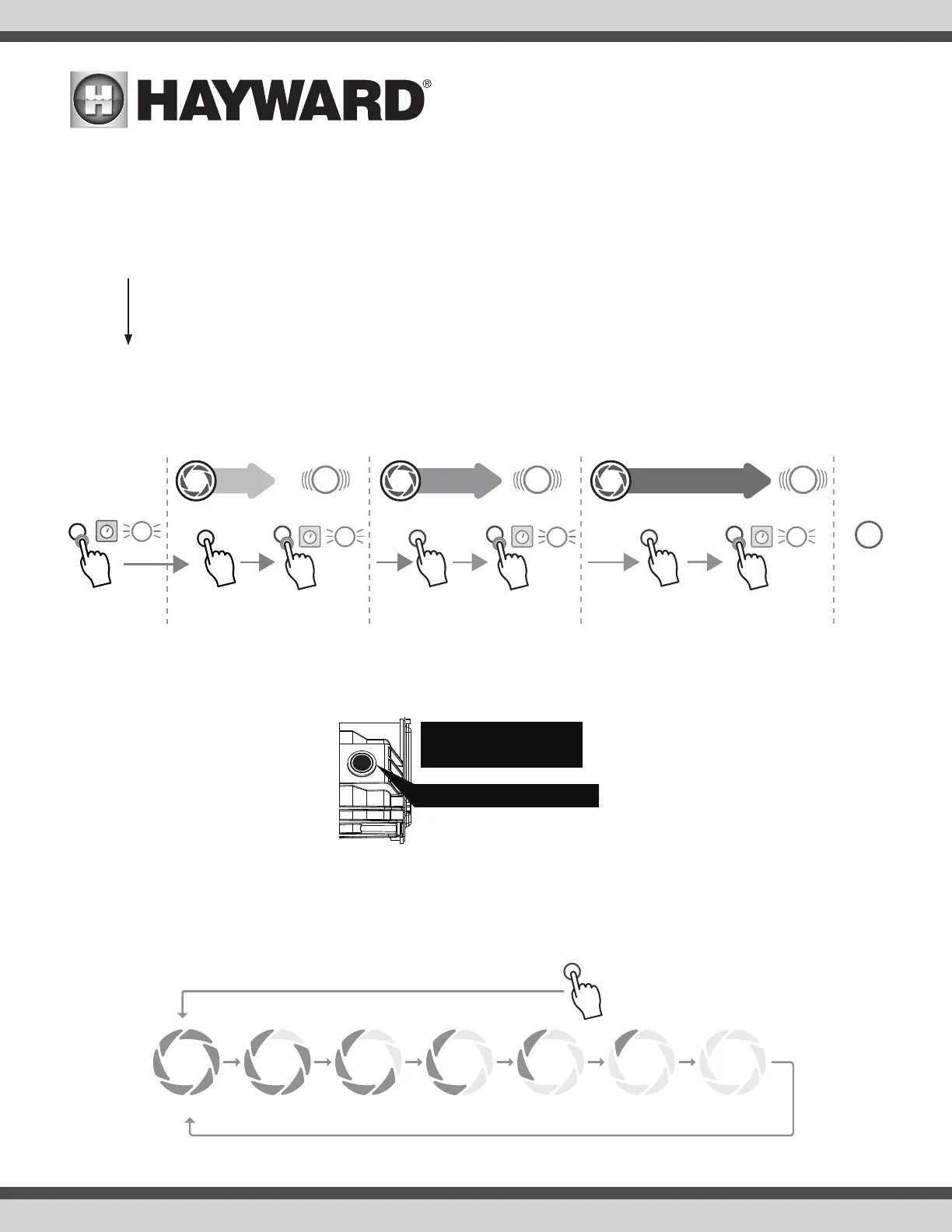
Programming the pump follows a simple process of pressing the button to cycle through available speeds (from fastest to slowest), and pressing and holding
the button to save the speed to a given interval. An overview is shown below.
Detailed Programming Procedure
1. While power is applied to the pump, press and hold the button for 4 seconds. When the button has been held long enough, the LED ring will rapidly flash
3 times, at which point the button may be released and the pump will enter programming mode.
2. Once in programming mode, the LED ring will communicate which interval is being programmed. The first interval is Interval 1, and the LED ring will repeat-
edly flash one time, followed by a pause.
3. To save a speed to Interval 1:
a. Adjust the speed of the pump to the desired speed by pressing the button. The first press always brings you to maximum speed (Speed 1=100%)
and each press after will decrease the speed until it reaches STOP and then the cycle will repeat. Refer to the diagram below.
Press and HOLD for 4 seconds
START PROGRAMMING
100% 80% 70% 50% 45% 40% 0%
START
CHOOSE PUMP SPEED
PRESS FOR NEXT SPEED
Speed1 Speed2 Speed3 Speed4 Speed5 Speed6 STOP
Choose
pump speed
INTERVAL 2 INTERVAL 3
8 hours 12 hours
Save &
Continue
Choose
pump speed
Choose
pump speed
INTERVAL 1
4 hours
1
2
3
4 second hold
Save &
Continue
4 second hold
Save &
Continue
4 second hold
Press & Hold
until the light
blinks
To ENTER
PROGRAM MODE
4 second hold
3x
Back to
Daily
Schedule
Solid
3x
3x
3x





 To Next Page