USE ONLY HAYWARD GENUINE REPLACEMENT PARTS
12
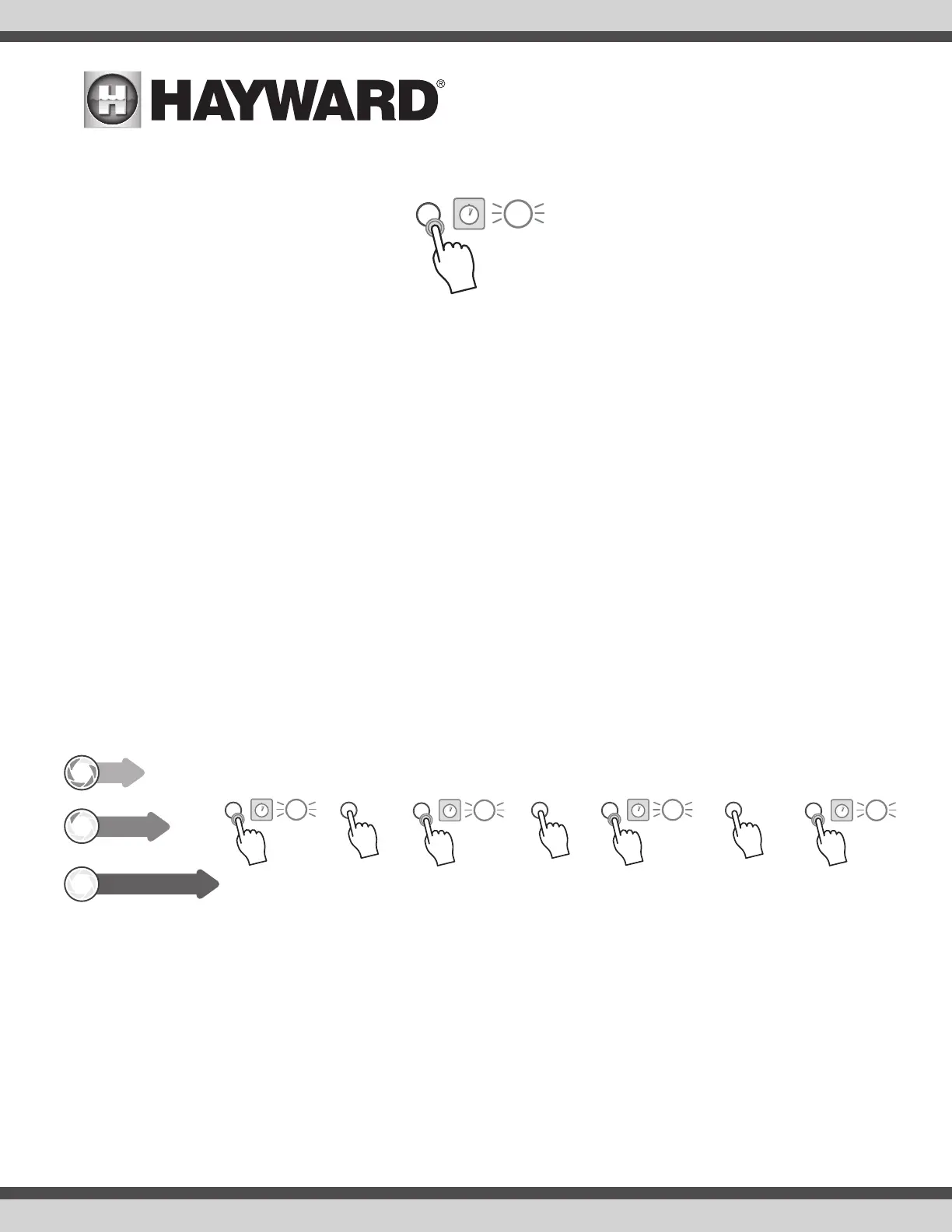
b. Once the desired speed is reached, press and hold the button for 4 seconds to save the speed. The LED will flash 3 times to confirm.
4. After saving a speed to Interval 1, the process will continue for programming Interval 2. The LED ring will repeatedly flash twice followed by a pause to
indicate that the user is currently programming Interval 2.
a. The initial speed for Interval 2 will be the speed that was programmed for Interval 1. If this is desired, press and hold for 4 seconds. If not, follow
the same procedure as step three to cycle through the available speeds, first press brings you to Speed 1, each additional press advances until the
desired speed is reached. Press and hold the button for 4 seconds to save the desired speed to Interval 2.
5. Once Interval 2 has been saved, programming mode will continue to the last interval and the LED will repeatedly flash 3 times followed by a pause to
indicate that the user is currently programming Interval 3.
a. The initial speed for Interval 3 will be the speed that was programmed for Interval 2. If this is desired, press and hold for 4 seconds. If not, follow
the same procedure as above. Once a speed has been selected, press and hold the button for 4 seconds to save the speed to Interval 3.
b. Once Interval 3 has been saved, the pump will exit programming mode and will restart.
c. The pump will be stopped for a few seconds while it restarts.
6. After the pump has restarted, the new schedule will take effect
7. The new schedule will retain the same 24 hour cycle as the previous schedule
a. Example: if the previous schedule started at 8:00AM, the new schedule will also start at 8:00AM regardless of when the programming occurred.
b. If the desire is to change the start time of the schedule, simply remove and reapply power to the pump using a switch or breaker. The schedule will
then start from when power was reapplied to the pump.
Example Program
Desired schedule starting at 8:00AM every day (apply power at 8:00AM to start program) - 80% for 4 hours, 40% for 8 hours and OFF for 12 hours
Important: If power is lost/removed from the pump during programming, any changes made to the schedule will not be saved. While in programming mode, if
no commands are entered by using the button within 2 minutes, then the pump will default to normal operation. In this case, any change made to the schedule
WILL be saved.
For the schedule to start at 8:00AM, remove and reapply power at 8:00AM.
Press & Hold Press & Hold Press & Hold Press & Hold
Press two times
1 2 3 5
4 second hold
Press six times
4
Press seven times
6 7
80% for 4 hours / 40% for 8 hours / 0% for 12 hours
4 hours
8 hours
12 hours
INTERVAL 1
INTERVAL 2
INTERVAL 3
80
40
0
3x
4 second hold
3x
4 second hold
3x
4 second hold
3x
Press & Hold
4 second hold
3x




 To Next Page