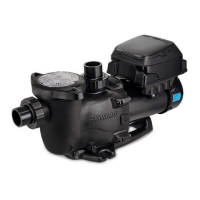
What to do if my Hayward SP1580X15VSP shows a motor over speed error?
- RRichard HayesAug 18, 2025
If your Hayward Water Pump displays a motor over speed error, it's recommended to contact Hayward Technical Service at (908) 355-7995 for assistance.
What to do if my Hayward SP1580X15VSP shows a motor over speed error?
If your Hayward Water Pump displays a motor over speed error, it's recommended to contact Hayward Technical Service at (908) 355-7995 for assistance.
What to do if my Hayward SP1580X15VSP Water Pump has communication error with master?
In case of a communication error with the master on your Hayward Water Pump, it's best to contact Hayward Technical Service at (908) 355-7995 for further assistance.
What to do if my Hayward Water Pump is showing AC input over-voltage?
If your Hayward Water Pump is experiencing AC input over-voltage, you should contact Hayward Technical Service at (908) 355-7995 for assistance.
What should I do if my Hayward Water Pump has AC input under-voltage?
If your Hayward Water Pump reports AC input under-voltage, contact Hayward Technical Service at (908) 355-7995 for further assistance.
What to do if my Hayward Water Pump displays a DC – link under voltage error?
If your Hayward Water Pump displays a DC – link under voltage error, it's recommended to contact Hayward Technical Service at (908) 355-7995 for assistance.
What to do if my Hayward Water Pump displays IPM over-current software protection error?
If your Hayward Water Pump displays an IPM over-current software protection error, it's recommended to contact Hayward Technical Service at (908) 355-7995 for assistance.
What should I do if my Hayward SP1580X15VSP shows Motor out of step?
If your Hayward Water Pump indicates that the motor is out of step, contact Hayward Technical Service at (908) 355-7995 for assistance.
What should I do if my Hayward SP1580X15VSP displays PFC output DC low voltage?
If your Hayward Water Pump shows PFC output DC low voltage, contact Hayward Technical Service at (908) 355-7995 for assistance.
What to do if my Hayward SP1580X15VSP Water Pump has a Motor Phase short circuit?
If your Hayward Water Pump is experiencing a Motor Phase short circuit, it's best to contact Hayward Technical Service at (908) 355-7995 for assistance.
How to fix Current sensor circuit error in Hayward Water Pump?
If your Hayward Water Pump is displaying a Current sensor circuit error, it's recommended to contact Hayward Technical Service at (908) 355-7995 for assistance.
Explains safety symbols, general precautions, and installer responsibilities.
Covers electrical wiring, grounding, bonding, GFCI requirements, and shock hazards.
Details risks like hair, limb, body, evisceration, and mechanical entrapment.
Addresses entrapment risks, hazardous pressure, separation hazards, and fire/burn risks.
Emphasizes electrical code compliance, grounding, bonding, and wiring.
Details how to properly ground and bond the pump for safety.
Provides a list of error codes and their corresponding troubleshooting steps.
Step-by-step guide for replacing the shaft seal.
Covers common issues like motor not starting, low flow, and noisy operation.
Explains safety symbols, general precautions, and installer responsibilities.
Covers electrical wiring, grounding, bonding, GFCI requirements, and shock hazards.
Details risks like hair, limb, body, evisceration, and mechanical entrapment.
Addresses entrapment risks, hazardous pressure, separation hazards, and fire/burn risks.
Emphasizes electrical code compliance, grounding, bonding, and wiring.
Details how to properly ground and bond the pump for safety.
Provides a list of error codes and their corresponding troubleshooting steps.
Step-by-step guide for replacing the shaft seal.
Covers common issues like motor not starting, low flow, and noisy operation.
| Model | SP1580X15VSP |
|---|---|
| Category | Water Pump |
| Type | Variable Speed Pump |
| Horsepower | 1.5 HP |
| Voltage | 115/230V |
| Motor Type | Permanent Magnet |
| Energy Efficiency | Energy Star Certified |
| Phase | Single Phase |
| Warranty | 3 Years |


Loading...