6
Controls
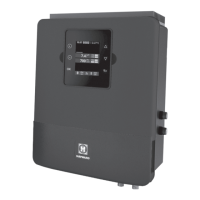
Main Switch
AUTO: For normal operation, the Main Switch should be left in the AUTO posi-
tion. In this position the SwimPure Plus will produce chlorine according to the
"Desired Output %" adjustment setting for the entire filtering/pumping cycle.
SUPER CHLORINATE: When you have an abnormally high bather load, a
large amount of rain, a cloudy water condition, or any other condition which
needs a large amount of purification to be introduced, put the Main Switch in the
SUPER CHLORINATE position. This electronically “super chlorinates” (shocks)
the water for 24 hours (filter pump must be on during this time) or until the
power has been turned off, whichever comes first. At the end of the super chlo-
rinate time, be sure to put the switch back into the AUTO position.
OFF: The OFF position prevents the SwimPure Plus from energizing the electro-
lytic cell. In this position there is no chlorine generation. NOTE: To service any
of the pool equipment or the SwimPure Plus, turn the power off at the circuit
breaker.
Indicator LED's
POWER When illuminated, the SwimPure Plus has input power.
GENERATING This LED is on steady during normal operation. When flash-
ing, the pool water is too hot or cold to operate.
SUPER CHLORINATE Illuminates during super-chlorination. See description
above.
REMOTELY CONTROLLED When illuminated, indicates that a remote pool
automation control (Hayward Pro Logic, Pentair Intellitouch, Polaris Eos, etc.) is
controlling the SwimPure Plus--the main switch and "Desired Output %" adjust-
ment are inactive. When flashing, the Pro Logic, Intellitouch or Eos is in SERVICE
or TIME-OUT mode and the Main Switch and "Desired Output %" adjustment are
active.
NO FLOW When illuminated, the flow switch has detected no water flowing
and the SwimPure Plus has stopped generating chlorine. A flashing LED indicates
a 15-60 second time delay period.
CHECK SALT When flashing, the salt level is low (below 2700 ppm) and SwimPure
Plus is generating at low efficiency. When illuminated steady, the salt level is too
low and SwimPure Plus has shut down. Before adding large quantities of salt, it is
advisable to have your salt level professionally checked.
HIGH SALT When illuminated, the salt level is too high and SwimPure Plus has
shut down.
INSPECT CELL A flashing indicator signifies that either the cell efficiency is
reduced or that it is time for regularly scheduled cell inspection. In either case,
inspect cell and clean if necessary. When illuminated steady, cell efficiency is
greatly reduced and the SwimPure Plus
has stopped producing chlorine. Inspect,
clean or replace if necessary.
9
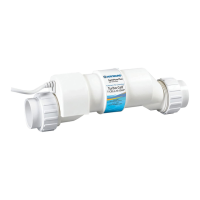
The SwimPure Plus electrolytic cell has a self cleaning feature incorporated into the
electronic control’s logic. In most cases this self cleaning action will keep the cell
working at optimum efficiency. In areas where water is hard (high mineral content) and
in pools where the water chemistry has been allowed to get "out of balance", the cell
may require periodic cleaning. The "Inspect Cell" LED will indicate if cell efficiency is
decreased and servicing is necessary. If the "Inspect Cell" LED remains on after a
thorough cleaning, the cell may be worn and require replacement.
Servicing and Cleaning the SwimPure Plus cell
Turn off power to the SwimPure Plus before removing the electrolytic cell. Once re-
moved, look inside the cell and inspect for scale formation (light colored crusty or flaky
deposits) on the plates and for any debris which has passed through the filter and
caught on the plates. If no deposits are visible, reinstall. If deposits are seen, use a high
pressure garden hose and try to flush the scale off. If this is not successful, use a plastic
or wood tool (do not use metal as this will scratch the coating off the plates) and scrape
deposits off of plates. Note that a buildup on the cell indicates that there is an unusually
high calcium level in the pool (old pool water is usually the cause). If this is not
corrected, you may to have to periodically clean the cell. The simplest way to avoid this
is to bring the pool chemistry to the recommended levels as specified.
Mild Acid Washing: Use only in severe cases where flushing and scraping will not
remove the majority of deposits. To acid wash, turn off power to SwimPure Plus. Re-
move cell from piping. In a clean plastic container, mix a 4:1 solution of water to muriatic
acid (one gallon of water to one quart of muriatic acid). ALWAYS ADD ACID TO
WATER - NEVER ADD WATER TO ACID. Be sure to wear rubber gloves and appropri-
ate eye protection. The level of the solution in the container should just reach the top
of the cell so that the wire harness compartment is NOT submerged. It may be helpful to
coil the wiring before immersing the cell. The cell should soak for a few minutes and then
rinse with a high pressure garden hose. If any deposits are still visible, repeat soaking
and rinsing. Replace cell and inspect again periodically.
Winterizing
The SwimPure Plus electrolytic cell and flow detection switch will be damaged by freez-
ing water just as your pool plumbing would. In areas of the country which experience
severe or extended periods of freezing temperatures, be sure to drain all water from the
pump, filter, and supply and return lines before any freezing conditions occur. The
electronic control is capable of withstanding any winter weather and should not be
removed.
Spring Start-up
DO NOT turn the SwimPure Plus on, until the pool water chemistry has been brought to
the proper levels. This information can be found on page 1.


 To Next Page
 Loading...