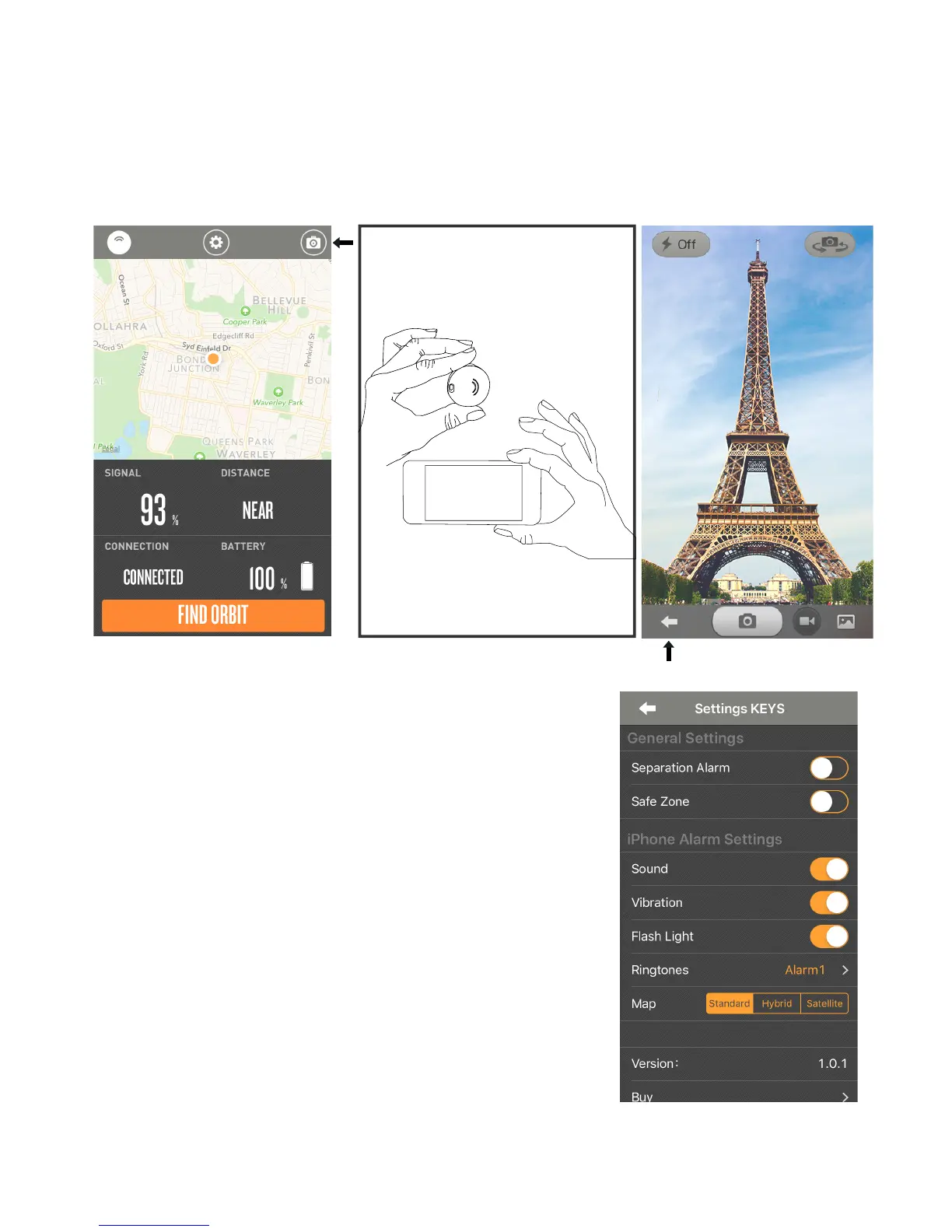
Advanced Settings
Separation Alarm
Safe Zone
Ringtones
Map
How to Take a Selfie
Tap on the settings button in the middle.
General settings include Separation Alarm and Safe Zone settings.
Turning on the Separation Alarm allows for your Orbit and your phone to
both ring when the devices step out of the 100ft/30metre radius to notify
you that you have forgotten an item.
If the Safe Zone feature is turned on, the Separation Alarm will not work
when connected to wi. This feature is perfect for when you’re at home
around the house.
There are over 15 ringtone alarms to choose from. Select a melody that
suits you. Select a different ringtone for different Orbits.
The map gives you three viewing options to nd your Orbit.
Standard, Hybrid or Satellite.
Tap on the top right icon at the top of the toolbar.
Position/focus your phone to what you want to take a photo of.
Click the side of ORBIT to take the photo.
When nished, tap on the arrow on the left side on the bottom toolbar on the app.
**Please note: That you need to use the camera in the app to use the sele with Orbit.
p8.


 To Next Page