15
NAVIGATING THE THERMOLINX APP
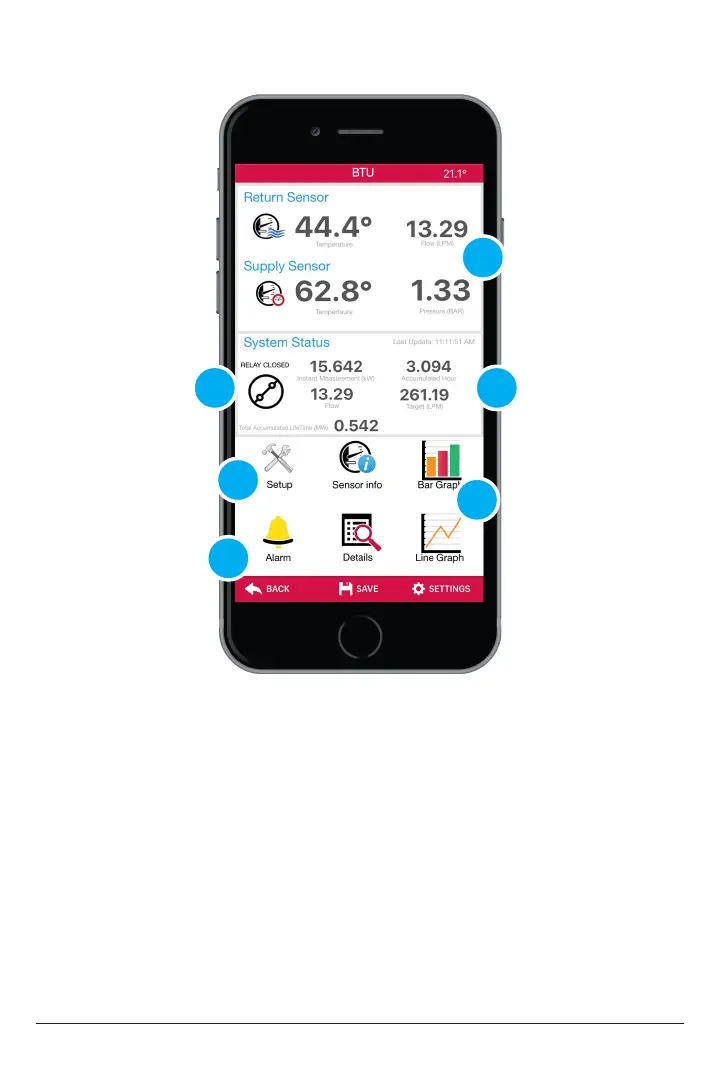
1. Relay Closed: Indicates if the relay is closed to activate a pump or valve.
2. Setup: Adjust Relay output, Fluid, and thermistor settings.
3. Sensor Info: Provides sensor type and unit serial number.
4. Alarms: Set alarm notication for ow, temperature, and pressure.
5. Temperatures: View temperature, ow and pressure data in real time
6. System Status: View Current Heat measurement and lifetime Heat accumulation
for days, week, monthly, and yearly.
7. Bar Graph/ Line Graph: View Current and historical Heat measurement data
graphing.
8. Details: View current and historical Heat in raw data.
1
4
2/3
5
6
7/8



 To Next Page